VMind OpenAPI
Built on the VMind chart generation tool, the VisActor team has launched VMind Agent, which improves the accuracy and efficiency of intelligent generation and adds multi‑turn editing capabilities. VMind Agent currently provides OpenAPI interfaces that you can call to achieve more advanced intelligent generation. The VMind Agent Playground offers a simple testing environment to experience VMind Agent’s capabilities.
VSeed
VSeed is a domain‑specific language (DSL) for analytics. It encapsulates commonly used charting capabilities, greatly improving the efficiency of building analytic reporting platforms. In most cases, given a dataset and chart type, it can render directly; each chart type comes with extensive default conventions.
VSeed is a subset of VChart and VTable. Its configuration is greatly simplified compared with VChart and VTable, making the options easier for large models to understand. It is a chart library specifically packaged for LLM‑driven generation.
VSeed repository: https://github.com/VisActor/VBI
VSeed showcase: https://visactor.github.io/VBI/vseed/galley/chartType/line.html
VMind Agent prioritizes using VSeed for code generation for better results, while also supporting native code generation for VChart and VTable.
VMind Agent
The overall technical approach of VMind Agent is as follows:
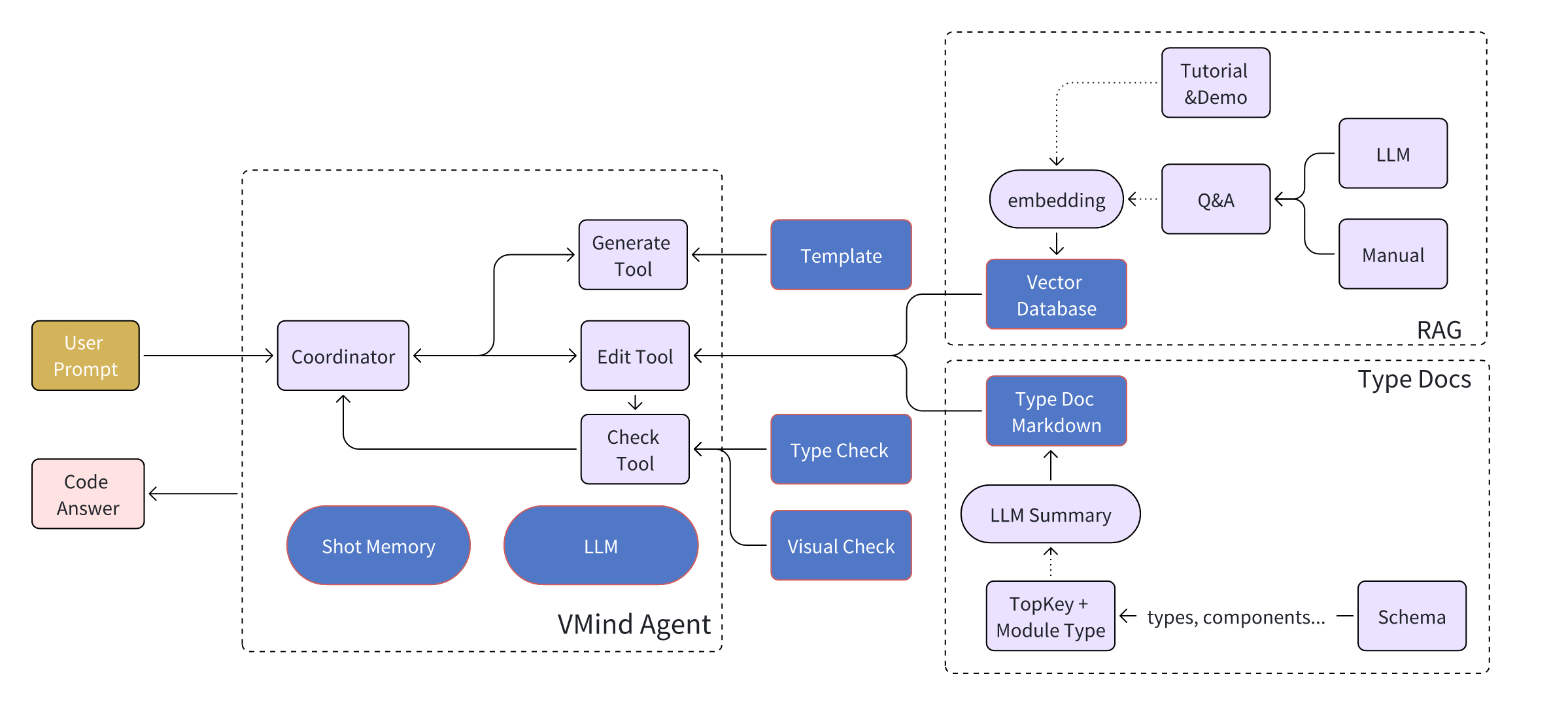
When the user provides instructions and code blocks to VMind Agent, the agent uses the LLM to actively call tools and proceeds step by step through Generate/Edit → Check → Edit → Check … until the user’s requirements are met, outputting the corresponding code blocks and explanatory text.
Compared with traditional chart generation tools, VMind Agent offers advantages in the following areas:
- 🤖 ReAct architecture: Reasoning–action loop implemented with LangGraph
- 🛠️ Diverse tools: Supports multiple chart generation and editing tools
- 📊 Chart types: Supports many chart and table types
- 🎨 Template system: Prebuilt chart templates
- 🔧 Chart editing: Supports modifying existing charts
- 💬 Natural language: Supports generating charts from pure natural‑language input
VMind Agent Architecture
VMind Agent is composed of a Coordinator (scheduler) and a set of tools, and is implemented with the @langchain/langgraph library. The main modules are:
Coordinator
The scheduler’s main job is to determine, based on the current state, which tool to call next or whether to end the task.
Generate Tool
The generation tool is invoked when the user has not provided code or explicitly asks to regenerate code. If no chart type is specified, the tool recommends a suitable chart type based on the data. Each chart or table type provides a basic template; the LLM uses the user’s data and the template to generate the simplest code block for subsequent editing.
Edit Tool
The editing tool is the core of VMind Agent. Based on the current code and the user’s goal, the LLM breaks the task into multiple simple steps and completes them one by one. Before executing each edit step, the tool retrieves relevant materials from the knowledge base according to the step’s requirements to assist the LLM.
Check Tool
After each edit operation, the check tool verifies whether the change introduces serious errors or fails to achieve the step’s goal. If the check fails, the previous edit is rolled back.
Short‑term Memory
Each conversation records the current sessionId, allowing the same user to recall the state saved in previous turns and continue multi‑turn editing.
VMind Agent Knowledge Base
To prevent hallucinations during editing, VMind Agent strictly limits the edit scope to the knowledge base fragments provided for each operation. The knowledge base consists of two parts:
RAG
Tutorial documents, demo examples, and Q&A content have strong independence and are well suited to a RAG approach. Relevant fragments are vectorized and stored in a vector database. For each edit operation, the system retrieves a set of related texts and code snippets for the model’s reference. When editing, if highly similar content is retrieved, the model can accurately perform the corresponding edits on the matched code snippets.
Type Docs
Configuration schemas for charts and tables are split by chart/table type and by module (e.g., axes, legends) into separate typed documentation fragments. Each fragment includes property names, types, and descriptions, and different fragments are indexed by different TopKeys. The LLM summarizes each fragment into Markdown and stores it in the database. For each TopKey, the LLM also produces a concise summary describing the scope covered by that TopKey.
For each edit, the system first retrieves relevant TopKeys based on the instruction, then injects the associated Markdown fragments into the prompt. The LLM’s edits are strictly constrained to the range covered by the retrieved knowledge to avoid hallucination‑driven errors.
VMind Agent Applications
Playground
VMind Agent Playground provides a simple testing environment to experience the agent’s capabilities. You can enter instructions and code blocks to see the generation and editing results.
Douyin Mini Program
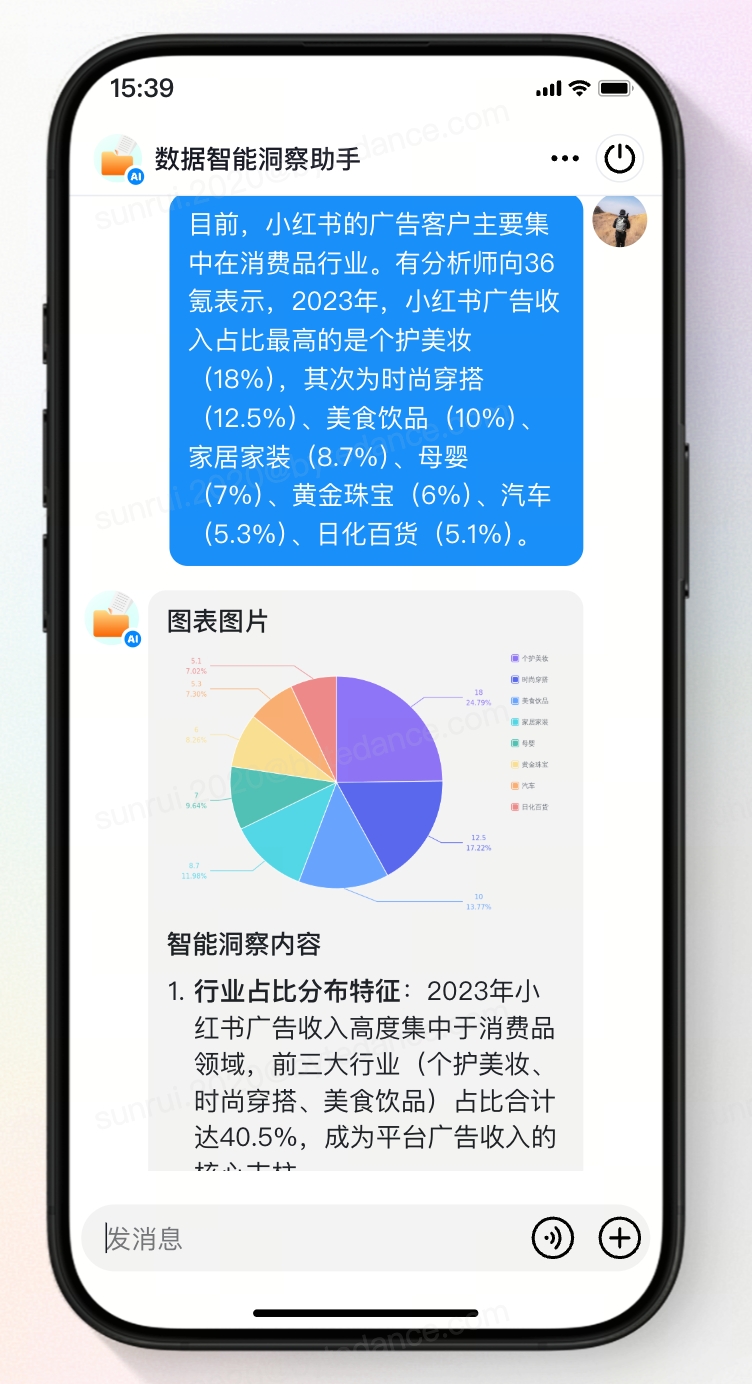
Based on VMind Agent, we have developed a sample mini program. In Douyin mini programs, search for “数据智能洞察助手”. Users can input text for intelligent insights and experience the agent’s generation and editing results.
VMind OpenAPI Support
Join our Feishu group to contact us and consult on VMind OpenAPI usage.