It is not only a fully functional graph visualization library, but also an explorer of data relationships.
!!!###!!!title=1.2 Basic Architecture and Source Code Structure of VTable——VisActor/VTable Contributing Documents!!!###!!!!!!###!!!description=---title: 1.2 Basic Architecture and Source Code Structure of VTable\rkey words: VisActor,VChart,VTable,VStrory,VMind,VGrammar,VRender,Visualization,Chart,Data,Table,Graph,Gis,LLM---
!!!###!!!
VTable Core Architecture
Structural Analysis
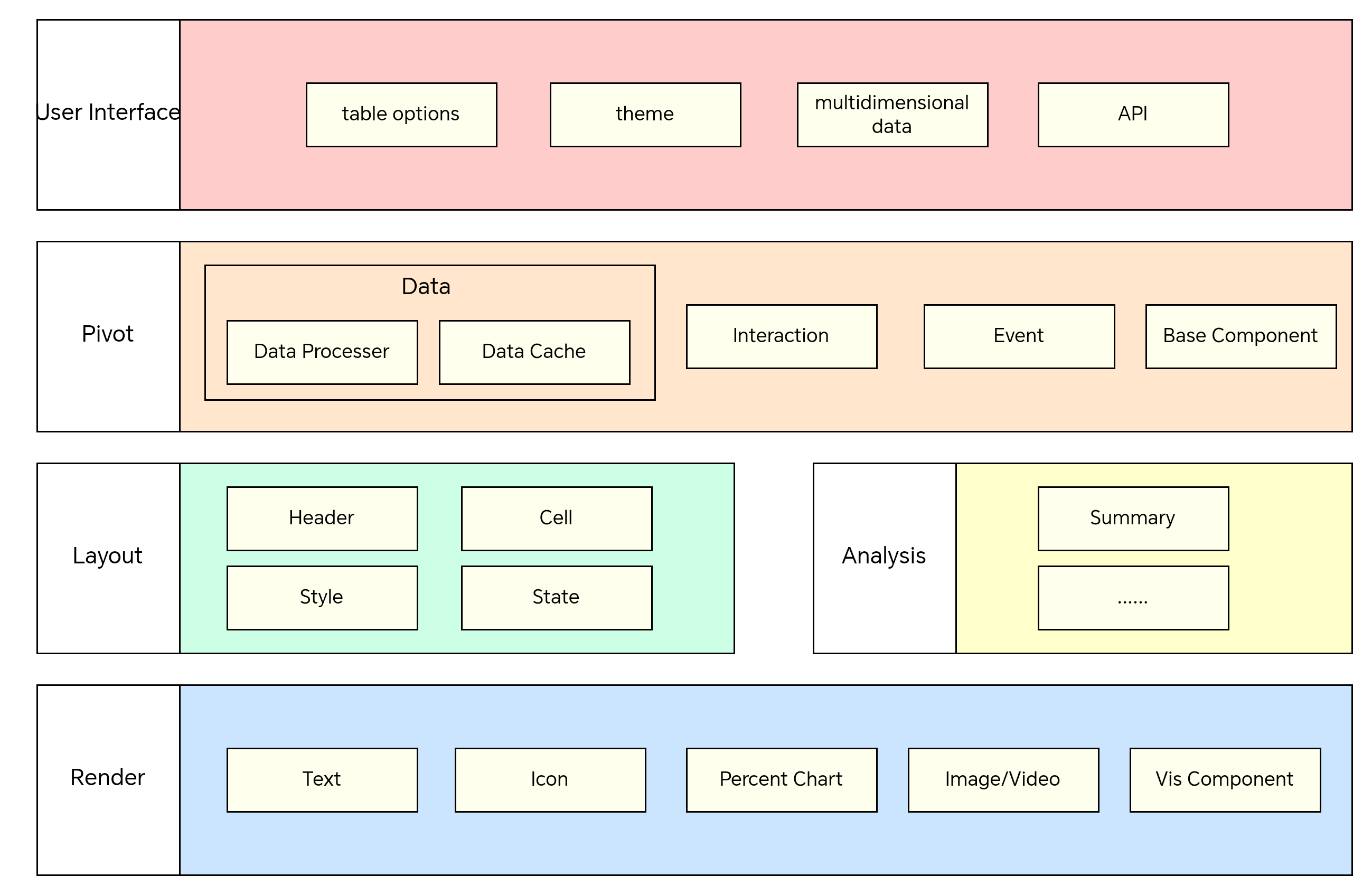
VTable can be roughly divided into several modules: data processing layer, layout module, rendering module, event module, interaction module, state management, component communication.
The data processing layer is responsible for managing the raw data, handling operations such as row-column transposition and built-in sorting, and then handing the processed data back to the table rendering;\r
The layout module is mainly responsible for the basic header layout, pivot table header layout, cell layout, and the calculation algorithm for row and column heights, and then hands over the calculated layout to the rendering layer for rendering.\r
The rendering module mainly calls vrender for rendering charts and various graphic elements and relies on the layout module.\r
The interaction module handles various user click operations, such as clicking the header to sort, editing cells, etc.;
The event module handles internal custom events, including lifecycle events, column width and row height adjustments, table scrolling, etc.;
The status module handles the storage of states such as hover, select, menu, sort, etc.;
Different modules implement publish-subscribe through EventTarget.
Data Processing Layer
This layer mainly receives incoming data and stores it, while performing basic transformations on the data, including aggregation and sorting operations.
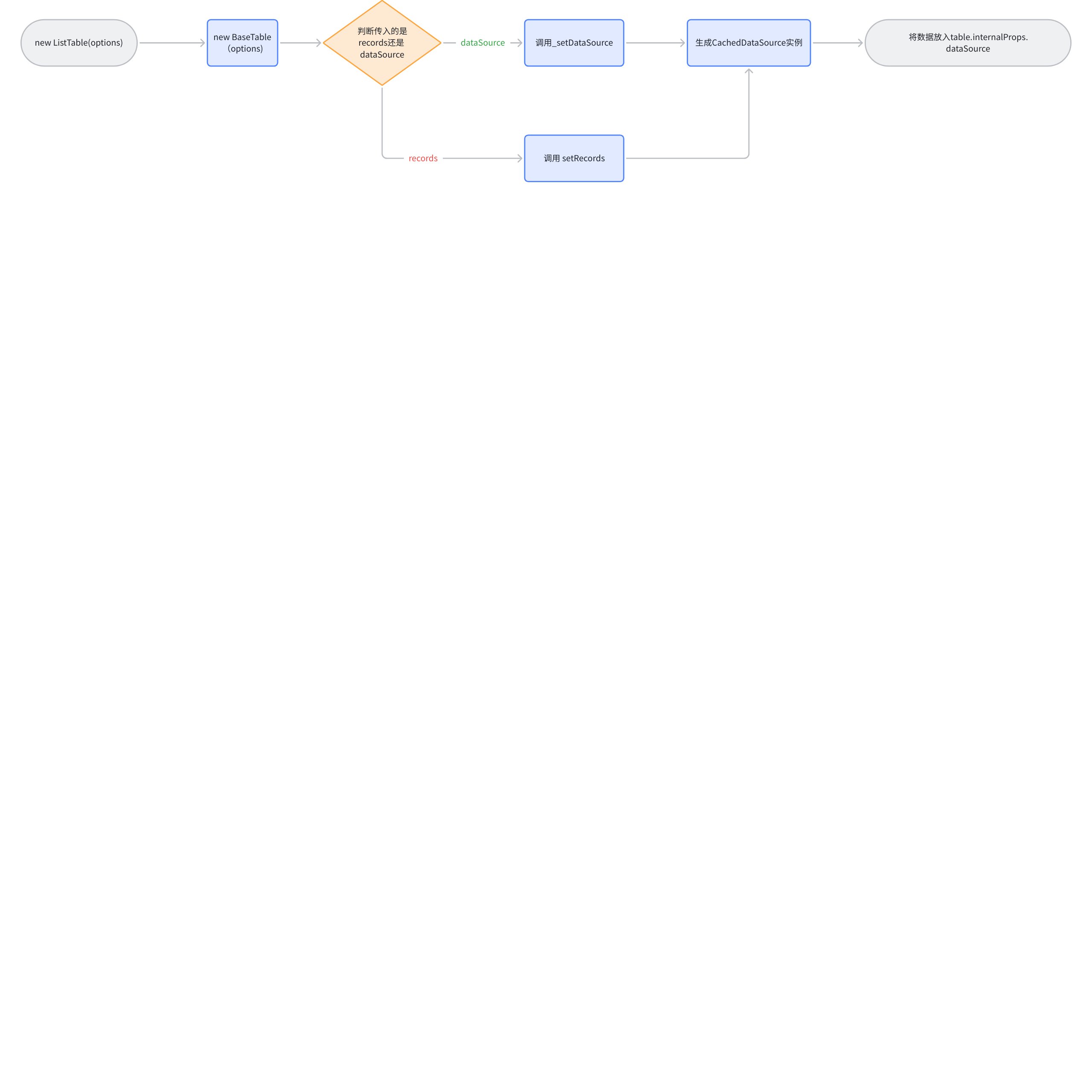
During the initialization of ListTable, some basic operations are performed on the incoming data. First, options.records or options.dataSource is passed to CachedDataSource for instantiation, and then the instance is placed in table.internalProps.dataSource for internal use by the component, such as when performing layout calculations for the table.
Initialization of the data layer:
First step: When initializing ListTable, handle dataSource or records
Step two: Use different judgments to put dataSource or records into internalProps, so that subsequent data changes can directly operate on the dataSource object\r
In the DataSource class, you can see that the management operations for records are implemented in DataSource, and the processing of raw data is abstracted into this module.
The logic layer mainly involves various types of logic processing, such as chart transposition, data sorting, filtering logic, and aggregation. The main data processing logic is stored in these files, including APIs exposed for external calls. The data initialization mentioned earlier is done by calling the methods in these files:
The core files of the layout module are located in VTable\packages\vtable\src\layout
The Layout module is the core module of the VTable component, including the header of the basic table, the header of the pivot table, the layout of chart cells, the logic of tree headers and tree cells. After adjustments are completed through the layout module, it is then handed over to the rendering layer for rendering. In addition, this file also contains a lot of auxiliary logic for layout adjustments.
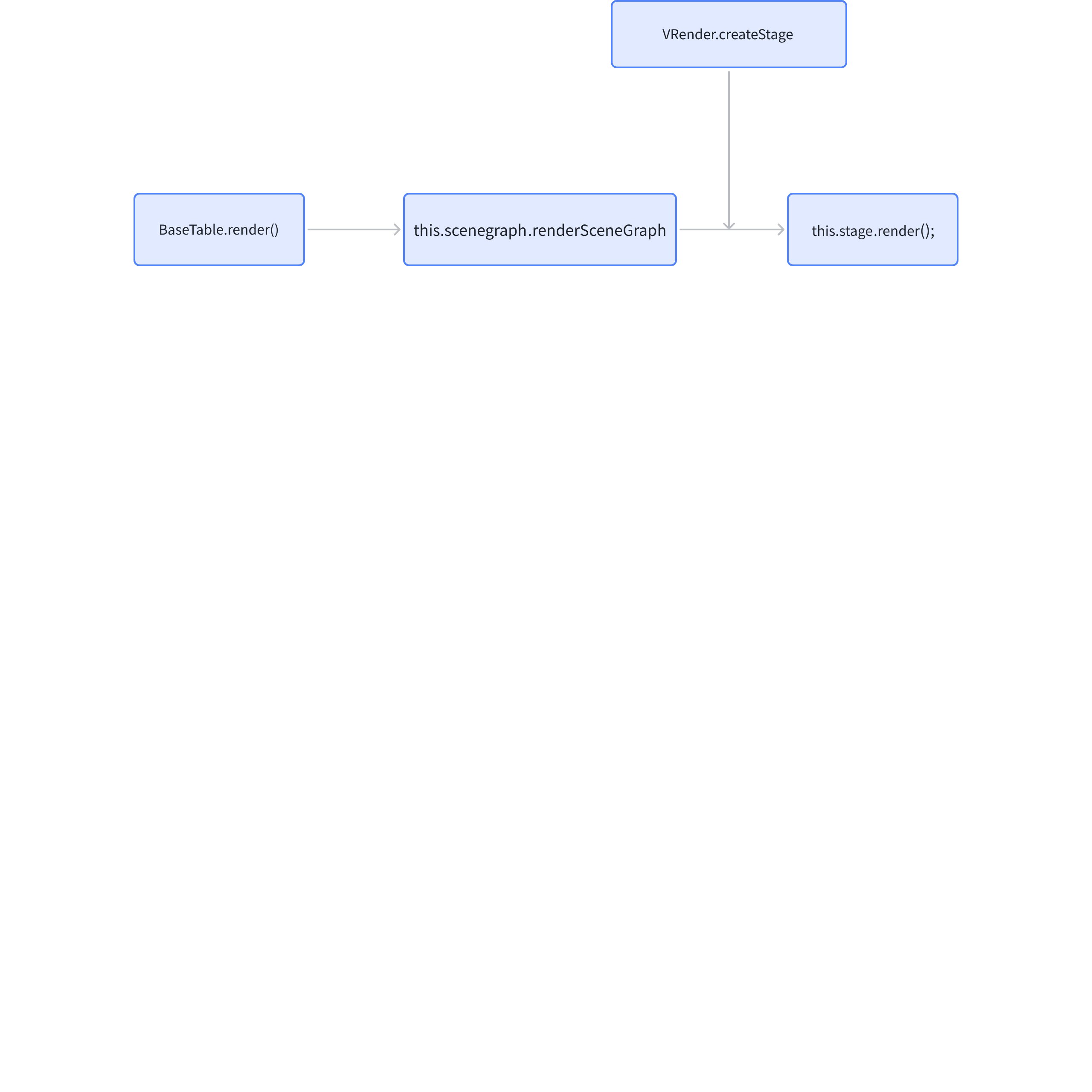
The entry point for the initial rendering is the BaseTable.render method, which internally calls renderSceneGraph in the scenegraph. It then uses the render method on the Stage created by createStage in VRender to draw the table to the specified DOM node. At this point, the first step of rendering is complete, and the subsequent rendering layer logic is invoked through the scenegraph.
Interaction Module
The interaction module mainly handles two tasks:
Listen to table custom events
Change table-related status, re-render the table
The interaction module mainly consists of the event module and state management, completing operations such as hover highlighting, select highlighting, and table scrolling.
Event Module
VTable\packages\vtable\src\event\event.ts
event.ts exposes EventManager, EventManager is used to manage various events of the table, including mouse events (such as click, double-click to auto-adjust column width, mouse movement, etc.) and keyboard events (such as mouse scroll, enter key to submit edited content, etc.).
VTable internally listens to most custom events within the table, including wheel and click events, through Stage.addEventListener provided by VRender. For example, the wheel event is used to implement table scrolling; click is used to change the selectState and simultaneously trigger the externally passed click_cell callback.
State Management
Global State Management: The state here exists independently of the table, and when the state changes, it will redraw the table. StateManager mainly includes the following parts:
hoverState table hover configuration and the currently hovered cell
selectState table currently selected cell
frozen rows or columns
scroll The current table's horizontal and vertical scroll position
Highlight state of sparkLine mini chart
Custom sorting within sort
These data are defined in StateManager and generated during table initialization. By updating the State, the table can be redrawn. The core file of StateManager is defined in: VTable\packages\vtable\src\state\state.ts
Component Communication
The component communication part of VTable relies on the EventTarget class. By observing the source code structure, it can be found that most modules inherit from EventTarget and implement event communication through EventTarget.
Communication between different layers is carried out through events, function calls, or data sharing. For example, when the interaction module receives a user's sorting operation request, it will call the sorting function of the logic processing layer and pass the sorting result to the rendering layer for re-rendering.
The rendering layer may update based on the data from the data layer, triggering certain operations in the interaction module, such as updating the display of the selected state, etc.
External callback:
External incoming event subscriptions are called back through fireListeners, for example, different lifecycle events will be promptly called back to the user through fireListeners.
Overall Module Design
VTable Source Code Structure
VTable Module Overview
Data Processing Layer
Options The table configuration passed in by the user, used to describe the structure, content, and style of the table.
DataSource is responsible for managing data, defining methods for reading and manipulating data;
Dataset Pivot table data parsing module;
Layout Module
Layout is responsible for the layout calculation of basic tables and pivot table headers, as well as the calculation of cell row and column heights, etc.;
Rendering Module
Scenegraph module is responsible for the creation and updating of table scene nodes;
SceneProxy is a submodule of Scenegraph, responsible for calculating the maximum number of display rows and columns, initializing the scene tree logic, and the logic for progressive table rendering.
Theme manages the global styles of the module table, providing styles for the cells;
State Management
StateManager is responsible for managing the current state of the table, including frozen, selected, hover, scroll, and other table states.
Event Module
EventManager is responsible for managing the definition and listening of custom events.
Component Communication
EventTarget provides a publish-subscribe pattern, responsible for event communication between different modules;
Vtable Directory Structure
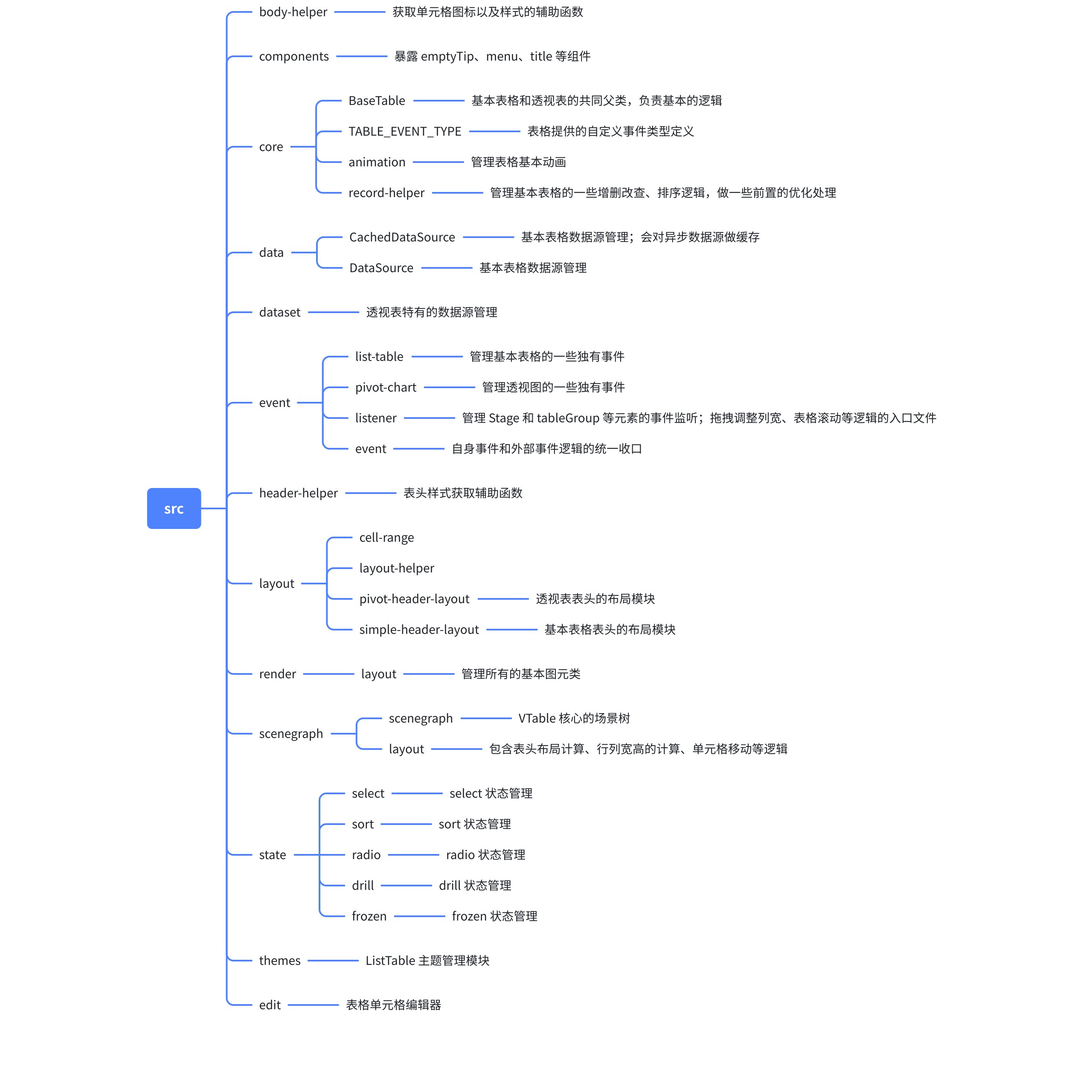
By observing the directory under the src folder, you can see the general project structure, which is strictly divided according to modules. Basically, each file exports a Class, and by constructing instances at different times and places, the initialization of the VTable is completed.
The diagram below roughly shows the code structure of VTable and the functions of each file.
Path Analysis
Starting from src/index.ts, you can see that VTable exposes the two most commonly used components, ListTable and PivotTable, from here. This is where different components of VTable converge.
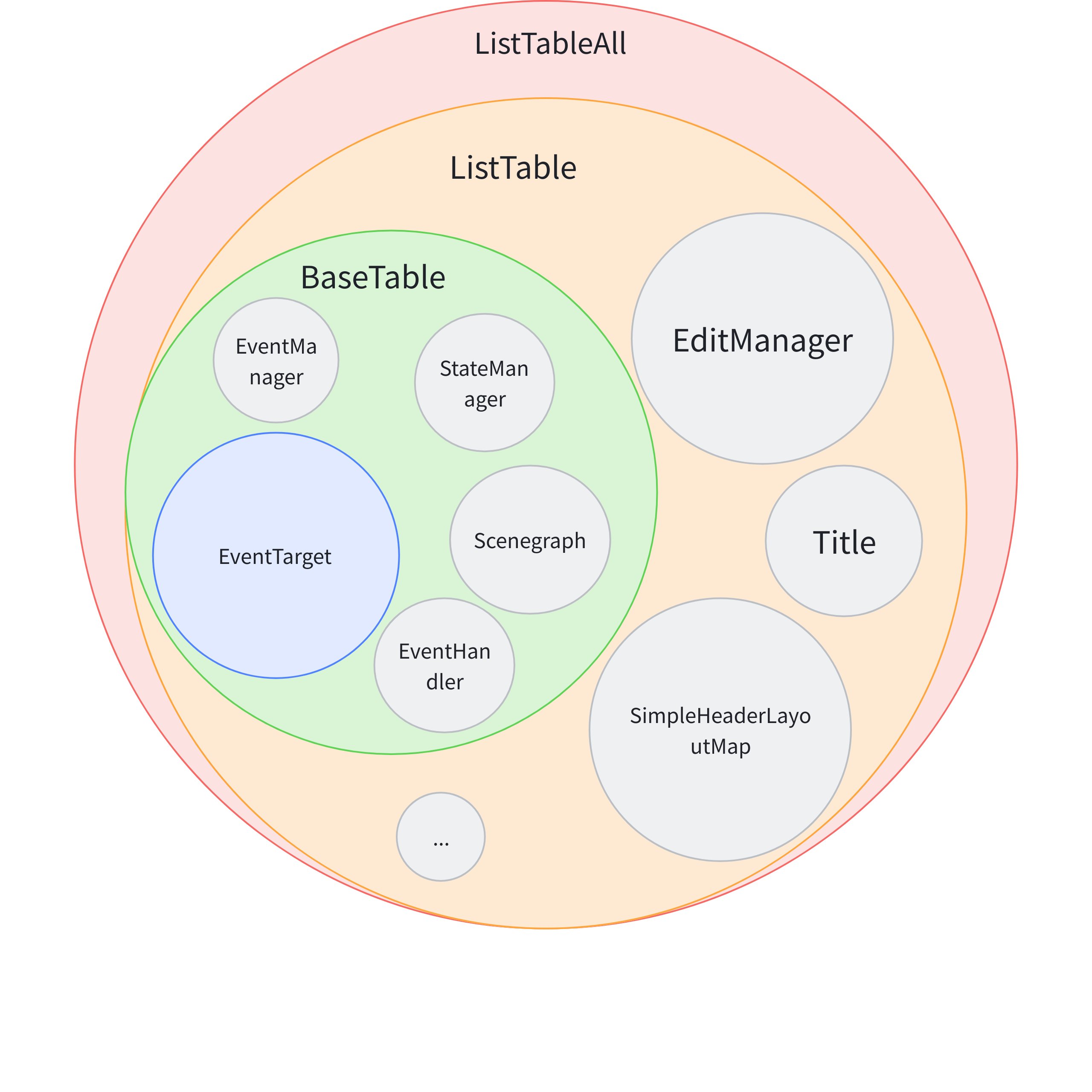
Enter ListTable-all, you can see that the necessary components are registered during the initialization of ListTable so that the chart instance can be called in different places.
Scenegraph Scene Tree
StateManager State Management
EventManager Interaction Event Management
* VTable/packages/vtable/src/core/BaseTable.ts
export abstract classBaseTableextendsEventTargetimplementsBaseTableAPI{
constructor {
...
this.scenegraph = new Scenegraph(this);
this.stateManager = new StateManager(this);
this.eventManager = new EventManager(this);
this.animationManager = new TableAnimationManager(this);
...
}
}
BaseTable inherits from the EventTarget class to implement publish-subscribe operations.
After performing path analysis on VTable, we can draw a rough reference diagram of the ListTable modules:
PivotTable also adopts a similar architecture, inheriting from BaseTable just like `ListTable`.
### Conclusion
VTable, through reasonable modular management of various functions, can maximize development efficiency and reduce the learning curve.
This article divides the structure of VTable into layers, categorizing it into data layer, logic layer, rendering layer, and interaction module. By analyzing different layers, it introduces the basic architecture of VTable.
Then, starting from the directory, it introduces the source code structure of VTable, the division of various modules, and the functions responsible for different modules. After analyzing from two perspectives, one can have a certain understanding of the overall architecture of VTable. \r
This document is provided by the following personnel