It is not only a fully functional graph visualization library, but also an explorer of data relationships.
!!!###!!!title=7.2 Pivot Table and Pivot Chart Data Module——VisActor/VTable Contributing Documents!!!###!!!!!!###!!!description=---title: 7.2 Pivot Table and Pivot Chart Data Module
key words: VisActor,VChart,VTable,VStrory,VMind,VGrammar,VRender,Visualization,Chart,Data,Table,Graph,Gis,LLM---
!!!###!!!
Overview
Data processing is one of the core steps of data visualization. This section will introduce how PivotTable organizes and processes data, enabling data to support efficient rendering of PivotTable while also possessing PivotTable data analysis capabilities.
Automatic Organization of Dimension Tree
Background of the Requirement
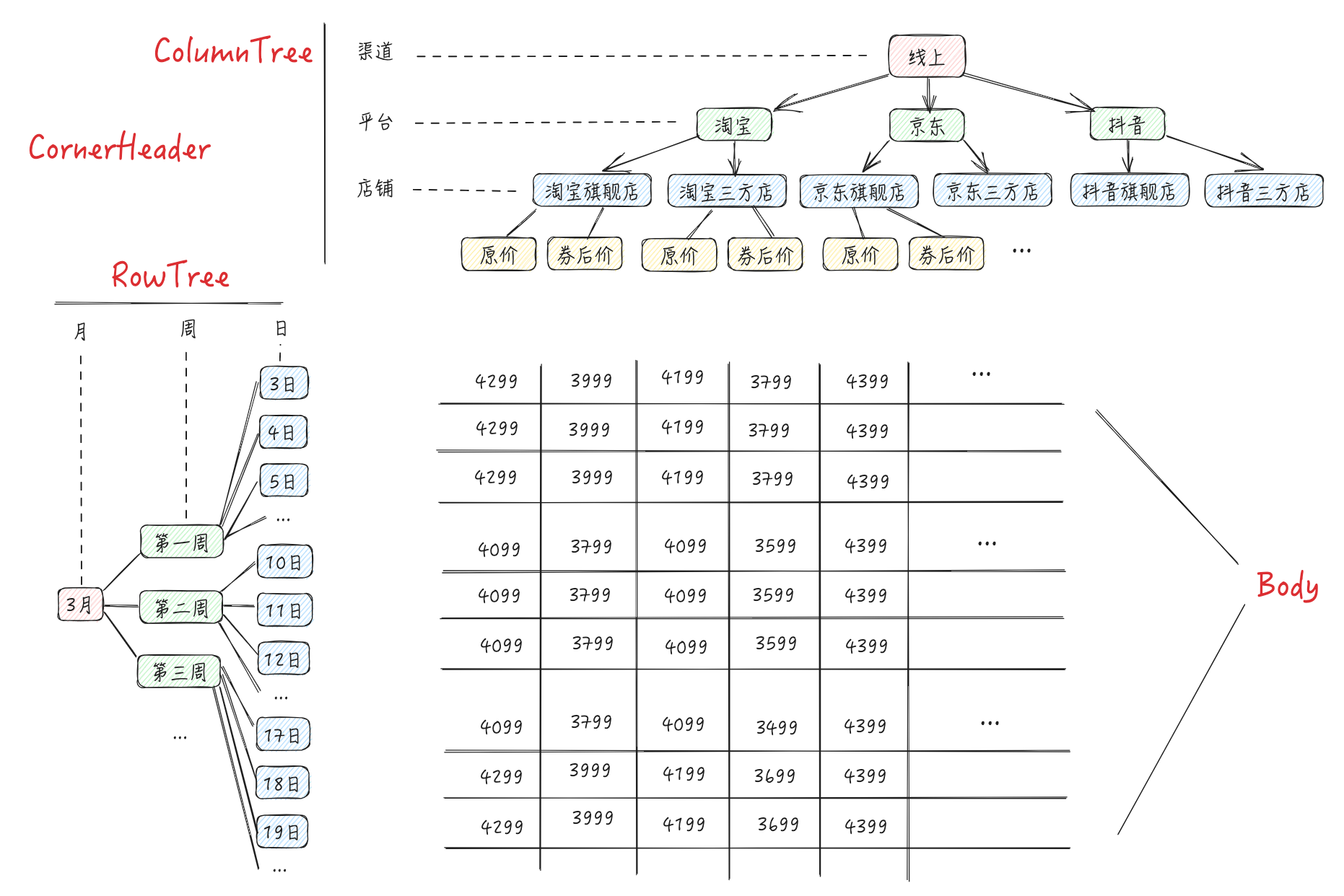
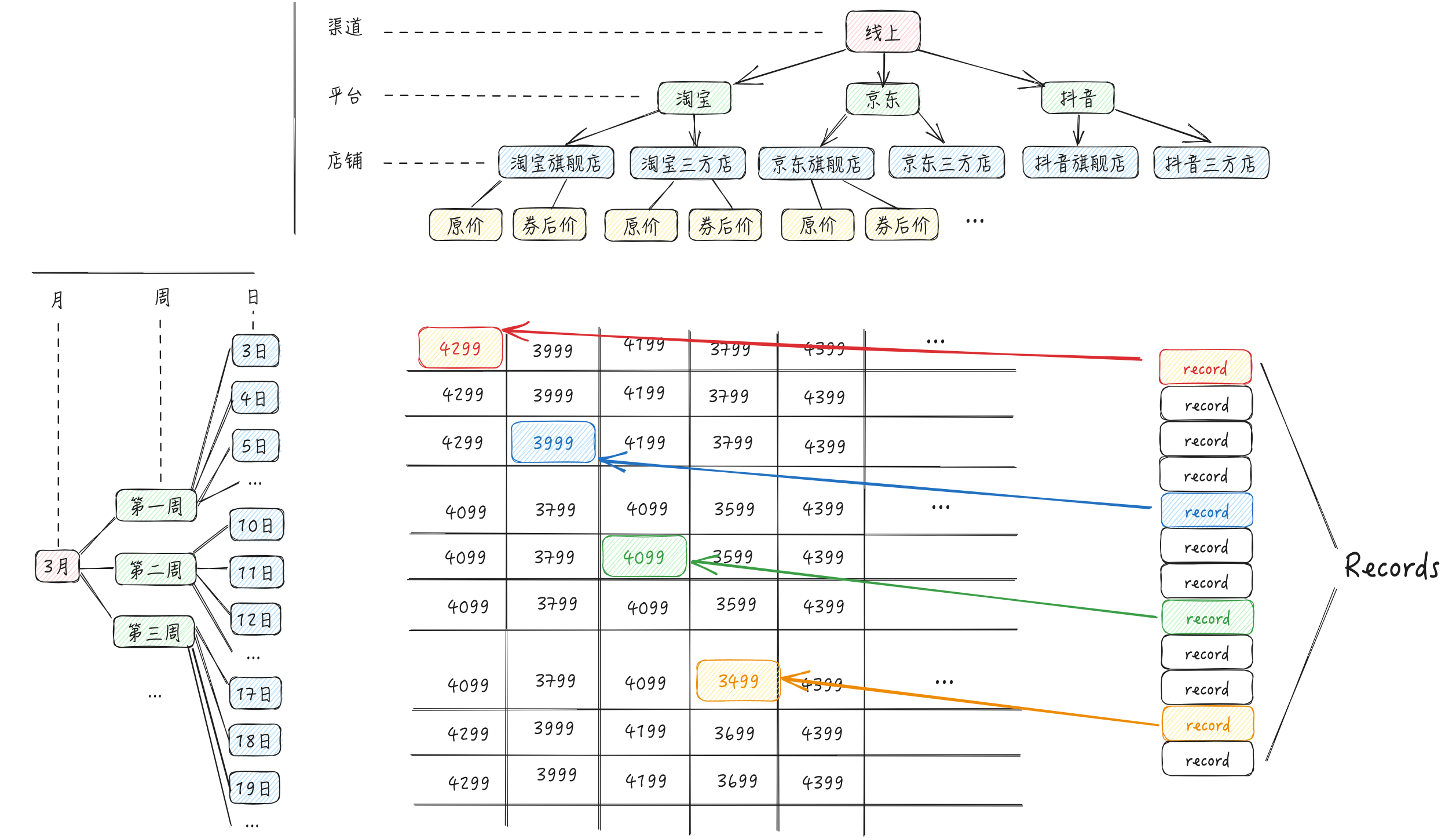
Using our diagram: \r
Suppose we want to implement such a multidimensional table, generally speaking, the parameters we expect from the business side are:
Well-organized dimension trees RowTree, ColumnTree (similar to timeTree and channelTree) \r
Specific data records under various dimensions and indicators \r
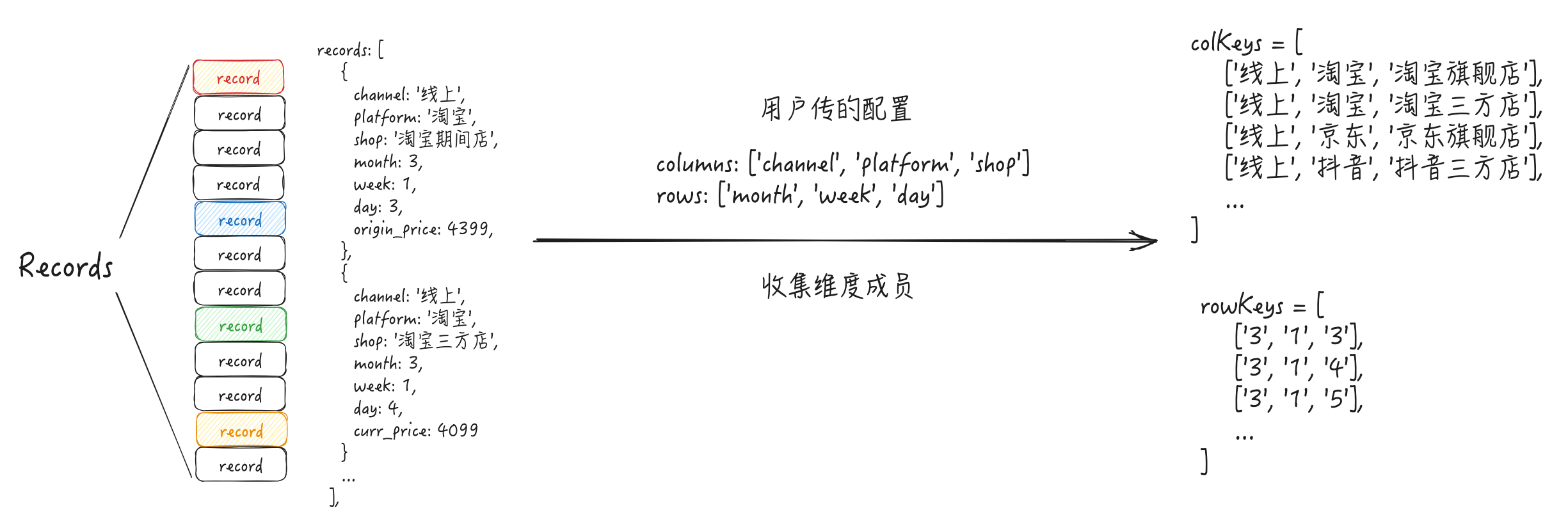
In theory, it can be achieved, but the drawbacks are also obvious: the business side needs to assemble the data into this structure by themselves, which has a high integration cost. We expect the business side to only pass concise Records with some simple configurations, and we can parse the data ourselves and render it into a multidimensional table. For example, the Records passed in are the original data found from the db: \r
Objective: Transform the original dataset `Records` through data processing to obtain a data structure that supports display in pivot table format
Implementation Approach
Analysis
With the above background and objectives, some questions may easily arise: \r
How to generate rowTree, columnTree from raw data?
Answer: Group aggregation. Similar to SQL's group, theoretically we can sort out the values of each dimension from records in a way similar to group (e.g., group aggregation to find the dimension values under platform such as "Taobao" | "JD" | "Douyin").
How to ensure the lowest time complexity and pursue performance when the data volume of records is large?
Approach
Convention for user-provided data & data structure
Collect dimension members (e.g., under the platform dimension there are "Taobao" | "JD" | "Douyin" three members)
Assemble rowTree, columnTree
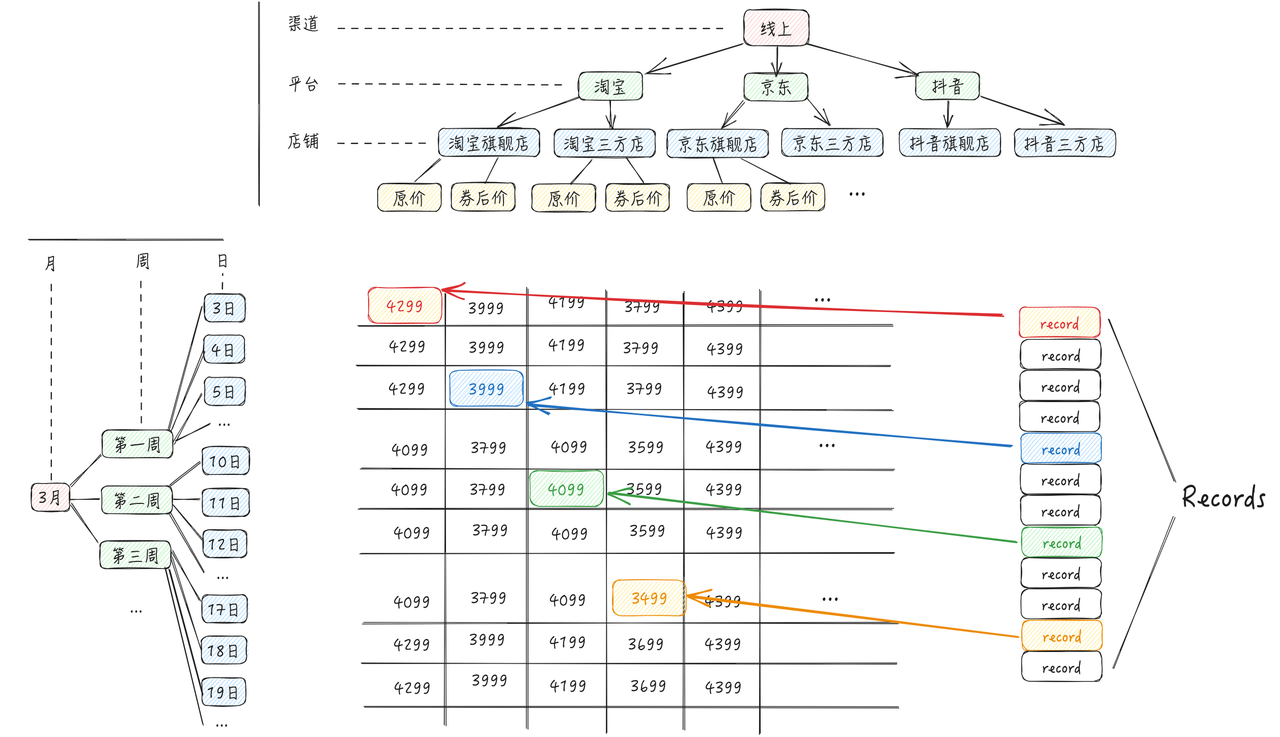
When rendering, quickly search for the corresponding data of the cell from records (as shown in the figure) \r
Theoretically, based on the known tasks: \r
Traversing the records once can accomplish the task of "collecting dimension members"; based on the collected dimension members and the columns, rows, indicatorKeys passed in by the user, theoretically, it is possible to assemble the rowTree and columnTree.
But how do we know the parent-child relationship of these dimensions? How do I know that the shop dimension is actually a sub-dimension of the platform dimension? \r
When users pass columns, the parent dimension should be sorted before the child dimension, e.g.:
But the issue of "quickly finding the corresponding data from records when rendering" is quite troublesome. Suppose we know the row dimension + column dimension of the cell, we need to implement the getCellValue(col: number, row: number) function. Do we have to iterate over records again? That would be too cumbersome.
The most efficient method: By leveraging the capabilities of a **hash map**, the time complexity of lookup can be reduced to O(1). So how to design the structure of a hash map? \r
In fact, the data area is a two-dimensional matrix, so you can use (row, col) to locate the position of each cell. Therefore, if we have a two-dimensional hash map, its structure is roughly as follows, which can be used to look up cell data.
// HashMap 的第一层 key 为 row,第二层 key 为 col
type HashMap = Record<string, Record<string, IndicatorValue[]>>

// 指标值
type IndicatorValue = {
    indicatorKey: string;
    value: string;
}
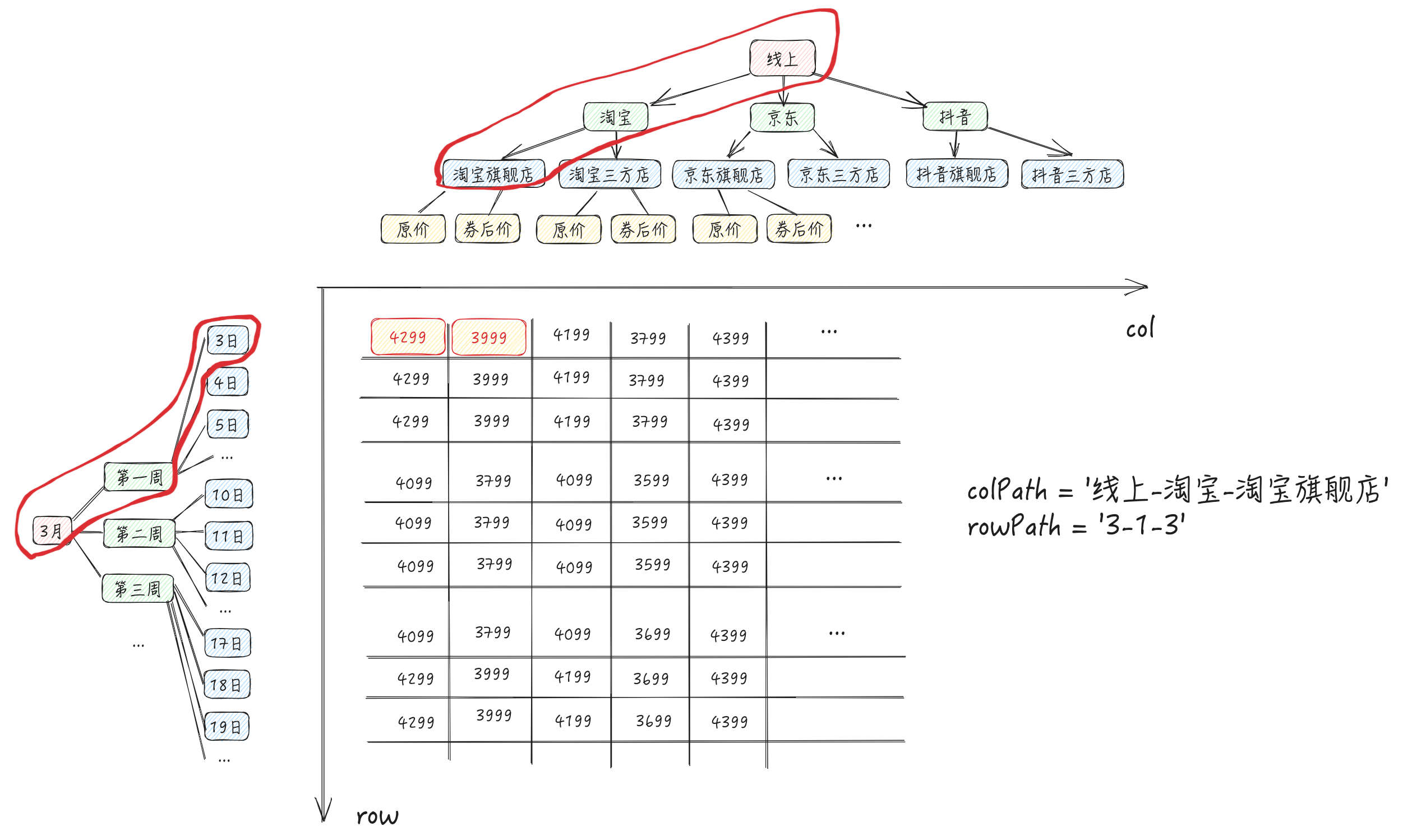
In our requirement, how do we define the structure of a hash map with two layers of keys? To ensure uniqueness, we can use the string composed of the path from root to leaf node in rowTree and columnTree as the key (as shown in the diagram and code below).
During the process of traversing the data, a dimension tree object (also referred to as a hash map in the previous text; for consistency, it will be referred to as a "dimension tree object" below) will also be generated.
With the dimension tree object, during rendering, you can quickly find the corresponding data for the cell from records.
Source Code
According to the above analysis process, let's take a look at how the source code is implemented.
Code entry: `packages/vtable/src/dataset/dataset.ts`
The following code has been simplified
setRecords: Entry method for data processing
processRecords: Process data, iterate through all entries
processRecord: Process a single piece of data, we have implemented most of the analysis process in this function \r
Traverse
In previous assumptions, we imagined that the dimension path would be 'online-Taobao-Taobao flagship store', which would be problematic because dimension members might also contain the '-' string.
In the source code, String.fromCharCode(0) is used as the separator for the dimension path, i.e., \u0000. In JavaScript, \u0000 represents the character with Unicode encoding U+0000, which is the null character (Null Character). This character is usually used to indicate the end of a string or as a placeholder, but it is typically not displayed in actual rendering. Here, it is mainly used to ensure the uniqueness of the dimension path string.
class Dataset {
    colKeys: string[][] = [];
    rowKeys: string[][] = [];
    private colFlatKeys: Record<string, number> = {}; // 记录某个colKey已经被添加到colKeys
    private rowFlatKeys: Record<string, number> = {}; // 记录某个rowKey已经被添加到rowKeys
    tree: Record<string, Record<string, Aggregator[]>> = {};

    stringJoinChar = String.fromCharCode(0); // 维度 path 的分隔符

    setRecords(records: any[] | Record<string, any[]>) {
        this.processRecords();

        ...
    }

    // 处理数据, 遍历所有条目
    private processRecords() {
        ...
        for (let i = 0, len = this.records.length; i < len; i++) {
            const record = this.records[i];

            ...
            this.processRecord(record);
        }
    }

    // 处理单条数据
    private processRecord(record: any, assignedIndicatorKey?: string) {
        ...

        const colKeys: { colKey: string[]; indicatorKey: string | number }[] = [];
        const rowKeys: { rowKey: string[]; indicatorKey: string | number }[] = [];

        // 收集维度成员
        const rowKey: string[] = [];
        rowKeys.push({ rowKey, indicatorKey: assignedIndicatorKey });
        for (let l = 0, len1 = this.rows.length; l < len1; l++) {
            const rowAttr = this.rows[l];
            if (rowAttr in record) {
                this.rowsHasValue[l] = true;
                **rowKey.push(record[rowAttr]);**
            }
        }

        const colKey: string[] = [];
        colKeys.push({ colKey, indicatorKey: assignedIndicatorKey });
        for (let n = 0, len2 = this.columns.length; n < len2; n++) {
            const colAttr = this.columns[n];
            if (colAttr in record) {
                this.columnsHasValue[n] = true;
                **colKey.push(record[colAttr]);**
            }
        }

        for (let row_i = 0; row_i < rowKeys.length; row_i++) {
            const rowKey = rowKeys[row_i].rowKey;
            ...

            for (let col_j = 0; col_j < colKeys.length; col_j++) {
                const colKey = colKeys[col_j].colKey;

                // 生成 flatRowKey,将用于维度tree对象的key
                **const flatRowKey = rowKey.join(this.stringJoinChar);**
**                const flatColKey = colKey.join(this.stringJoinChar);**

                ...

                if (rowKey.length !== 0) {
                  if (!this.rowFlatKeys[flatRowKey]) {
                    **this.rowKeys.push(rowKey);**
                    this.rowFlatKeys[flatRowKey] = 1;
                  }
                }
                if (colKey.length !== 0) {
                  if (!this.colFlatKeys[flatColKey]) {
                    **this.colKeys.push(colKey);**
                    this.colFlatKeys[flatColKey] = 1;
                  }
                }

                if (!this.tree[flatRowKey]) {
                  this.tree[flatRowKey] = {};
                }

                // 生成维度 tree 对象
                if (!this.tree[flatRowKey]?.[flatColKey]) {
                  this.tree[flatRowKey][flatColKey] = [];
                }

                const toComputeIndicatorKeys = this.indicatorKeysIncludeCalculatedFieldDependIndicatorKeys;
                for (let i = 0; i < toComputeIndicatorKeys.length; i++) {
                    let needAddToAggregator = false;

                    ...

                    // 生成维度 tree 对象
                    if (needAddToAggregator) {
                        **this.tree[flatRowKey]?.[flatColKey]?.[i].push(record);**
                    }
                }
                ...

            }
        }

    }
}
Assemble to generate
ArrToTree and ArrToTree1: Convert rowKeys and colKeys to a tree structure
PivotTable can obtain cell values from the dataset module through methods like pivotTable.getCellValue. These methods will eventually call the dataset.getAggregator method.
It can be seen that it is directly read through flatRowKey + flatColKey + indicatorIndex on the dimension tree object, which is very convenient, and the time complexity can almost be regarded as O(1)
Add: In a tree display scenario, if you need to dynamically insert child node data, you may use the setTreeNodeChildren interface -> call the addRecords interface -> trigger processRecord
Change: In the table editing scenario, the value of the cell may be updated, and pivotTable.changeCellValues and pivotTable.changeCellValue will be called to change the cell data
In addition to triggering the recalculation of width and height, the above method will ultimately trigger the dataset.changeRecordFieldValue method (as shown in the code below) during data processing. It can be seen that records will be updated first; then this.processRecords() is called to start traversing records again, regenerating the dimension tree object.
changeRecordFieldValue(fieldName: string, oldValue: string | number, value: string | number) {
  ...

  for (let i = 0, len = this.records.length; i < len; i++) {
      const record = this.records[i];
      if (record[fieldName] === oldValue) {
        **record[fieldName] = value;**
      }
  }

  this.rowFlatKeys = {};
  this.colFlatKeys = {};
  this.tree = {};
  **this.processRecords();**
}
Data Analysis
Background of the Requirement
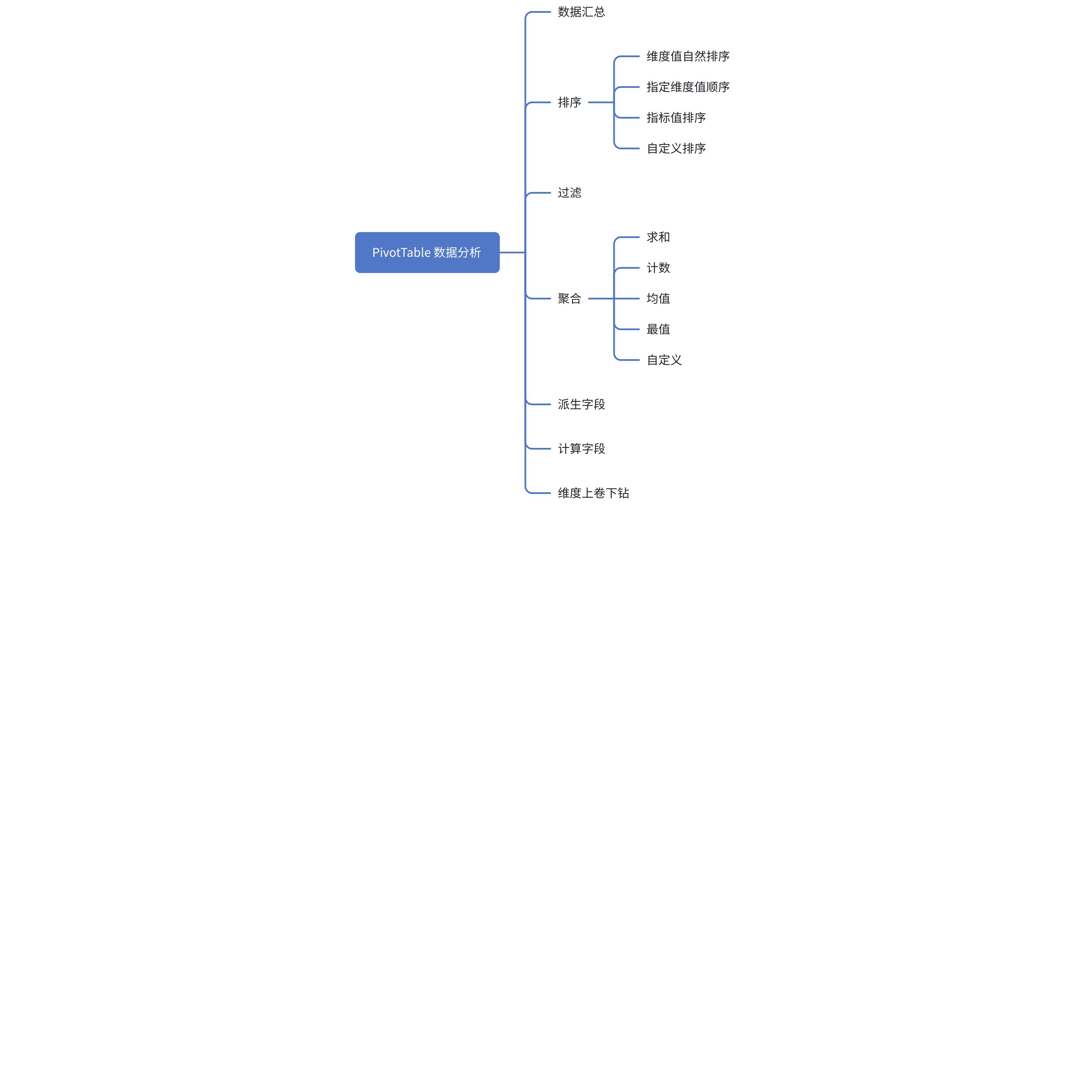
One of the core functions of multidimensional tables is data analysis, which can help users analyze various scenario indicators and comparisons, aiding business analysis to drive decision-making. The following are the data analysis capabilities of PivotTable.
Requirements Analysis
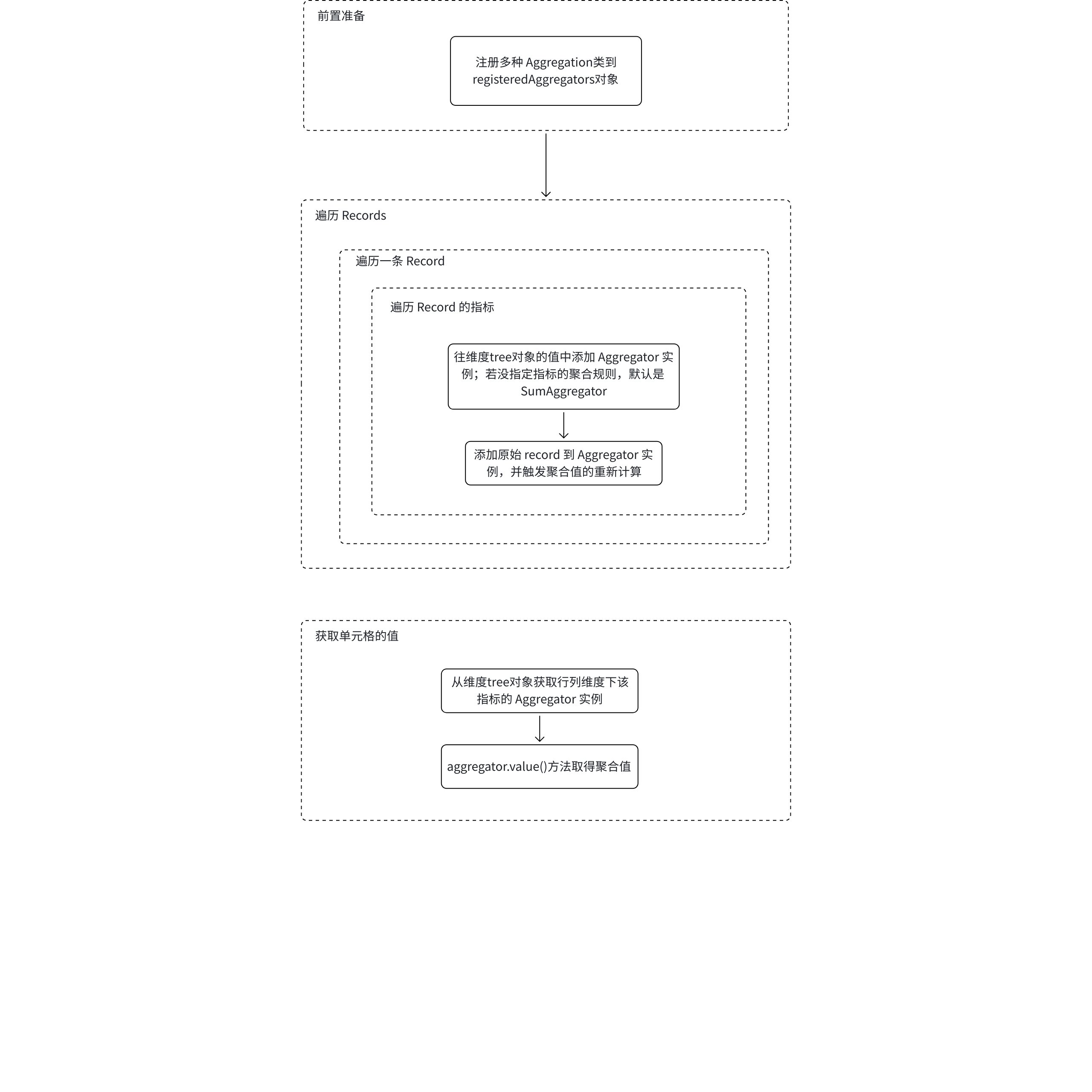
In the previous section "Automatic Organization of Dimension Tree", we imagined the dimension tree object value as the IndicatorValue[] type. To implement the functions of aggregation and calculated fields, the data structure of the dimension tree object value needs to be redesigned. What should the data structure be? How can we perform statistics on these aggregated data while traversing **Records**? This is actually one of the core designs of this section.
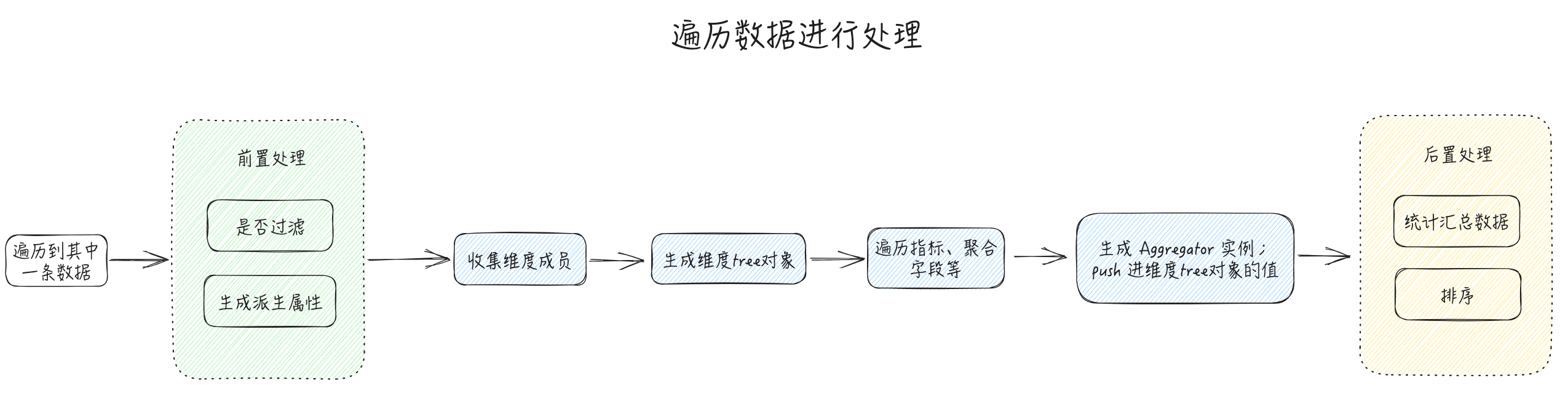
The filtering and derived field functions can be implemented before traversing Records. According to the agreed filtering rules, unnecessary data is removed from Records first, without affecting subsequent calculations.
What is the difference between calculated fields and derived fields? Both are data derived from the original data.
Derived fields: **Dimensions** derived from the original data. eg. There is a dimension date field with the value "2025-02-03", and it is expected to derive dimensions year, month, week, day
Calculated fields: **Metrics** derived from the original data. eg. There are metrics "original price" and "actual price", and it is expected to derive the metric "discount strength"
1. Summarization is a commonly used feature in multidimensional tables. It may be implemented **after traversing** `**Records**`, because we need to aggregate and calculate fields after they have values, only then can we perform summarization.
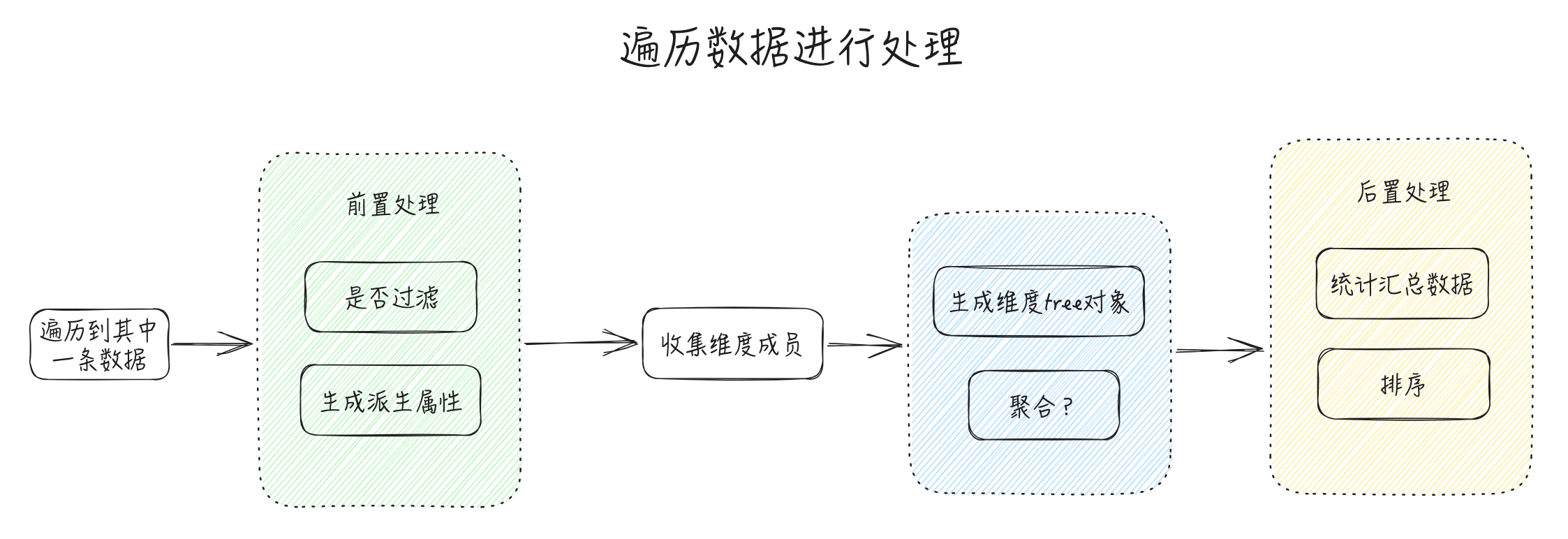
According to the above analysis, in order to achieve data analysis functionality, the data parsing process may change as follows:
Source Code & Implementation
With the above analysis and questions, let's take a look at how the source code is implemented.
Code entry: `packages/vtable/src/dataset/dataset.ts`
The following code has been simplified
These logics are mainly distributed in the setRecords, processRecords, and processRecord methods.
setRecords: Entry method for data processing \r
processRecords: Process data, iterate through all entries
processRecord: Process a single data entry
Filter
The source code is as follows, it should be understandable
export class Dataset {
    // 过滤规则
    filterRules?: FilterRules;

    // 明细数据
    records?: any[] | Record<string, any[]>;
    filteredRecords?: any[] | Record<string, any[]>;

    // 处理数据, 遍历所有条目
    private processRecords() {
        let isNeedFilter = false;
        if ((this.filterRules?.length ?? 0) >= 1) {
          isNeedFilter = true;
        }

        for (let i = 0, len = this.records.length; i < len; i++) {
            const record = this.records[i];
            // 如果 this.filterRecord(record) 为false,这条原始数据就被过滤掉了,不进入后面的数据处理流程
            if (!isNeedFilter || **this.filterRecord(record)**) {
                (this.filteredRecords as any[]).push(record);
                this.processRecord(record);
            }
          }
    }

    // 遍历过滤规则,有一条命中就会被过滤掉
    private filterRecord(record: any): boolean {
        let isReserved = true;
        if (this.filterRules) {
            for (let i = 0; i < this.filterRules.length; i++) {
                const filterRule = this.filterRules[i];
                if (filterRule.filterKey) {
                    const filterValue = record[filterRule.filterKey];
                    if (filterRule.filteredValues?.indexOf(filterValue) === -1) {
                        isReserved = false;
                        break;
                    }
                } else if (!filterRule.filterFunc?.(record)) {
                    isReserved = false;
                    break;
                }
            }
        }
        return isReserved;
    }
}