It is not only a fully functional graph visualization library, but also an explorer of data relationships.
!!!###!!!title=7.3 PivotTable Code Structure and Detail Analysis——VisActor/VTable Contributing Documents!!!###!!!!!!###!!!description=---title: 7.3 PivotTable Code Structure and Detail Analysis key words: VisActor,VChart,VTable,VStrory,VMind,VGrammar,VRender,Visualization,Chart,Data,Table,Graph,Gis,LLM---!!!###!!!
Tree Display
Requirements
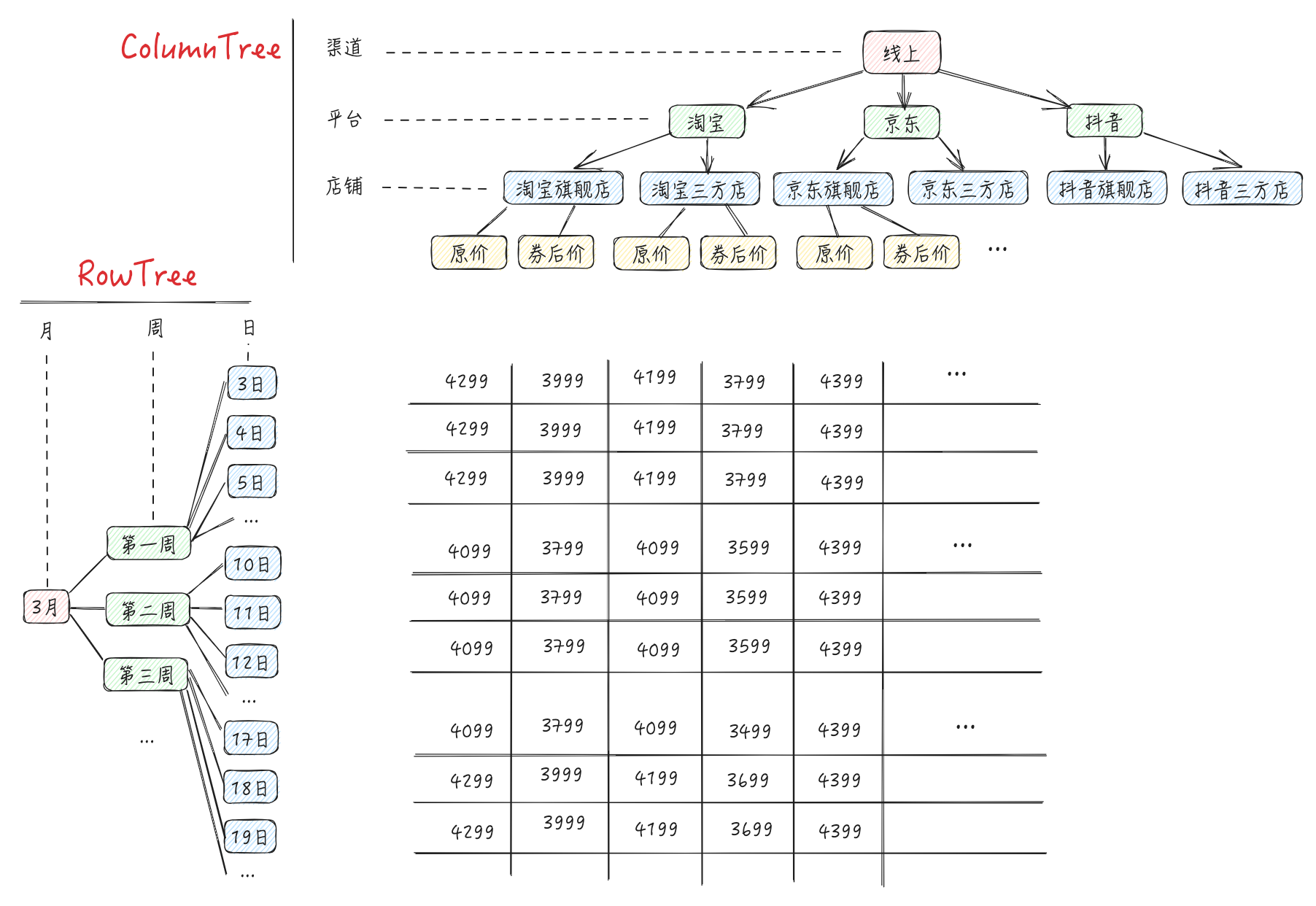
A major feature of PivotTable is the tree-like rowHeader and columnHeader. Users can define the display format of the tree based on the following configuration:
rowHierarchyType / columnHierarchyType : Tree display mode
grid (supports row and column)
tree (only supports row)
grid-tree (supports row and column)
indicatorsAsCol: Whether indicators are displayed as list headers, default is true
When customizing rowTree / columnTree, you can use node.hierarchyState to set the collapse state of each node
Problem
From the above requirements, we might have some questions❓: \r
How to render a tree-like rowHeader / columnHeader, and what data is needed?
Different rowHierarchyType / columnHierarchyType will have different merged cells and expansion logic, how to handle it more elegantly?
How does the layout algorithm handle these types of HierarchyType
Source Code
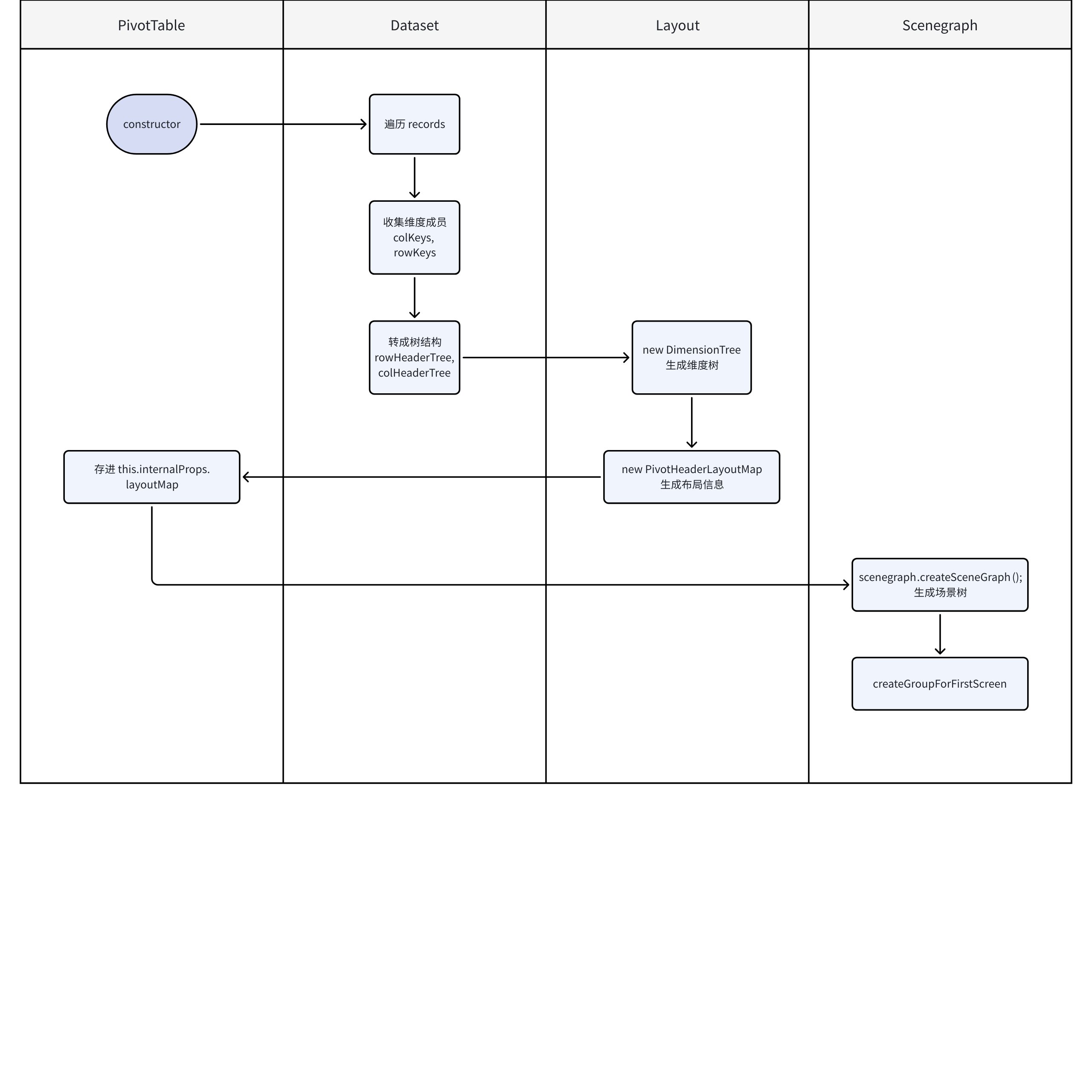
In section 7.2 "Automatic Organization of Dimension Tree", we learned that in the setRecords method of the Dataset module, the dimension members rowKeys collected from the raw data are used to call**ArrToTree**to assemble the dimension tree, stored in**Dataset.rowHeaderTree**.
Subsequent PivotTable will continue to process based on rowHeaderTree, rendering the tree header. Let's take a look at the details of this entire process.
Dataset.rowHeaderTree / colHeaderTree
If the user passes a custom tree customRowTree/colHeaderTree, it is directly assigned to dataset.rowHeaderTree / colHeaderTree
Otherwise, use ArrToTree and ArrToTree1 to convert dimension members rowKeys and colKeys into a tree structure, and then assign values.
It will be passed from dataset.rowHeaderTree / colHeaderTree or user custom header tree as a parameter to the DimensionTree class, instantiated to generate rowDimensionTree / columnDimensionTree
// packages/vtable/src/PivotTable.ts
export class PivotTable extends BaseTable implements PivotTableAPI {
    constructor(...) {
        ...

        const keysResults = parseColKeyRowKeyForPivotTable(this, options);
        let { columnDimensionTree, rowDimensionTree } = keysResults;

        ...

        if (!options.columnTree) {

            **columnDimensionTree = new DimensionTree(**
                (this.dataset.colHeaderTree as ITreeLayoutHeadNode[]) ?? [],
                ...
            );
        }

        if (!options.rowTree) {

            **rowDimensionTree = new DimensionTree(**
                (this.dataset.rowHeaderTree as ITreeLayoutHeadNode[]) ?? [],
                ...
            )

        }


    }
}
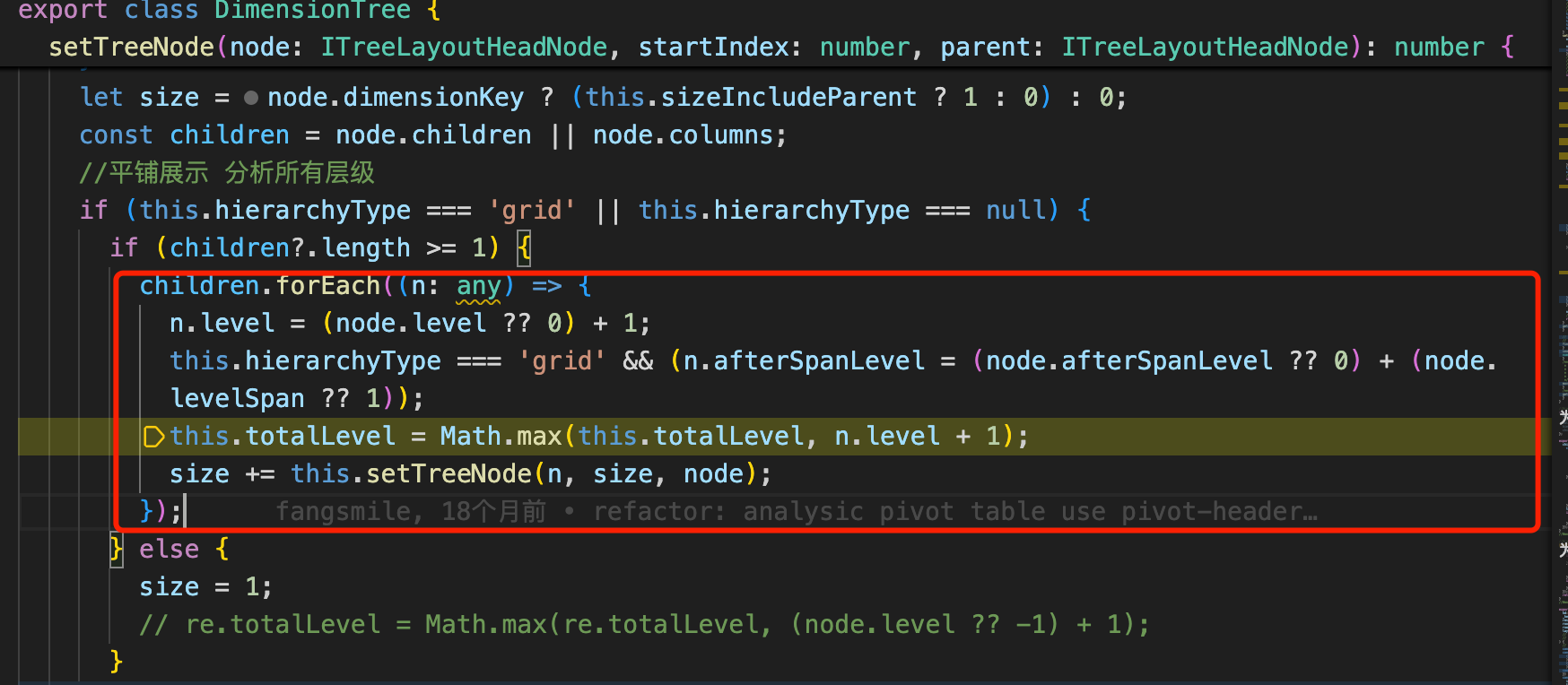
In the constructor function of the DimensionTree class, the core logic is in this.setTreeNode(this.tree, 0, this.tree). setTreeNode is a recursive function that will traverse the tree and process each node with setTreeNode.
Generate node id
According to **hierarchyType** configuration and **node.hierarchyState**, update the **level** attribute of the node (to be used for layout later), update the DimensionTree's totalLevel and size attributes
PivotHeaderLayoutMap
**layoutMap is one of the core parameters of PivotTable,** which will directly determine the layout, width, and height of the cells.
    **this.internalProps.layoutMap = new PivotHeaderLayoutMap**(
        this,
        this.dataset,
        columnDimensionTree,
        rowDimensionTree
    );
}
}
Let's see what the `PivotHeaderLayoutMap` class does:

1. **Determine the logic for merged cells and node collapse state**. The following four attributes will determine the display content and merged cell logic of `cornerHear`, `columnHear`, `rowHeader`

```Typescript
// packages/vtable/src/layout/pivot-header-layout.ts
export class PivotHeaderLayoutMap implements LayoutMapAPI {
    /**下面四份代表实际展示的 如果隐藏了某部分表头 那这里就会相比上面的数组少了隐藏掉的id 例如收hideIndicatorName影响*/
    _cornerHeaderCellIds: number[][] = [];
    private _columnHeaderCellIds: number[][] = [];
    private _rowHeaderCellIds: number[][] = [];
    private _rowHeaderCellIds_FULL: number[][] = []; //分页需求新增  为了保存全量的id  当页的是_rowHeaderCellIds

    // 记录单元格 HeaderData 对象
    cornerHeaderObjs: HeaderData[];
    columnHeaderObjs: HeaderData[] = [];
    rowHeaderObjs: HeaderData[] = [];
    ...
}
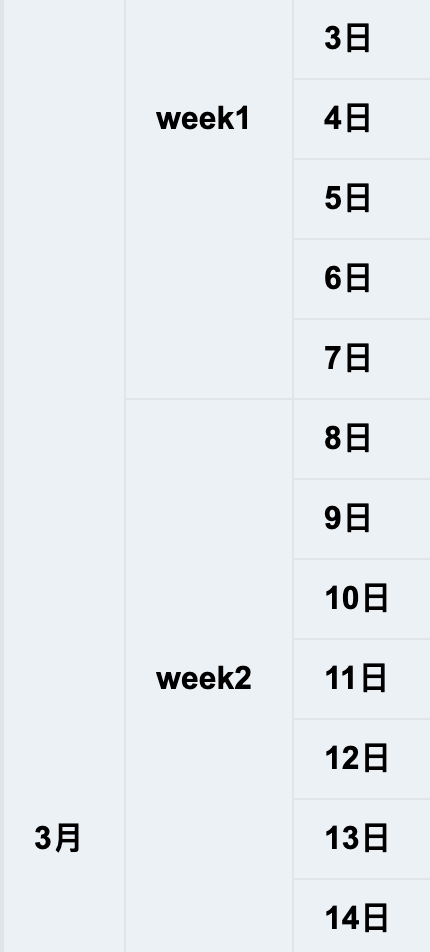
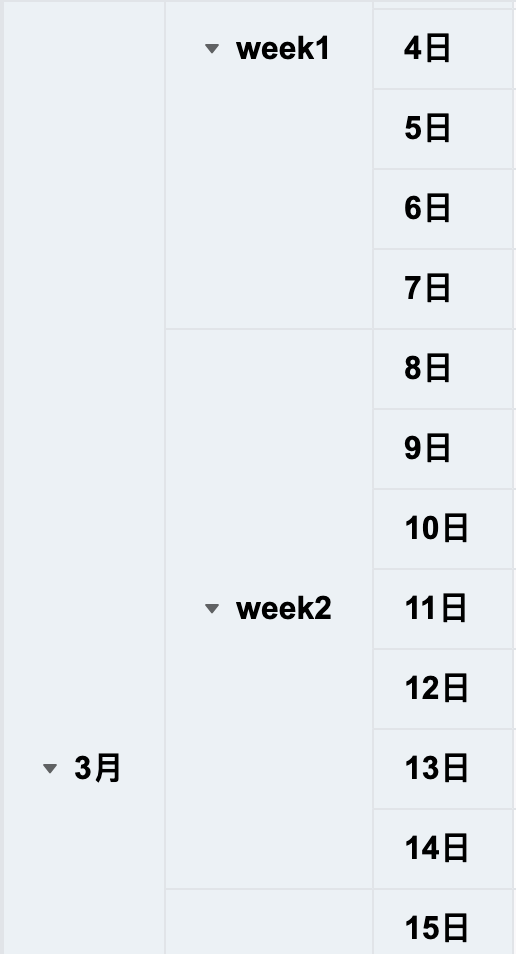
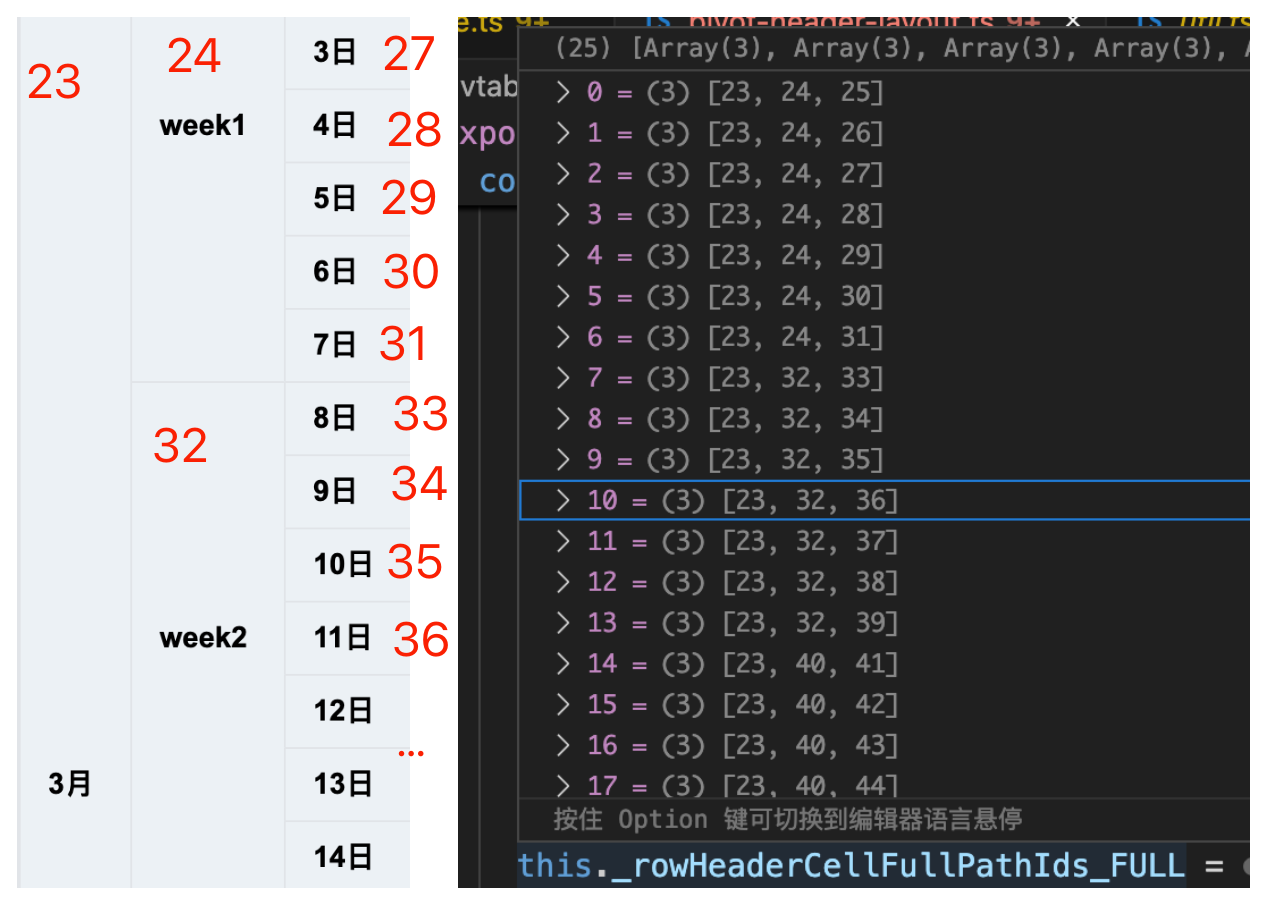
When rowHierarchyType is grid, the two-dimensional array _rowHeaderCellIds specifies the unique Id corresponding to each cell. If the Ids are the same, it indicates a merged cell situation. As shown in the left image below, Id:23 is a merged situation, and Id:27 is a non-merged situation. \r
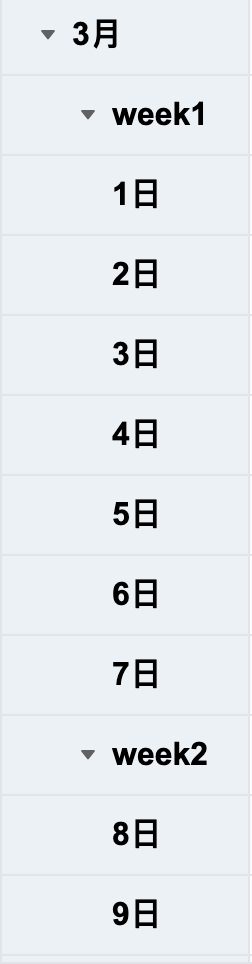
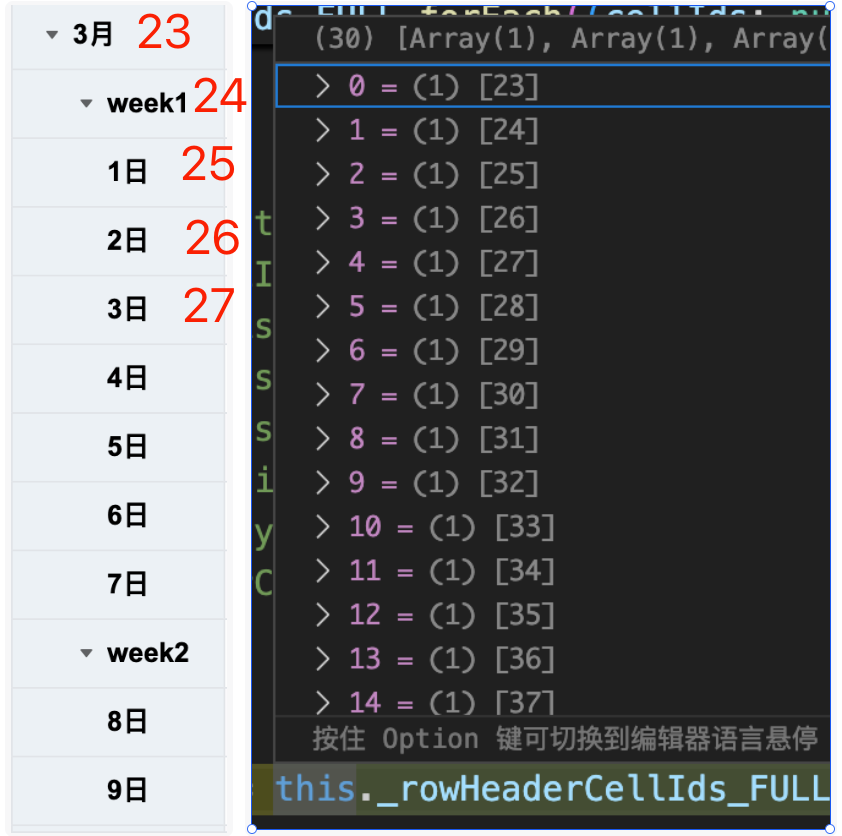
When rowHierarchyType is tree, all dimensions will be displayed in the same column, _rowHeaderCellIds will be as shown in the figure below: \r
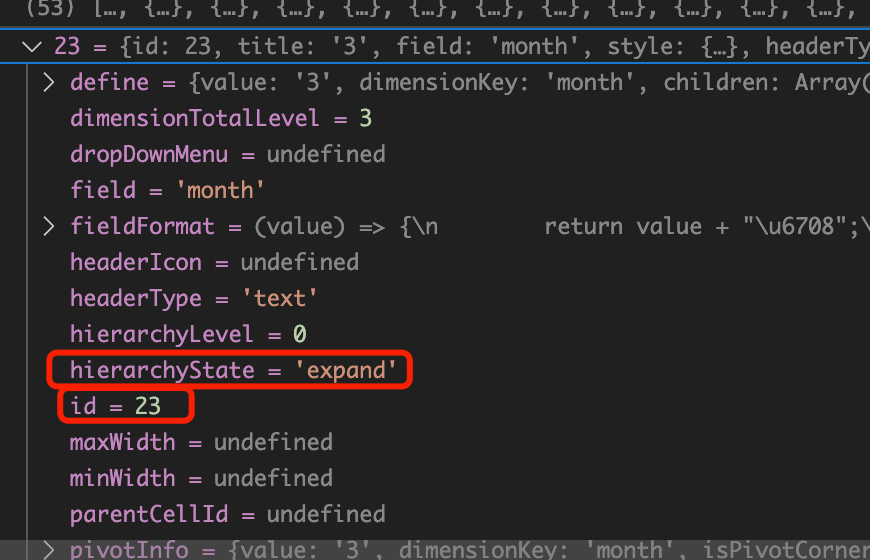
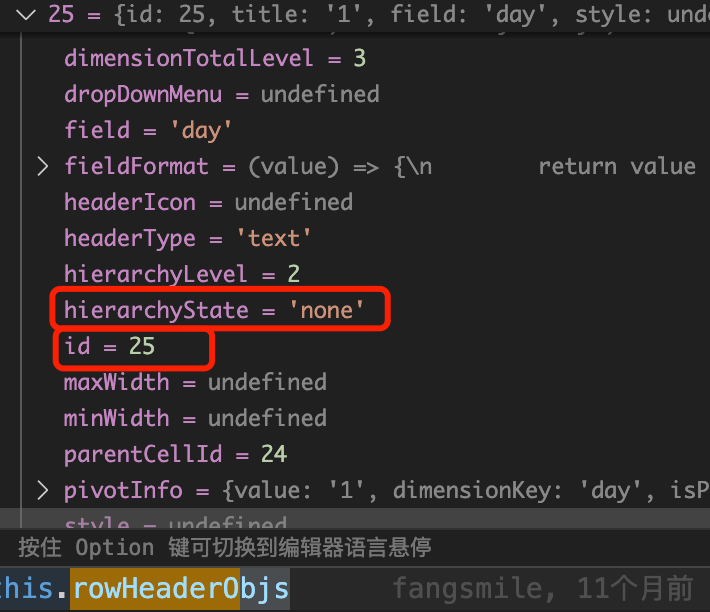
And node.hierarchyState will record the node's collapsed state
The specific logic for generating row header and column header cell data can be seen in this._addHeaders(), this._addHeadersForGridTreeMode(), and this._addHeadersForTreeMode().
The logic of the three this._addHeadersXX() methods is similar, and they will combine with the dealHeaderXX() method to form recursive logic, traverse the tree, generate**HeaderData**type cell data, and perform appropriate storage.\r
Create a scene tree, publish events, and celebrate!
scenegraph.createSceneGraph() actually belongs to the rendering engine (packages/vtable/src/scenegraph/scenegraph.ts), which is beyond the scope of this chapter, so it will not be analyzed in detail here.
In certain business scenarios, the business side may expect the row and column dimension trees to be displayed exactly as specified. In this case, you can pass in the dimension trees using rowTree and columnTree to achieve this.
Source Code
Dataset
You can see that if the user passes a custom row header tree or column header tree, it is directly assigned to dataset.rowHeaderTree / colHeaderTree
export class Dataset {
    ...

    setRecords(records: any[] | Record<string, any[]>) {
        ...

        if (this.customRowTree) {
            this.rowHeaderTree = this.customRowTree;
        }
        if (this.customColTree) {
            this.colHeaderTree = this.customColTree;
        }
      }
    }
}
DimensionTree
You can see that if the user passes a custom row header tree and column header tree, the tree provided by the user will be directly used in new DimensionTree
In fact, it is not using dataset.rowHeaderTree / colHeaderTree to generate DimensionTree
// packages/vtable/src/PivotTable.ts
export class PivotTable extends BaseTable implements PivotTableAPI {
    constructor(...) {
        ...

        const keysResults = parseColKeyRowKeyForPivotTable(this, options);
        let { columnDimensionTree, rowDimensionTree } = keysResults;
    }
}

// packages/vtable/src/layout/layout-helper.ts
export function parseColKeyRowKeyForPivotTable(table: PivotTable, options: PivotTableConstructorOptions) {

    if (options.columnTree) {
        columnDimensionTree = new DimensionTree(
            **(table.internalProps.columnTree as ITreeLayoutHeadNode[]) ?? [],**
            ...
        );
    }
    if (options.rowTree) {
        rowDimensionTree = new DimensionTree(
            **(table.internalProps.rowTree as ITreeLayoutHeadNode[]) ?? [],**
            ...
        );
    }

    return {
        ...
        columnDimensionTree,
        rowDimensionTree
    };
}
The subsequent process is consistent with the "tree display" process, which is to generate layoutMap and create a scene tree
Custom Header Column Merging
Requirements
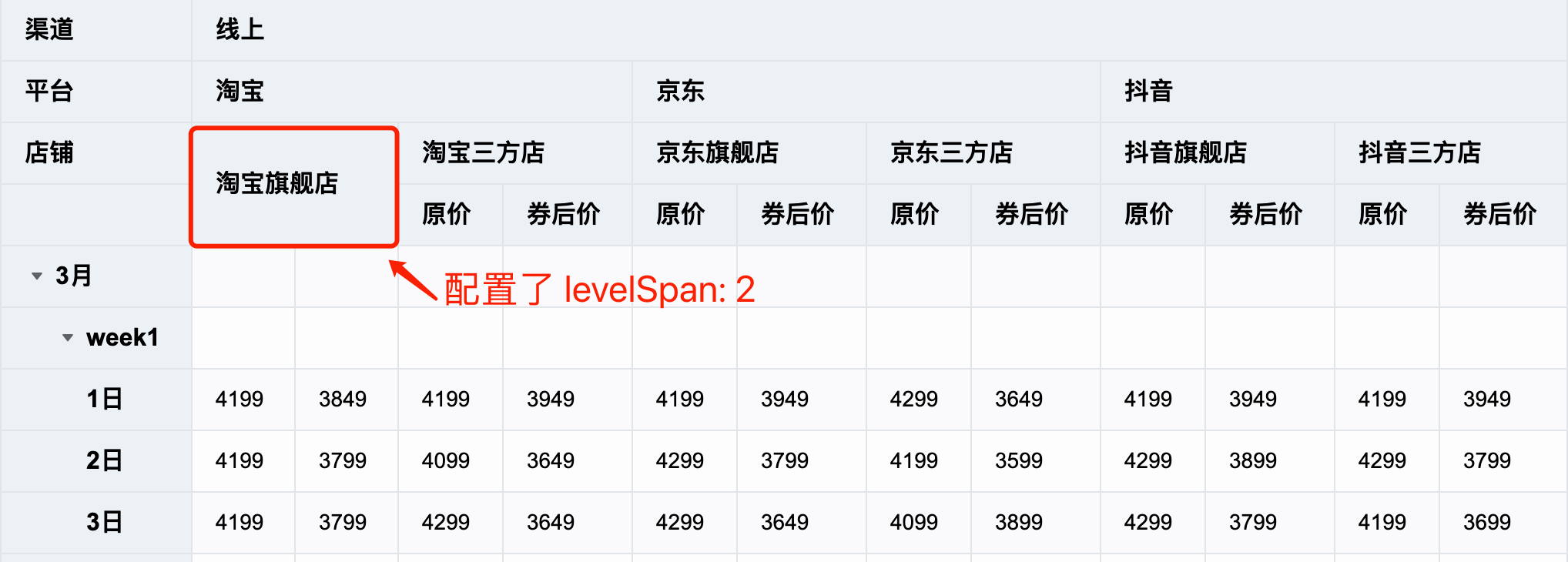
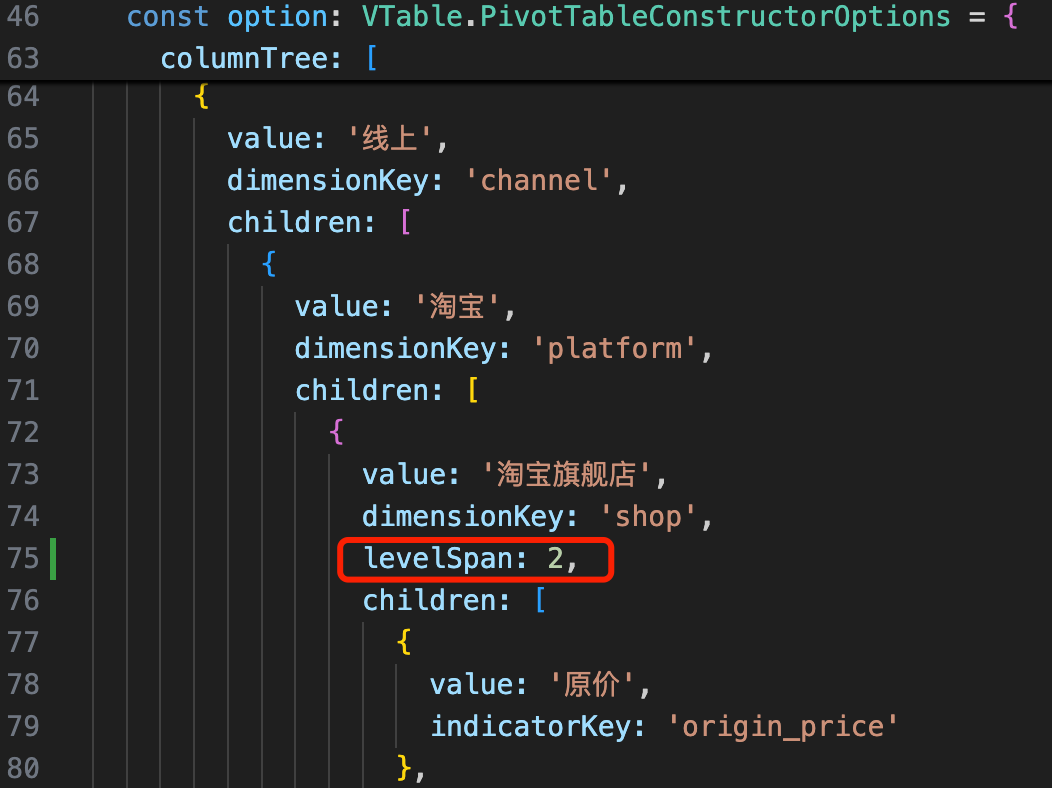
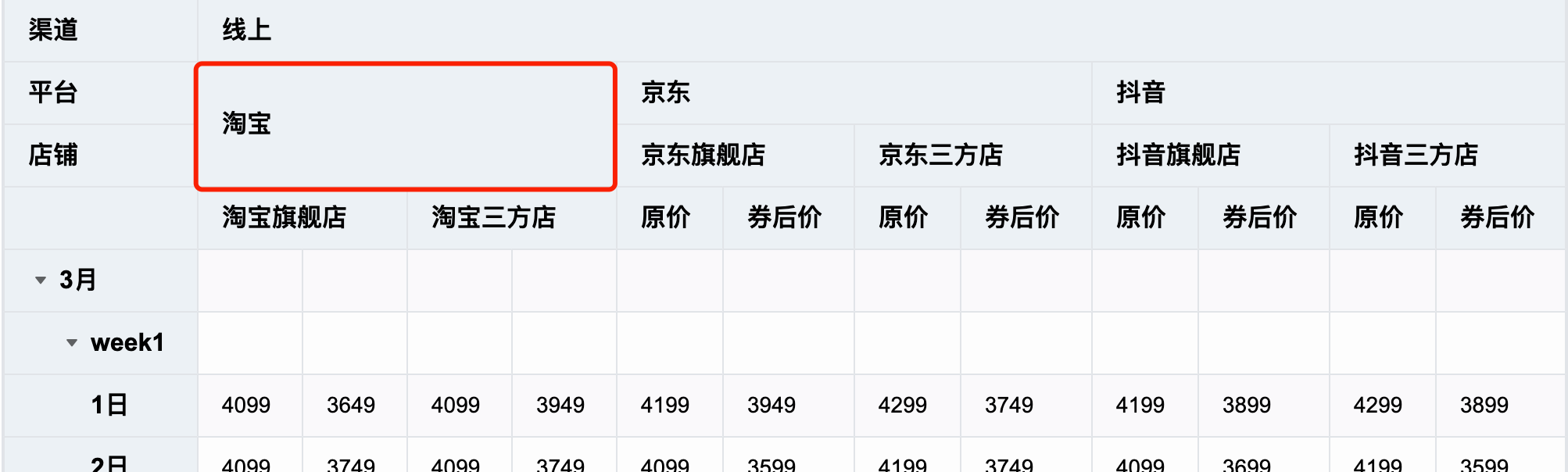
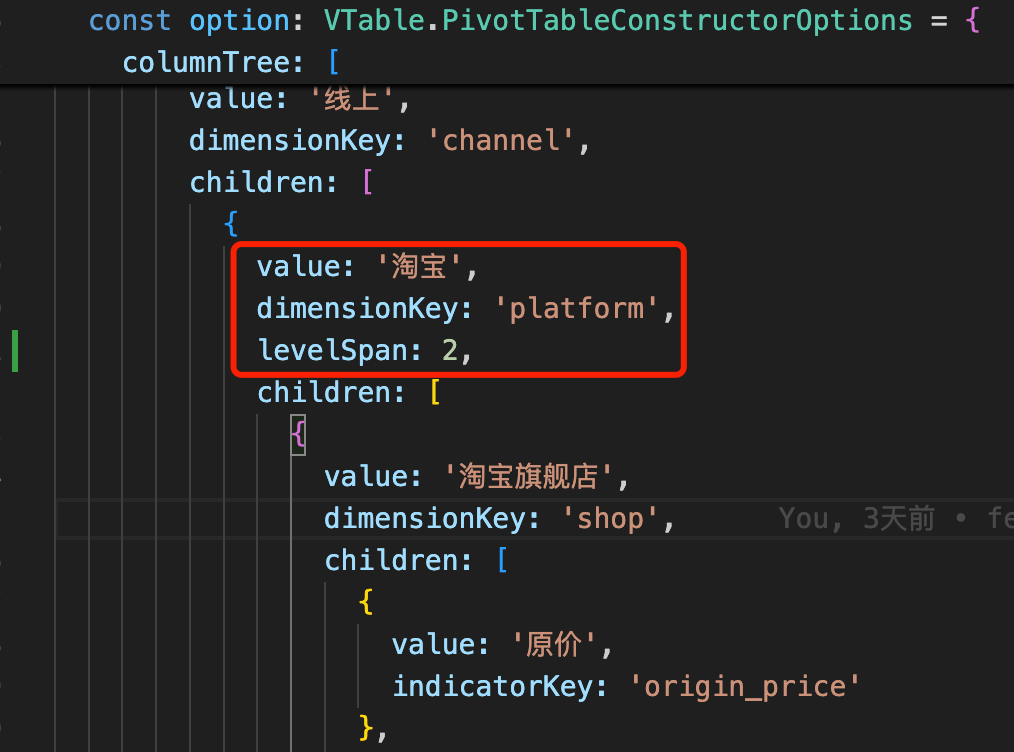
In the node configuration of custom rowTree and columnTree, there is a levelSpan field that can be used to specify the range of header cell merging, with a default value of 1.
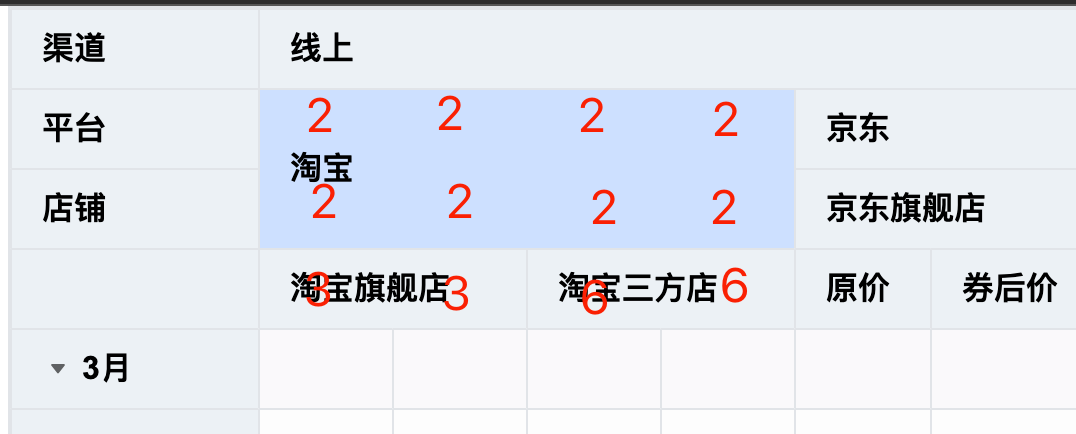
case1: Set "Taobao flagship store" with levelSpan: 2
case2: Set "Taobao" with levelSpan: 2
From the two cases above, it can be seen that nodes with levelSpan set will merge downwards the corresponding level of cells; their descendant nodes will render normally, but the total depth of the header remains unchanged, and nodes exceeding the depth will be hidden. The business side can set levelSpan as needed to render a more flexible custom header tree.
Source Code
DimensionTree
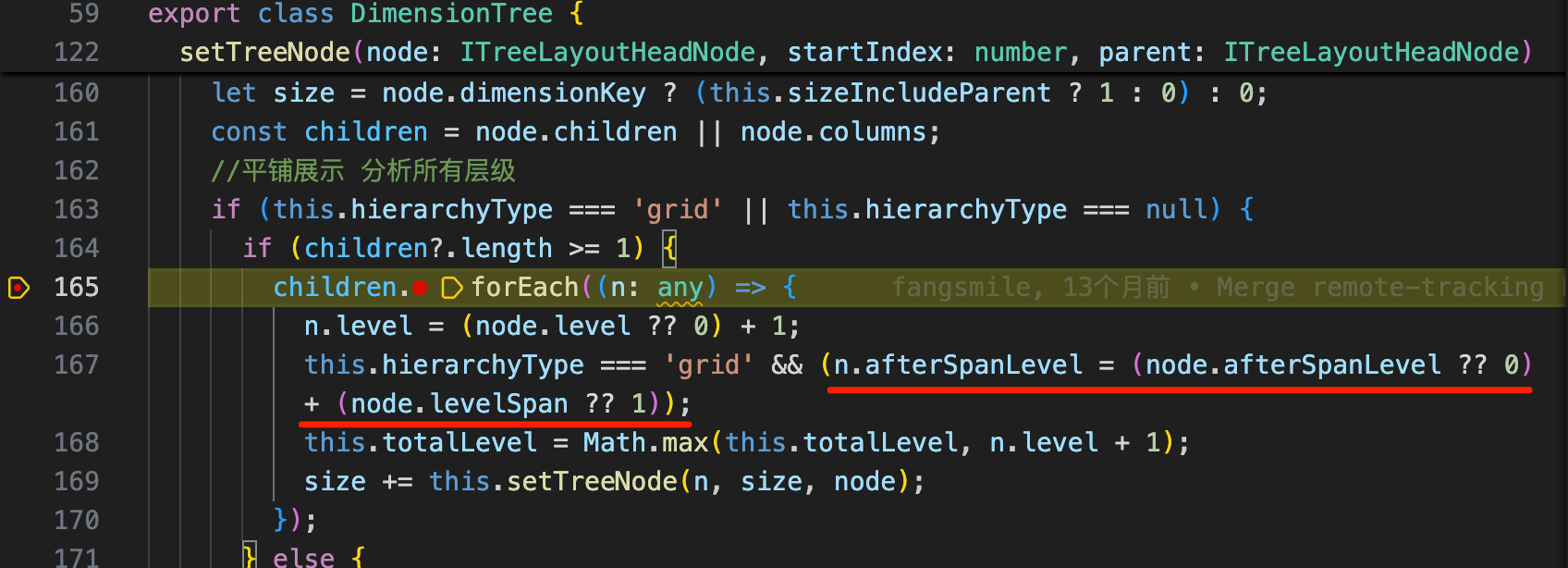
If columnTree is passed and levelSpan is set for a certain node, it will affect the logic of DimensionTree.setTreeNode.
You can see node.afterSpanLevel = node.afterSpanLevel + node.levelSpan
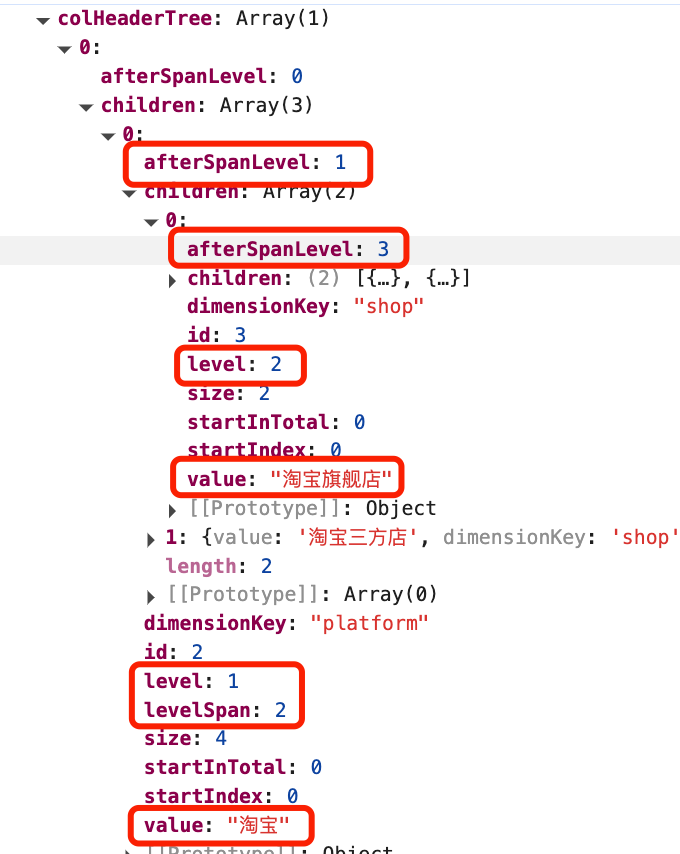
level: The actual level where the node is located
**afterSpanLevel**: Calculate the level in the case of node spanning (+spanLevel)**
PivotHeaderLayoutMap
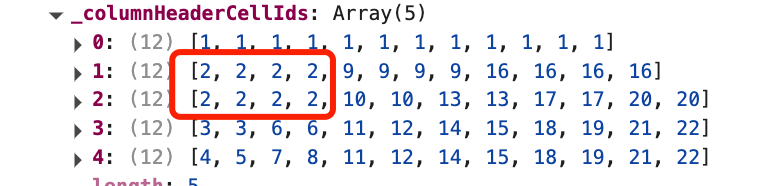
It will affect the generation of this._columnHeaderCellIds. After traversing the column header tree through this._addHeaders and dealHeader, it is finally as shown in the figure below. \r
Implementation of Typical Interactions
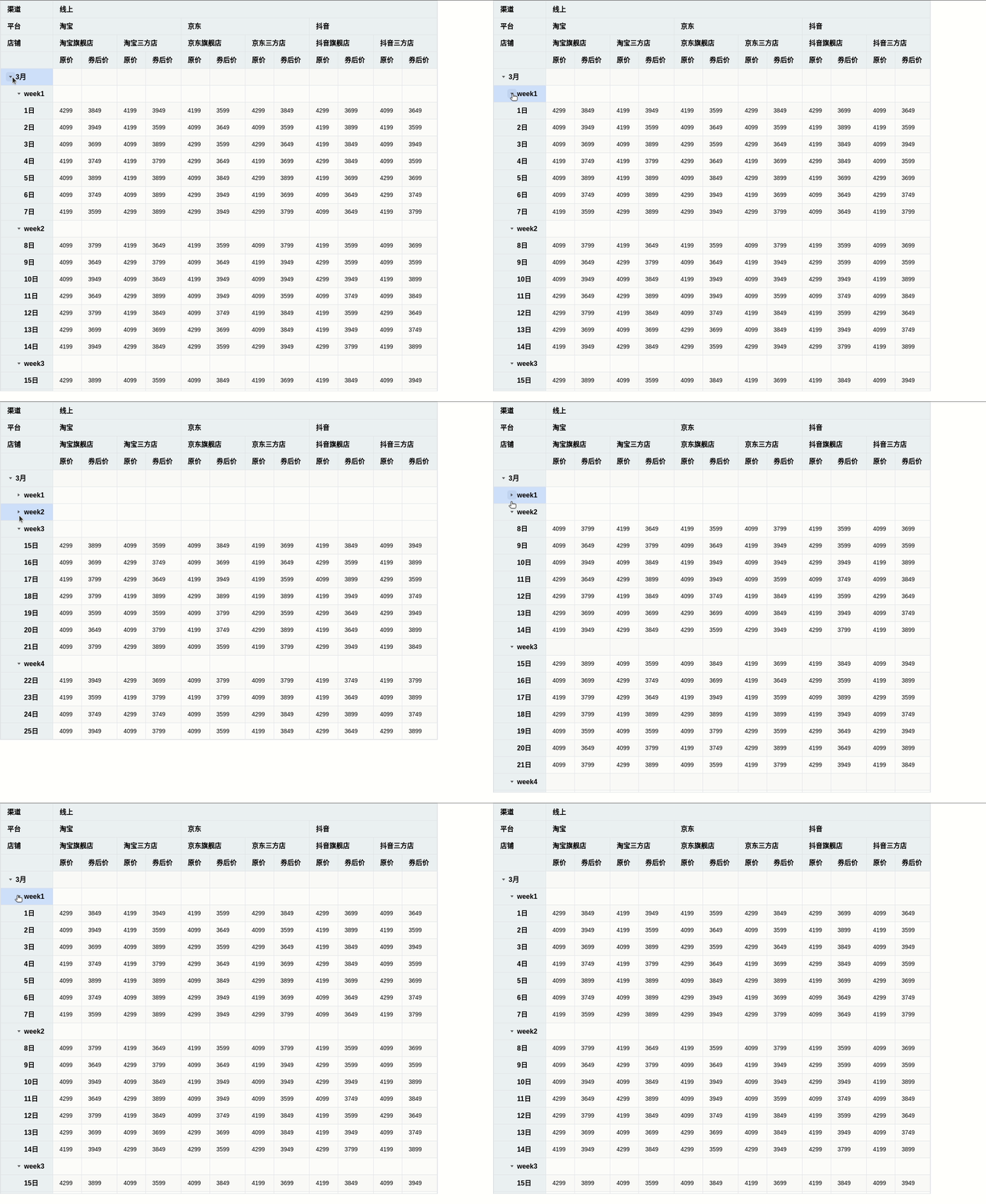
Expand & Collapse Dimension Tree
Interaction Effects
Source Code
We take the example of collapsing dimension tree nodes (HierarchyState from expand -> collapse) for analysis.
PivotTable.toggleHierarchyState
This method is the entry point. You can see: \r
Actually calls this._refreshHierarchyState()
After completion, publish the PIVOT_TABLE_EVENT_TYPE.TREE_HIERARCHY_STATE_CHANGE event
Call this.recalculateColWidths() to recalculate column widths
Call this.component.updateScrollBar() to update the scrollbar
Finally call this.updateNextFrame() to re-render
Process Summary
The core logic is in PivotHeaderLayoutMap.toggleHierarchyState: it will recursively regenerate the tree to create new header tree cell information (_columnHeaderCellIds, _rowHeaderCellIds); and collect information on added, deleted, and modified rows.
Finally, re-render the table with the generated change information
This document was revised and organized by the following personnel