!!!###!!!title=6.2 Basic Table Data Processing——VisActor/VTable Contributing Documents!!!###!!!!!!###!!!description=---title: 6.2 Basic Table Data Processing key words: VisActor,VChart,VTable,VStrory,VMind,VGrammar,VRender,Visualization,Chart,Data,Table,Graph,Gis,LLM--- !!!###!!!

Introduction

For all tables, data sources are an essential part. @Visactor/VTable provides various data source structures, including two-dimensional arrays, object structures, tree structures, and asynchronous lazy-loaded data sources (https://visactor.com/vtable/guide/data/async_data). To adapt to so many data structures, a reasonable data processing module is needed, and @Visactor/VTable provides such capability internally. Let's see how basic tables parse data.

Core Classes Involved in Table Data Processing

  • VTable\packages\vtable\src\data\CachedDataSource.ts: CachedDataSource is responsible for intercepting incoming external records and provides APIs for adding, deleting, updating, and querying records; it wraps the DataSource with an additional layer.

  • VTable\packages\vtable\src\data\DataSource.ts: This class implements various data processing operations and maintains the raw data in dataSource.records to support dynamic updates of the table, as well as the underlying implementation logic of the CRUD API provided externally by the basic table instance. BaseTable will intercept modifications to the instance of DataSource to ensure that the basic table is re-rendered when dataSource is modified.

ListTable Data Parsing Principle

The previous article introduced the initialization process of ListTable [], which briefly mentioned the part related to records. Now, let's delve into the analysis of the data source parsing process of ListTable.

We will analyze with a simple case. The following code generates a basic table (since the process of parsing data involves sorting, sortState is added in the configuration to facilitate analyzing how sortState affects data parsing).

import * as VTable from '../../src';
const CONTAINER_ID = 'vTable';
const generatePersons = count => {
  return Array.from(new Array(count)).map((_, i) => ({
    id: i + 1,
    email1: `${i + 1}@xxx.com`,
  }));
};

export function createTable() {
  const records = generatePersons(2000);
  const columns: VTable.ColumnsDefine = [
    {
      field: 'id',
      title: 'ID',
      sort: true,
    },
    {
      field: 'email1',
      title: 'email',
      sort: true,
    },
  ];
  const option: VTable.ListTableConstructorOptions = {
    container: document.getElementById(CONTAINER_ID),
    records,
    columns,
    widthMode: 'autoWidth',
    sortState: {
      field: 'email1',
      order: 'desc'
    },
  };
  const tableInstance = new VTable.ListTable(document.getElementById(CONTAINER_ID)!, option);
}
    

The initialization process has already been introduced in [], so the remaining processes will not be elaborated on. We will directly move on to the parts related to records. \r

  • packages\vtable\src\ListTable.ts

Here are three judgments made, two of which can be classified as one. Let's first look at the judgments of the following two branches.

Input records

setRecords

  // packages\vtable\src\ListTable.ts
  */***
*   * 设置表格数据 及排序状态*
*   * @param records*
*   * @param option 附近参数,其中的sortState为排序状态,如果设置null 将清除目前的排序状态*
*   */*
  setRecords(records: Array<any>, option?: { sortState?: SortState | SortState[] | null }): void {
    // 省略
    this.internalProps.dataSource = null;
    // 省略
    
    *// 清空单元格内容*
    this.scenegraph.clearCells();

    *//重复逻辑抽取updateWidthHeight*
    if (sort !== undefined) {
      if (sort === null || (!Array.isArray(sort) && isValid(sort.field)) || Array.isArray(sort)) {
        this.internalProps.sortState = this.internalProps.multipleSort ? (Array.isArray(sort) ? sort : [sort]) : sort;
        this.stateManager.setSortState((this as any).sortState as SortState);
      }
    }
    
    if (records) {
      _setRecords(this, records);
      if ((this as any).sortState) {
        const sortState = Array.isArray((this as any).sortState) ? (this as any).sortState : [(this as any).sortState];

        *// 根据sort规则进行排序*
        if (sortState.some((item: any) => item.order && item.field && item.order !== 'normal')) {
          if (this.internalProps.layoutMap.headerObjectsIncludeHided.some(item => item.define.sort !== false)) {
            this.dataSource.sort(
              sortState.map((item: any) => {
                const sortFunc = this._getSortFuncFromHeaderOption(undefined, item.field);
                *// 如果sort传入的信息不能生成正确的sortFunc,直接更新表格,避免首次加载无法正常显示内容*
                const hd = this.internalProps.layoutMap.headerObjectsIncludeHided.find(
                  (col: any) => col && col.field === item.field
                );
                return {
                  field: item.field,
                  order: item.order || 'asc',
                  orderFn: sortFunc ?? defaultOrderFn
                };
              })
            );
          }
        }
      }
      this.refreshRowColCount();
    } else {
      _setRecords(this, records);
    }
    
    *// 生成单元格场景树*
    this.scenegraph.createSceneGraph();
    //... 省略
    this.render();

  }    

  • First, clear the original dataSource, compatible with the previous sort configuration, and then clear all cell contents; \r

  • Next, update the internal this.sort through the stateManager.setSortState method to obtain the basic information of the cell corresponding to sort. In setSortState, the sort configuration is generated based on the passed sortState configuration and column information.

  • Enter the next branch and check if records exist. Both checks will enter _setRecords, and the only difference between the two checks is that if records are passed in, initial sorting will be performed based on the sortState and the sort configuration on the column. \r

_setRecords

// packages\vtable\src\core\tableHelper.ts
*// 先卸载 dataSource 上监听的所有事件,然后执行 fn,最后重新监听 dataSource 上的事件*
export function _dealWithUpdateDataSource(table: BaseTableAPI, fn: (table: BaseTableAPI) => void): void {
  const { dataSourceEventIds } = table.internalProps;

  if (dataSourceEventIds) {
    dataSourceEventIds.forEach((id: any) => table.internalProps.handler.off(id));
  }

  fn(table);

  table.internalProps.dataSourceEventIds = [
    table.internalProps.handler.on(table.internalProps.dataSource, DataSource.EVENT_TYPE.CHANGE_ORDER, () => {
      if (table.dataSource.hierarchyExpandLevel) {
        table.refreshRowColCount();
      }
      table.render();
    })
  ];
}

*/** @private */*
export function _setRecords(table: ListTableAPI, records: any[] = []): void {
  _dealWithUpdateDataSource(table, () => {
    table.internalProps.records = records;
    const newDataSource = (table.internalProps.dataSource = CachedDataSource.ofArray(
      records,
      table.internalProps.dataConfig,
      table.pagination,
      table.internalProps.columns,
      table.internalProps.layoutMap.rowHierarchyType,
      getHierarchyExpandLevel(table)
    ));
    // 添加到 releaseList 中
    table.addReleaseObj(newDataSource);
  });
}    

_setRecords calls _dealWithUpdateDataSource, passing in a callback function; \r

In _dealWithUpdateDataSource, the first step is to remove all event listeners related to dataSource, the second step is to execute the passed callback function, and the third step is to bind the CHANGE_ORDER event to the dataSource. When the CHANGE_ORDER event is triggered, the table will be re-rendered. \r

Returning to the passed-in callback function, it first updates the records in internalProps, saving the original records passed in externally. Then it calls the CachedDataSource.ofArray method to obtain an instance of CachedDataSource, which is assigned to table.internalProps.dataSource; \r

Before parsing data in ofArray, getHierarchyExpandLevel is called to get the current tree structure's expand level, and it is passed as the last parameter to ofArray. \r

After _setRecords is completed, this.scenegraph.createSceneGraph() and this.render() are called to trigger table rendering.

Pass in dataSource

Since BaseTable implements the proxy for dataSource, when dataSource is passed in, it will directly follow the set dataSource process.

// packages\vtable\src\ListTable.ts
  set dataSource(dataSource: CachedDataSource | DataSource) {
    *// 清空单元格内容*
    this.scenegraph.clearCells();
    _setDataSource(this, dataSource);
    this.refreshRowColCount();
    *// 生成单元格场景树*
    this.scenegraph.createSceneGraph();
    this.render();
  }    

_setDataSource

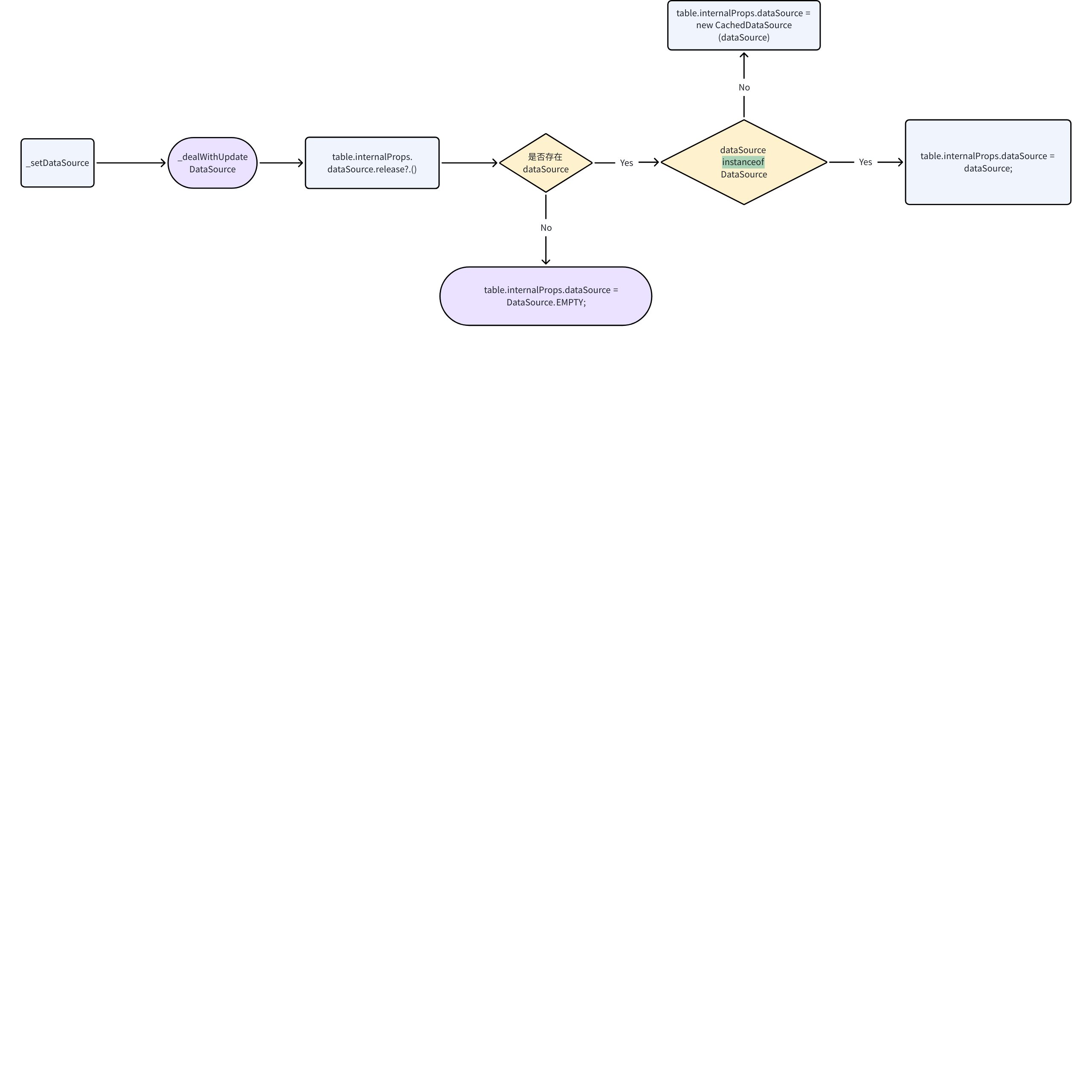
Compared to the _setRecords method that only receives records, when dataSource is passed in, VTable internally calls _setDataSource. The following diagram shows the process of _setDataSource. \r

After completing the initialization of dataSource, just like the latter part of the process of passing in records, set dataSource calls this.render() to trigger table rendering. This completes the data parsing of ListTable, where dataSource is mainly used for the parsing of the body in the basic table.

CachedDataSource Preprocessing

Summarizing the general data processing flow, we can get the following flowchart: \r

In summary, whether passing in dataSource or records, it inevitably involves CachedDataSource. Below is a detailed explanation of CachedDataSource. \r

CachedDataSource Core Processing

The previously mentioned situation of passing in records refers to the CachedDataSource.ofArray method. By observing the ofArray method, it is found that it essentially still uses new CachedDataSource, but adapts the records. The first parameter of the ofArray method is options.records. \r

Note that one of the parameters of CachedDataSource is passed with records. The reason for passing records will be explained later.

// packages\vtable\src\data\CachedDataSource.ts
  static ofArray(
    array: any[],
    dataConfig?: IListTableDataConfig,
    pagination?: IPagination,
    columns?: ColumnsDefine,
    rowHierarchyType?: 'grid' | 'tree',
    hierarchyExpandLevel?: number
  ): CachedDataSource {
    return new CachedDataSource(
      {
        get: (index: number): any => {
          *// if (Array.isArray(index)) {*
          *//   return getValueFromDeepArray(array, index);*
          *// }*
          return array[index];
        },
        length: array.length,
        records: array
      },
      dataConfig,
      pagination,
      columns,
      rowHierarchyType,
      hierarchyExpandLevel
    );
  }    

Observing the constructor of CacheDataSource, it can be found that CachedDataSource inherits from DataSource. When initializing CachedDataSource, the _isGrouped field is updated based on groupByRules, which will affect the call to getCellValue. After completing some basic operations, DataSource is directly initialized. \r

// packages\vtable\src\data\CachedDataSource.ts
export class CachedDataSource extends DataSource {
 /// ....
  constructor(
    opt?: DataSourceParam,
    dataConfig?: IListTableDataConfig,
    pagination?: IPagination,
    columns?: ColumnsDefine,
    rowHierarchyType?: 'grid' | 'tree',
    hierarchyExpandLevel?: number
  ) {
    let _isGrouped;
    if (isArray(dataConfig?.groupByRules)) {
      rowHierarchyType = 'tree';
      _isGrouped = true;
    }
    super(opt, dataConfig, pagination, columns, rowHierarchyType, hierarchyExpandLevel);
    this._isGrouped = _isGrouped;
    this._recordCache = [];
    this._fieldCache = {};
  }
  // ... 
}    

DataSource Initialization

For basic table data processing, DataSource is the most important part, including the addition, deletion, modification, and query of records, as well as the value retrieval of the table body, all rely on this module. \r

DataSource supports six parameters during initialization

  • dataSourceObj: Data source object, which can internally pass in records. As mentioned earlier in the ofArray method, records will be carried within this parameter. \r

  • dataConfig: Data parsing configuration

  • pagination: current pagination configuration

  • columns: Current column configuration

  • rowHierachyType: The display form of the hierarchical dimension structure, either flat or tree structure. This configuration is only used in pivot tables. \r

  • hierarchyExpandLevel: The level of expansion for the tree structure, which will affect the initialization of the tree structure in initTreeHierarchyState \r

// packages\vtable\src\data\DataSource.ts
export class DataSource extends EventTarget implements DataSourceAPI {
// ...
 constructor(
    dataSourceObj?: DataSourceParam,
    dataConfig?: IListTableDataConfig,
    pagination?: IPagination,
    columns?: ColumnsDefine,
    rowHierarchyType?: 'grid' | 'tree',
    hierarchyExpandLevel?: number
  ) 
 //...
 }    

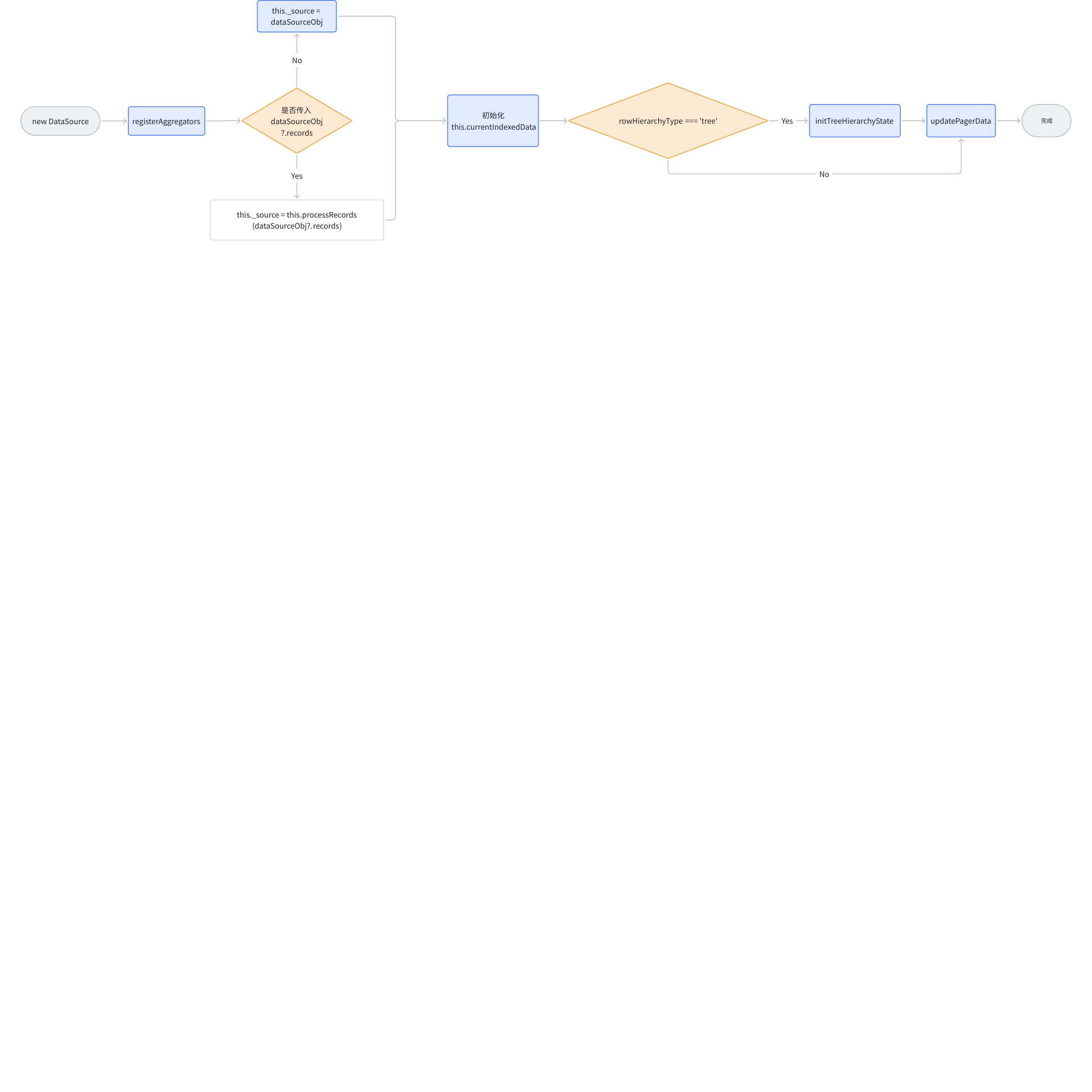
Below is the parsing process of DataSource

Core Features of DataSource

  • _source: ListTable stores the original records into DataSource._source, and implements a proxy for DataSource.records, accessing dataSource.records is actually accessing dataSource._source.

  • currentIndexedData: Each row corresponds to the index of the source data, which is a two-dimensional array structure used to store the indices of the displayed data, involving the basic layout of the table and data display. The following example shows currentIndexedData in a tree structure. The main data processing of ListTable, including the generation of the tree structure, retrieval of cell content, sorting, and the generation of _currentPagerIndexedData, all rely on this field. \r

[
  0, // 数据源对应第1条数据 紧邻其下的是第1条数据的子节点 说明第1条数据被展开了
  [0, 0], // 数据源对应第1条下的 第1个子节点
  [0, 1], // 数据源对应第1条下的 第2个子节点
  1, // 数据源对应第2条数据
  [1, 0], // 以此类推 。。。
  [1, 1], 
  [1, 2], 
  [1, 3], 
  2, 
  [2, 0], 
  [2, 1], 
  3
];    

For example, the DataSource.sort method actually sorts it, but does not update the passed-in records, only updates currentIndexedData;

For the use of currentIndexedData, you can refer to the DataSource.getValueFromDeepArray method. For example, to get the data of the second row, the reading method is records[0].children[0], which exactly corresponds to [0,0]
1. updatePagerData: By using the structure of the passed records and currentIndexedData, it updates _currentPagerIndexedData (*the index of the source data corresponding to each row of the current page*). This field is relied upon when performing CRUD operations on the data. After updating _currentPagerIndexedData, the initialization of the DataSource is complete. \r

Analysis of Core Functional Functions Involved

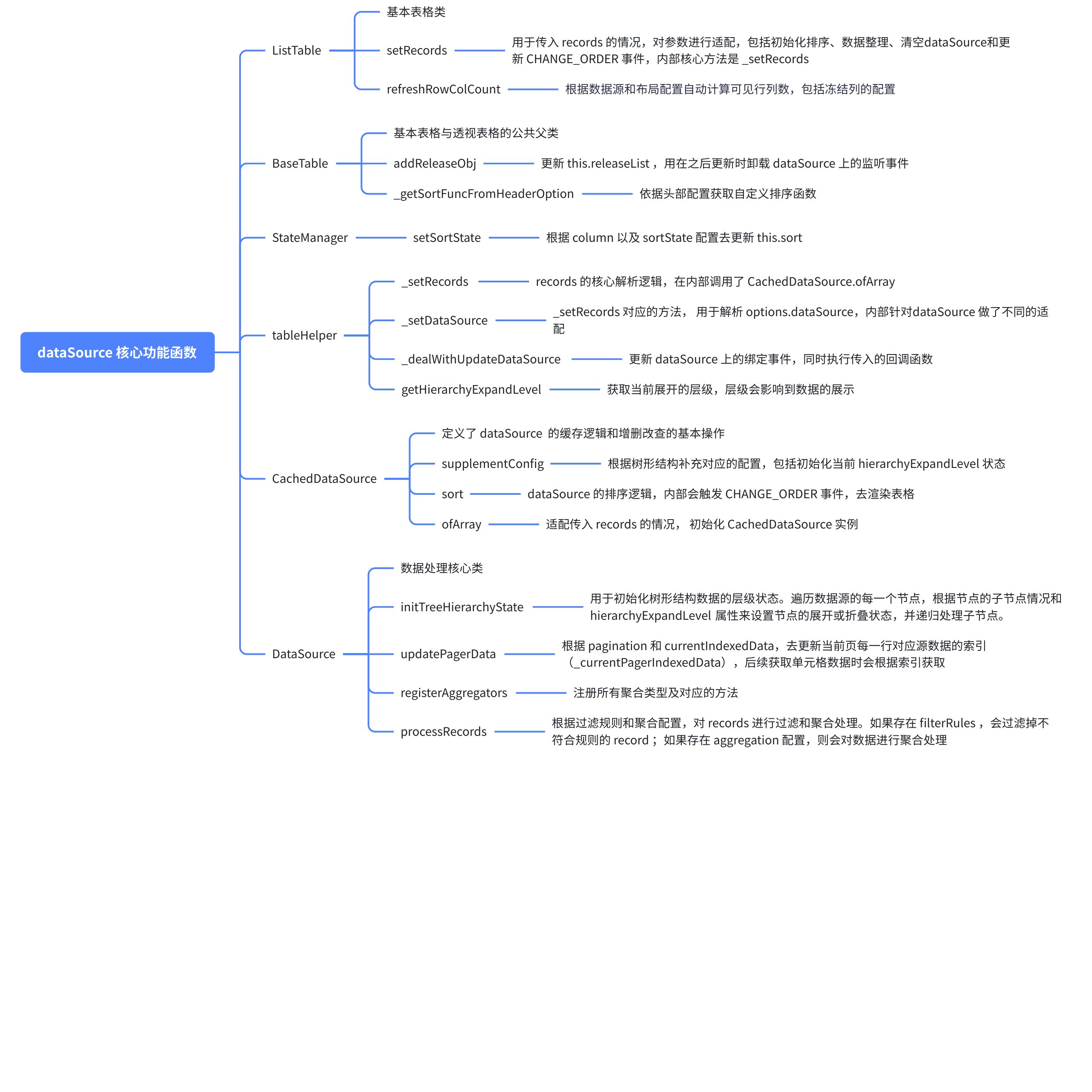
The following diagram shows all the key functions and their roles mentioned earlier regarding the data parsing process. \r

Efficient Data CRUD Operations

Global Update and Local Update

Imagine how to efficiently update a table with a large number of columns without lagging. Common table component libraries based on Vue or React mostly rely on native DOM, which can utilize the built-in diff and update algorithms of VDom to achieve DOM reuse, enabling high-performance full data source updates. However, @Visactor/VTable is drawn based on canvas and does not have the concept of a virtual DOM, so achieving similar operations without affecting performance becomes a challenge. ListTable exposes many APIs for updating data sources, including full updates and partial updates. Let's look at how optimization is done internally in ListTable through some commonly used APIs.

addRecords

Reviewing the ListTable source code, we can easily see the definition of addRecords: \r

// packages\vtable\src\ListTable.ts
  */***
*   * 添加数据 支持多条数据*
*   * @param records 多条数据*
*   * @param recordIndex 向数据源中要插入的位置,从0开始。不设置recordIndex的话 默认追加到最后。*
*   * 如果设置了排序规则recordIndex无效,会自动适应排序逻辑确定插入顺序。*
*   * recordIndex 可以通过接口getRecordShowIndexByCell获取*
*   */*
  addRecords(records: any[], recordIndex?: number | number[]) {
    listTableAddRecords(records, recordIndex, this);
    this.internalProps.emptyTip?.resetVisible();
  }    

listTableAddRecords

The listTableAddRecords method is directly called in addRecords, and ListTable is optimized for data updates in this function. \r

// packages\vtable\src\core\record-helper.ts
*/***
* * 添加数据 支持多条数据*
* * @param records 多条数据*
* * @param recordIndex 向数据源中要插入的位置,从0开始。不设置recordIndex的话 默认追加到最后。*
* * 如果设置了排序规则recordIndex无效,会自动适应排序逻辑确定插入顺序。*
* * recordIndex 可以通过接口getRecordShowIndexByCell获取*
* */*
export function listTableAddRecords(records: any[], recordIndex: number | number[], table: ListTable) {
  if (table.options.groupBy) {
    (table.dataSource as CachedDataSource).addRecordsForGroup?.(records, recordIndex);
    // 刷新行列数
    table.refreshRowColCount();
    // 如果有排序直接触发排序数据
    table.sortState && sortRecords(table);

    *// 更新整个场景树*
    table.scenegraph.clearCells();
    table.scenegraph.createSceneGraph();
  } else if ((table.dataSource as CachedDataSource).rowHierarchyType === 'tree') {
    (table.dataSource as CachedDataSource).addRecordsForTree?.(records, recordIndex);
    // 省略,与上一个分支相同
  } else if (table.sortState) {
    table.dataSource.addRecordsForSorted(records);
    // 由于排序必定会打乱顺序,所有必须得重新更新场景树
    sortRecords(table);
    *// 更新整个场景树 省略*
  } else {
    // 省略
    table.dataSource.addRecords(records, recordIndex);
    const oldRowCount = table.transpose ? table.colCount : table.rowCount;
     // 省略
    if (table.scenegraph.proxy.totalActualBodyRowCount === 0) {
    *// body 单元格为 0 的情况,直接更新整个场景树*
    // 省略
      return;
    }
    const newRowCount = table.transpose ? table.colCount : table.rowCount;
    if (table.pagination) {
      // 省略
      if (recordIndex < endIndex) {
        *// 插入当前页或者前面的数据才需要更新 如果是插入的是当前页后面的数据不需要更新场景树*
        if (recordIndex < endIndex - perPageCount) {
          *// 如果是当页之前的数据 则整个场景树都更新*
        } else {
          *// 如果是插入当前页数据*
          const rowNum = recordIndex - (endIndex - perPageCount) + headerCount;
          if (oldRowCount - headerCount === table.pagination.perPageCount) {
            *// 如果当页数据是满的 则更新插入的部分行,只计算当前页的数据*
            // updateRows 是 [{ row: xxx, col: xxx}] 的格式
            // 省略
            table.transpose ? table.scenegraph.updateCol([], [], updateRows) : table.scenegraph.updateRow([], [], updateRows);
          } else {
            *// 如果当页数据不是满的 则插入新数据*
            // 省略
            table.transpose ? table.scenegraph.updateCol([], addRows, []) : table.scenegraph.updateRow([], addRows, []);
          }
        }
      }
    } else {
      // 省略,如果没有分页的话,则需要计算出哪些需要添加,哪些需要更新,只有聚合的情况会有 updateRows
      table.transpose ? table.scenegraph.updateCol([], addRows, updateRows) : table.scenegraph.updateRow([], addRows, updateRows);
    }
  }
}    

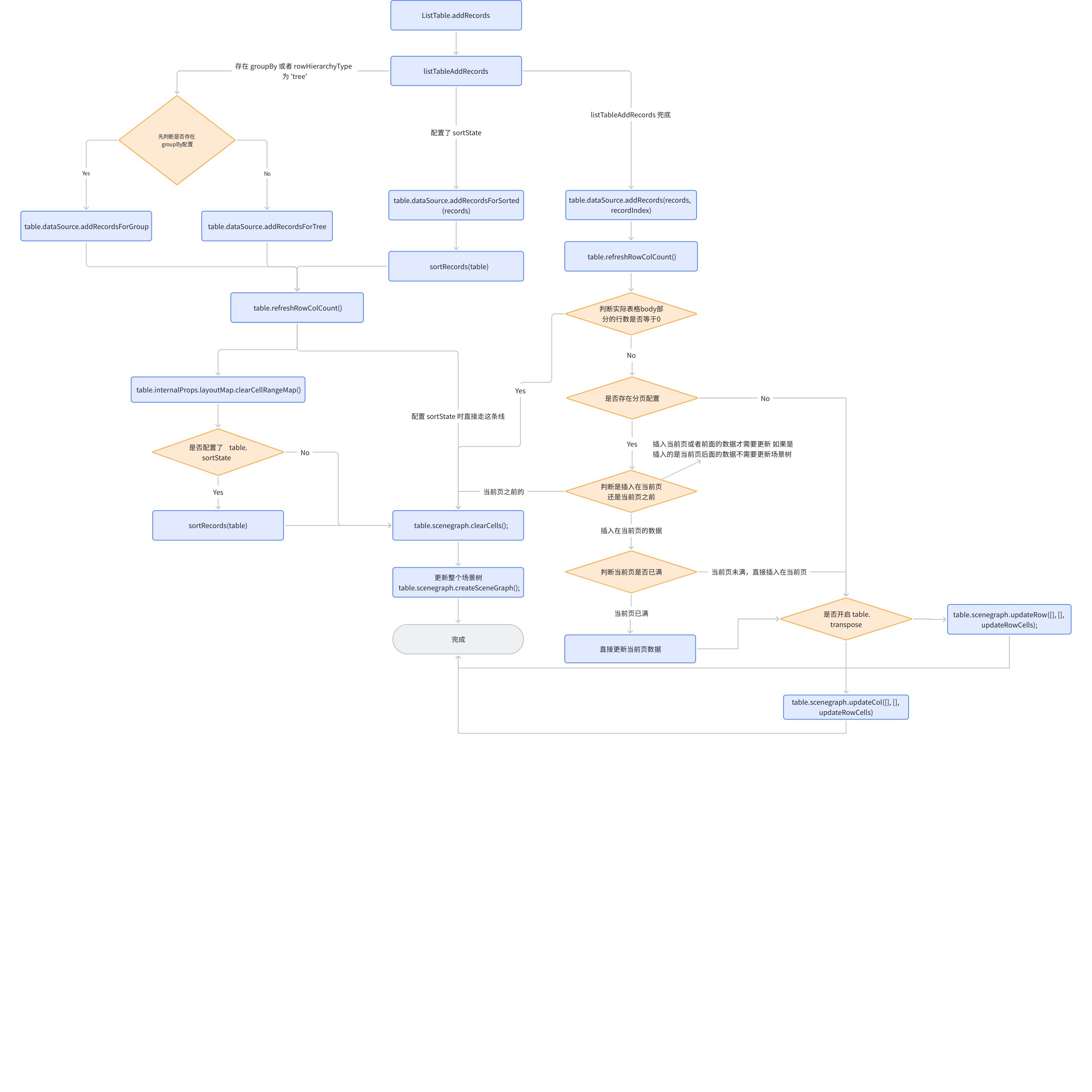
It contains four branches internally, the first two branches have the same logic, the only difference is whether to call dataSource.addRecordsForGroup or dataSource.addRecordsForTree. After the call is completed, the entire scene tree is updated directly.

The third branch checks the sortState, adds data and sorts it through dataSource.addRecordsForSorted, directly updating the entire scene tree.

The most important part is the last branch, which first calls dataSource.addRecords to add data, then calculates to determine which rows and columns actually need updating, and performs partial updates through updateCol or updateRow to reduce performance waste.

Features involved in DataSource

  • DataSource.addRecords: Add multiple data records in recordArr sequentially at the index position, while updating currentIndexedData and pagination data; \r

  • CachedDataSource.addRecordsForGroup: Append table data in the group; \r

  • DataSource.addRecordsForSorted: Clear the sortedIndexMap while updating records; \r

  • DataSource.addRecordsForTree: Adjust the tree structure expansion state while updating records; \r

addRecords Full Process

updateRecords

Think carefully, for data updates, is it similar to adding data? In some cases, there is no need to update the scene tree, just like addRecords, you can update specific rows directly. \r

Similar to addRecords, updateRecords is also defined in the ListTable class, and it can be seen that only listTableUpdateRecords is called inside updateRecords.

// packages\vtable\src\ListTable.ts
  */***
*   * 修改数据 支持多条数据*
*   * @param records 修改数据条目*
*   * @param recordIndexs 对应修改数据的索引(显示在body中的索引,即要修改的是body部分的第几行数据)*
*   */*
  updateRecords(records: any[], recordIndexs: (number | number[])[]) {
    listTableUpdateRecords(records, recordIndexs, this);
  }    

listTableUpdateRecords

// packages\vtable\src\core\record-helper.ts
/**
 * 修改数据 支持多条数据
 * @param records 修改数据条目
 * @param recordIndexs 对应修改数据的索引(显示在body中的索引,即要修改的是body部分的第几行数据)
 */
export function listTableUpdateRecords(records: any[], recordIndexs: (number | number[])[], table: ListTable) {
  if (!recordIndexs?.length) return;

  if (table.options.groupBy) {
    // 优先判断是否配置分组
    (table.dataSource as CachedDataSource).updateRecordsForGroup?.(records, recordIndexs as number[]);
      // 通用更新流程,更新场景树
      table.scenegraph.clearCells();
      table.scenegraph.createSceneGraph();
  } else if ((table.dataSource as CachedDataSource).rowHierarchyType === 'tree') {
    // 树形结构
    (table.dataSource as CachedDataSource).updateRecordsForTree?.(records, recordIndexs as number[]);
    // 省略:通用更新流程,更新场景树
  } else if (table.sortState) {
    // 配置了排序
    table.dataSource.updateRecordsForSorted(records, recordIndexs as number[]);
    sortRecords(table);
    // 省略:通用更新流程,更新场景树
  } else {
    // 默认分支
    const updateRecordIndexs = table.dataSource.updateRecords(records, recordIndexs);
    if (!updateRecordIndexs.length) return;
    if (table.pagination) {
        // 省略  
        // recordIndexsMinToMax 为需要更新的行号
        const updateRows = [];
        for (let index = 0; index < recordIndexsMinToMax.length; index++) {
          const recordIndex = recordIndexsMinToMax[index];
          // 这里只会去计算在当前页的需要更新的行
          if (recordIndex < endIndex && recordIndex >= endIndex - perPageCount) {
           // 计算实际渲染行号(考虑表头、聚合行等因素),只计算在当前页的数据
            const rowNum =
              recordIndex -
              (endIndex - perPageCount) +
              (table.transpose ? table.rowHeaderLevelCount : table.columnHeaderLevelCount) +
              topAggregationCount;
            updateRows.push(rowNum);
          }
        }
        if (updateRows.length >= 1) {
          // updateRowCells 为 上面计算出的 updateRows 跟聚合行的和
          table.transpose
            ? table.scenegraph.updateCol([], [], updateRowCells)
            : table.scenegraph.updateRow([], [], updateRowCells);
        }
      } else {
        const updateRows = [];
        // 省略:获取 updateRowCells
        // 计算方式为 需要更新的行加顶部和底部的聚合行
        table.transpose
            ? table.scenegraph.updateCol([], [], updateRowCells)
            : table.scenegraph.updateRow([], [], updateRowCells);
      }
  }
}    

listTableUpdateRecords is generally similar to listTableAddRecords, both have four situations. In the first three situations, the scene tree will be directly updated. The difference lies in the default branch; listTableUpdateRecords will not calculate addRows, it will only calculate updateRowCells. \r

Features Involved in DataSource

  • DataSource.updateRecords: Modify records according to the index, and update currentIndexedData and pagination data; \r

  • CachedDataSource.updateRecordsForGroup: Update records and refresh Group status; \r

  • DataSource.updateRecordsForSorted: Clear the sortedIndexMap while updating records; \r

  • DataSource.updateRecordsForTree: Update records while adjusting the tree structure expansion state; \r

deleteRecords

deleteRecords is used to delete data from a specified index. Consider whether deleting data from a specified index can be similar to previous methods, where in some scenarios, the entire scene tree does not need to be updated. \r

// packages\vtable\src\ListTable.ts
  */***
*   * 删除数据 支持多条数据*
*   * @param recordIndexs 要删除数据的索引(显示在body中的索引,即要修改的是body部分的第几行数据)*
*   */*
  deleteRecords(recordIndexs: number[] | number[][]) {
    listTableDeleteRecords(recordIndexs, this);
    this.internalProps.emptyTip?.resetVisible();
  }    

listTableDeleteRecords

// packages\vtable\src\core\record-helper.ts
/**
 * 删除数据 支持多条数据
 * @param recordIndexs 要删除数据的索引(显示在body中的索引,即要修改的是body部分的第几行数据)
 */
export function listTableDeleteRecords(recordIndexs: number[] | number[][], table: ListTable) {
  if (recordIndexs?.length > 0) {
    if (table.options.groupBy) {
      (table.dataSource as CachedDataSource).deleteRecordsForGroup?.(recordIndexs);
      // 省略
      // 更新整个场景树
    } else if ((table.dataSource as CachedDataSource).rowHierarchyType === 'tree') {
      (table.dataSource as CachedDataSource).deleteRecordsForTree?.(recordIndexs);
      // 省略
      // 更新整个场景树
    } else if (table.sortState) {
      table.dataSource.deleteRecordsForSorted(recordIndexs as number[]);
      // 省略
      // 更新整个场景树
    } else {
      const deletedRecordIndexs = table.dataSource.deleteRecords(recordIndexs as number[]);
      // 省略
      const oldRowCount = table.transpose ? table.colCount : table.rowCount;
      table.refreshRowColCount(); // 这里会去根据数据源重新调整行列数
      const newRowCount = table.transpose ? table.colCount : table.rowCount;
      if (table.pagination) {
        const { perPageCount, currentPage } = table.pagination;
        const startIndex = perPageCount * (currentPage || 0);
        const endIndex = startIndex + perPageCount;
        if (minRecordIndex < endIndex) {
          // 删除当前页或者前面的数据才需要更新 如果是删除的是当前页后面的数据不需要更新场景树
          if (minRecordIndex < endIndex - perPageCount) {
            // 如果删除包含当页之前的数据 则整个场景树都更新
          } else {
            const headerCount = table.transpose ? table.rowHeaderLevelCount : table.columnHeaderLevelCount;
            const topAggregationCount = table.internalProps.layoutMap.hasAggregationOnTopCount;
            // 如果是仅删除当前页数据
            const minRowNum =
              minRecordIndex -
              (endIndex - perPageCount) +
              (table.transpose ? table.rowHeaderLevelCount : table.columnHeaderLevelCount) +
              topAggregationCount;
            // 如果当页数据是满的 则更新影响的部分行
            const updateRows = [];
            const delRows = [];
            // 省略
            // 如果删除的是当前页的数据,则 minRowNum 到当前页最后一条都需要进行更新
            if (newRowCount < oldRowCount) {
              // 如果删除数据后出现当前页不满的情况,需要进行比较,删掉多的行,更新 delRows
            }
            table.transpose ? table.scenegraph.updateCol(delRows, [], updateRows) : table.scenegraph.updateRow(delRows, [], updateRows);
          }
        }
      } else {
        // 如果没有配置分页,跟上面的判断相同,通过计算得出实际需要更新和删除的行
        table.transpose ? table.scenegraph.updateCol(delRows, [], updateRows) : table.scenegraph.updateRow(delRows, [], updateRows);
      }
    }
  }
}    

Features Involved in DataSource

  • DataSource.deleteRecords: Delete data from the specified index on records, while updating currentIndexedData and pagination data; \r

  • CachedDataSource.deleteRecordsForGroup: Delete records while refreshing the Group status; \r

  • DataSource.deleteRecordsForTree: Clear the sortedIndexMap while deleting records; \r

  • DataSource.deleteRecordsForTree: Adjust the tree structure expansion state while deleting records; \r

Data Update Principle

From the above commonly used APIs, the logic for data updates in ListTable is generally the same, consisting of four branches. In most scenarios, the default branch is entered, where methods in DataSource are first called to update records and currentIndexedData. Then, the actual rows that need to be updated are calculated. During the update, only scenegraph.updateCol is called to redraw the corresponding rows, thus achieving a DOM-like reuse operation. \r

getCellValue

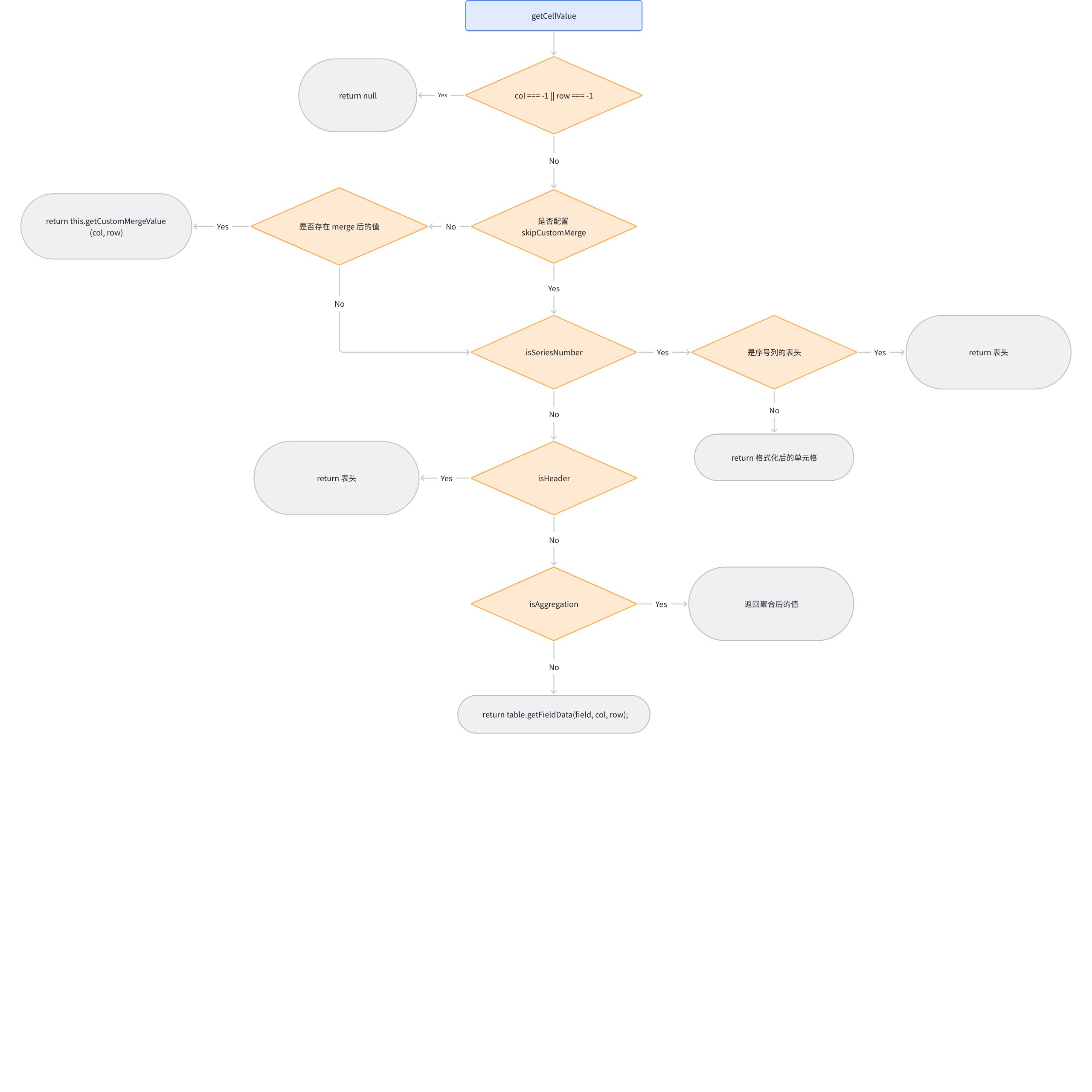
ListTable also provides us with the ability to obtain the display value of a cell. Now let's look at how to get the displayed data through pseudocode: \r

// packages\vtable\src\ListTable.ts
*/** 获取单元格展示值 */*
getCellValue(col: number, row: number, skipCustomMerge?: boolean): FieldData {
  // 1. 无效坐标检查
  if (col === -1 || row === -1) return null
  
  // 2. 合并单元格处理(优先处理)
  if (!skipCustomMerge) {
    const merged = this.getCustomMergeValue(col, row)
    if (merged) return merged
  }

  // 3. 序号列处理
  if (isSeriesNumber) {
    if (表头中的序号列) return 标题
    else {
      // 分组表格的特殊序号计算
      value = 分组模式 ? 获取分组序号 : 普通行号 
      return 应用格式化函数后的值
    }
  }
  
  // 4. 表头单元格处理
  else if (isHeader) {
    return 表头标题(支持函数形式)
  }
  
  // 5. 聚合单元格处理
  else if (isAggregation) {
    if (顶部聚合) return 聚合值格式化
    else if (底部聚合) return 聚合值格式化
  }

  // 6. 普通数据单元格
  const { field } = table.internalProps.layoutMap.getBody(col, row);
  return table.getFieldData(field, col, row);
}    

getCellValue Flowchart

getFieldData

getFieldData internally calls the DataSource.getField method, which uses currentIndexedData to obtain the actual data index, thereby retrieving the actual data from the records. \r

Summary

  • Modular data processing: @Visactor/VTable separates the data processing of pivot tables and basic tables into two parts. Basic tables use DataSource and CachedDataSource, while pivot tables use a more complex DataSet class. This approach makes subsequent adjustments more convenient;

  • Data source abstraction: ListTable internally abstracts data through DataSource and CachedDataSource, placing all logic within the module to reduce cognitive load during data processing and achieve low coupling; \r

  • Efficient data processing: Since @Visactor/VTable is rendered based on Canvas, it cannot be manipulated like native DOM when updating data. ListTable cleverly avoids unnecessary rendering by calculating the rows that actually need to be updated and added, achieving efficient data processing.

This document is provided by the following personnel

taiiiyang(https://github.com/taiiiyang)

This document was revised and organized by the following personnel
玄魂