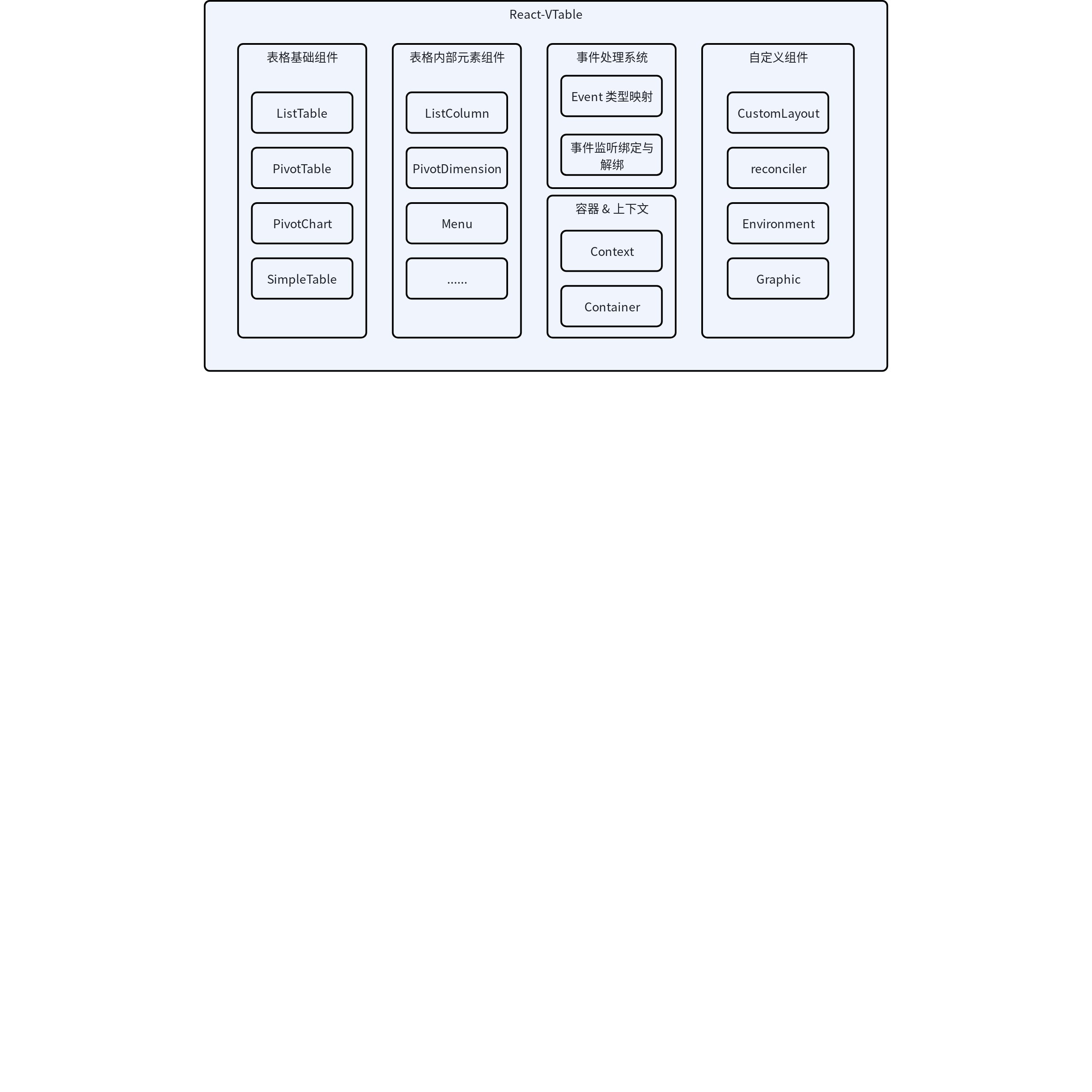
Table Components: Including main table types such as ListTable, PivotTable, PivotChart \r
Table Internal Element Components: such as ListColumn, PivotDimension, and other table internal configuration components \r
Event Handling System: Unified management of table interaction events
Container and Context Management Module: Handles the rendering container and lifecycle of tables, providing a table state sharing mechanism \r
Custom Components: Use encapsulated React components or external React components to implement custom rendering functionality
2. Core Components
2.1 Base Table (BaseTable)
BaseTable is the foundational component for all table types, defined in src/tables/base-table.tsx. It is responsible for:
Create and manage table instances
Handle table option and related configuration
Manage the lifecycle of the table
Bind event handler
The BaseTable component uses React's forwardRef to expose the table instance to the parent component and provides table context through React's Context API.
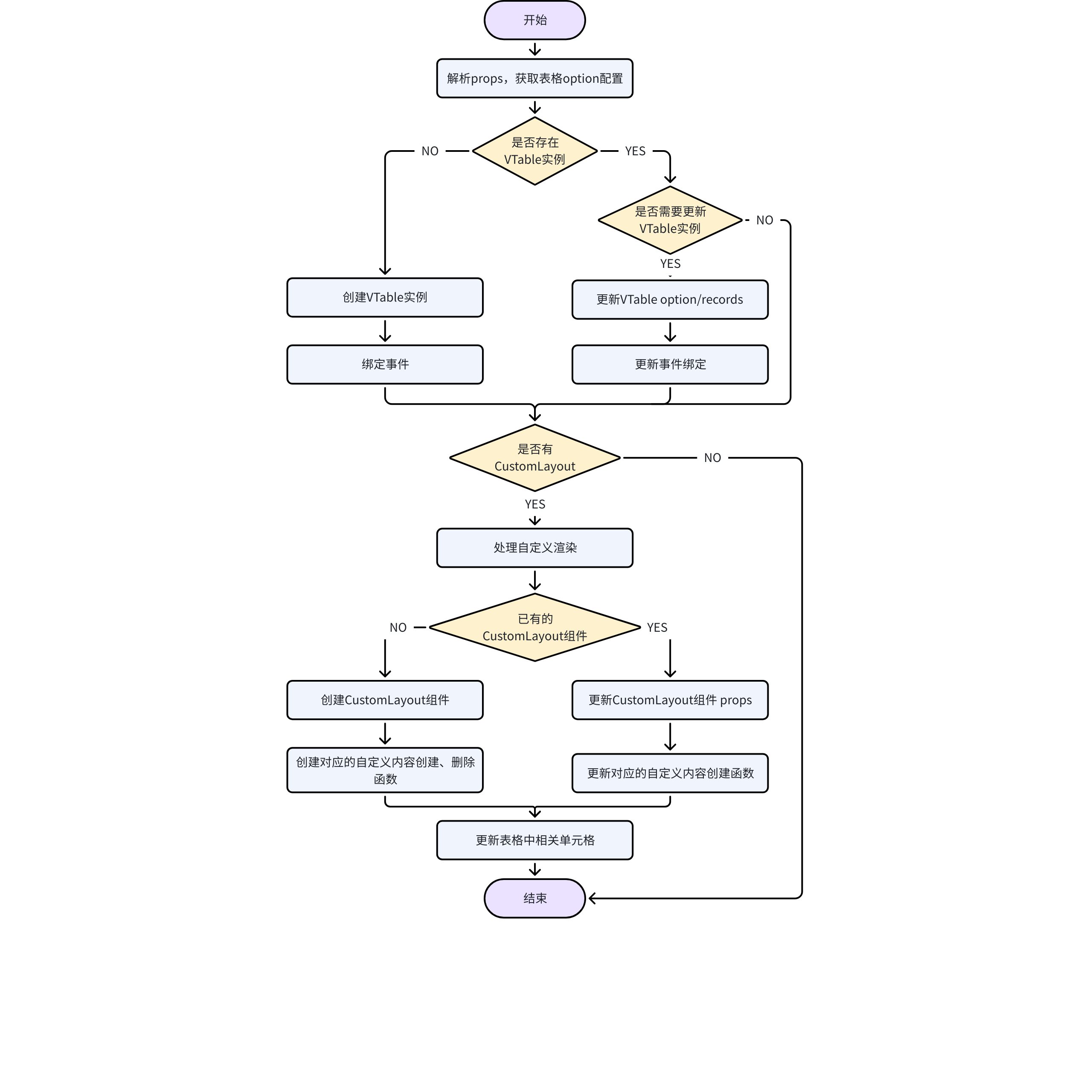
Each time the props change, obtain the updated table option, compare and determine whether the table needs to be updated. If necessary, create or update the table instance.
Similar to VTable, React-VTable provides several main table types:
ListTable: List table
PivotTable: Pivot table
PivotChart: Pivot Table
Simplified Table: ListTableSimple and PivotTableSimple, simplified versions split for package size optimization, only containing basic text rendering. You can register the components you need to use as needed. \r
These components are created using the createTable factory function, for example:
export const ListTable = createTable<React.PropsWithChildren<ListTableProps>>('ListTable', {
  type: 'list-table',
  vtableConstrouctor: ListTableConstrouctor as any
});
3. Component System
3.1 Basic Component Creation
React-VTable uses the createComponent factory function (defined in src/table-components/base-component.tsx) to create various internal table element components:
Manage the state of components in the context of a table
3.2 Component Types
The main component types include:
List Component: such as ListColumn
Pivot Table Components: Such as PivotColumnDimension, PivotRowDimension, PivotIndicator, PivotColumnHeaderTitle
UI Components: such as Menu, Tooltip, EmptyTip
Custom Component: such as CustomComponent
These components mainly configure various parts of the table options, such as column attributes, dimensions of the pivot table, etc.; they do not render content and will eventually be converted into attribute values in the table instance options.
4. Event Handling System
The event handling system is defined in src/eventsUtils.ts, providing:
The table events in the event system are the same as VTable. The names of event callbacks have been modified according to the specifications for installing React components. The corresponding relationships are as follows: \r
React-VTable Event Callback
VTable Event Name \r
onClickCell
click_cell
onSelectedCell
selected_cell
onMouseMoveCell
mousemove_cell
onResizeColumn
resize_column
onSortClick
sort_click
onScroll
scroll
...
...
5. Context and Containers
5.1 Table Context
The table context is defined in src/context/table.tsx, providing a shared mechanism for table instances and configurations.
5.2 Container Components
withContainer is a higher-order component, defined in src/containers/withContainer.tsx, responsible for:
Create and manage the DOM container for tables
Handling table size settings and updates
Manage the lifecycle of containers
6. Custom Rendering
6.1 Core File Structure
custom directory contains the following key files:
The CustomLayout component enhances the custom rendering capabilities for VTable, allowing users to encapsulate their own React components using the CustomLayout component functionality, and use native DOM React components within the component.
The CustomLayout component is usually used as a subcomponent of columns, dimensions, or metrics. A CustomLayout component corresponds to multiple cells, which means it corresponds to multiple actual rendered component instances. Therefore, the main task within the CustomLayout component is to handle such correspondences. \r
custom-layout.tsx implements the core component of CustomLayout:
reconciler.ts implements the React rendering reconciler based on react-reconciler, responsible for coordinating React components with the VTable rendering system. Using Reconciler, the primitives in VTable custom rendering can be encapsulated as components in a React way. For detailed react-reconciler configuration, refer to https://github.com/facebook/react/tree/main/packages/react-reconciler
6.4 React Property Handling Plugin
VRender supports users in configuring React DOM components in the react attribute of primitives. VTable's custom rendering uses this feature, allowing users to use React DOM components in encapsulated custom components.
vtable-react-attribute-plugin.ts implements the VRender rendering React component plugin, which is an extension of the ReactAttributePlugin provided by VRender, with some customization for table scenarios:
vtable-browser-env-contribution.ts provides an adaptation layer for the browser environment, and is also an extension of the BrowserEnvContribution plugin provided by VRender, with some customization for table scenarios:
class VTableBrowserEnvContribution extends BrowserEnvContribution {
  // 更新HTMLElement
  updateDom(dom: HTMLElement, params: CreateDOMParamsTypeForVTable): boolean {
    const tableDiv = dom.parentElement;
    if (tableDiv && params.graphic) {
      // 获取该HTMLElement在表格中的位置和范围
      const top = parseInt(params.style.top, 10);
      const left = parseInt(params.style.left, 10);

      let domWidth;
      let domHeight;
      if ((dom.style.display = 'none')) {
        const cellGroup = getTargetCell(params.graphic);
        domWidth = cellGroup.attribute.width ?? 1;
        domHeight = cellGroup.attribute.height ?? 1;
      } else {
        domWidth = dom.offsetWidth;
        domHeight = dom.offsetHeight;
      }
      if (top + domHeight < 0 || left + domWidth < 0 || top > tableDiv.offsetHeight || left > tableDiv.offsetWidth) {
        // 如果超过表格显示范围,将style.display置为'none',提升交互性能
        dom.style.display = 'none';
        return false;
      }
    }

    // ... 更新style

    return true;
  }
}
6.6 Primitive Components
graphic.ts provides a componentized encapsulation of custom rendering primitives in VTable, allowing users to directly reference these primitive components from the @visactor/react-vtable repository.
7. Workflow
User creates a table component and configures properties
Internal components (such as ListColumn) parse configuration through the parseOption method
BaseTable creates a VTable instance and applies the configuration
Event system binds user-provided event handler functions
Handling Custom Components
This document was revised and organized by the following personnel