It is not only a fully functional graph visualization library, but also an explorer of data relationships.
!!!###!!!title=11. Data Editing——VisActor/VTable Contributing Documents!!!###!!!!!!###!!!description=---title: 11 Data Editing
key words: VisActor,VChart,VTable,VStrory,VMind,VGrammar,VRender,Visualization,Chart,Data,Table,Graph,Gis,LLM---
!!!###!!!
Introduction
1.1
In modern data visualization and table applications, the demand for editing table data is increasing. VTable, as a powerful table component library, provides comprehensive data editing features to meet this demand. vtable is an open-source table project aimed at providing users with flexible and efficient data management and editing capabilities. Data editing is one of the core functions of table applications, allowing users to modify, validate, and save data in tables. To achieve this functionality, vtable adopts an object-oriented design approach, defining a base editor class and various specific editors to meet the editing needs of different types of data.
1.2
This source code interpretation document aims to deeply analyze the implementation principles of the VTable data editing function, helping developers better understand its design concepts, module division, and core processes, so as to use and extend this function more efficiently in actual projects. We will start from three aspects: concept introduction, code design, and core processes, to help readers understand the design philosophy and implementation method of the editor.
Introduction to Concepts
2.1 The Role of the Editor Base Class
The editor base class is the core framework of the entire editing functionality. It defines the interfaces that all specific editors must implement, including general functions such as initialization, validation, and saving. In this way, the base class provides a unified interface for specific editors, ensuring code reusability and extensibility. At the same time, the base class is also responsible for handling some common logic, such as error handling and state management.
2.2 Specific Editor Design Concepts
Specific editors are customized implementations for specific data types (such as text, numbers, dates, etc.). Each specific editor inherits from a base class and implements specific logic based on the data type it handles. For example, a text editor may not require complex validation logic, while number and date editors need to strictly format check the input data. Through this design, vtable can flexibly support the editing needs of various data types.
Code Design
3.1 Overall Approach
The overall design of the data editing functionality of VTable follows the principles of modularity and extensibility. By breaking down the editing functionality into multiple independent modules, each responsible for specific functions such as edit management, editor implementation, type definition, etc., the code structure is clear and easy to maintain and extend. At the same time, interfaces and base classes are used to standardize the behavior of editors, ensuring that different types of editors can seamlessly collaborate with the edit management module. \r
3.2 Code Structure
3.2.1 Editor Manager
packages/vtable/src/edit/edit-manager.ts
* **Function**: Responsible for managing the editing process of table cells, including event binding, starting editing, completing editing, and canceling editing.
* **Dependencies**: The `IEditor` interface defines the behavior specifications of the editor, `TABLE_EVENT_TYPE` defines the table event types, `getCellEventArgsSet` retrieves the event argument set, `isPromise` determines whether it is a Promise, and `isValid` verifies the validity of the value.
packages/vtable/src/edit/editors.ts
* **Function**: Defines an editor management module. It exports an editor registry `editors` and a function `get` to retrieve editors. The `get` function looks up an editor by name from the registry, and if not found, it issues a warning and returns `undefined`.
editors.ts defines an editor management module for managing and retrieving editor instances with different names.
import type { IEditor } from '@visactor/vtable-editors';
export const editors: { [key: string]: IEditor } = {};
export function get(editorName: string): IEditor {
  const editor = editors[editorName];
  if (!editor) {
    console.warn('editor should register before init table!');
    return undefined;
  }
  return editors[editorName];
}
editors is an exported constant object used to store all registered editor instances. Its type is a map type with keys as strings (key: string) and values as instances of type IEditor. Initially, this object is empty.
get is an exported function used to obtain the corresponding editor instance from the editors object based on the editor name editorName.
First, try to get the editor instance with the specified name through editors[editorName] and assign it to the variable editor.
Then, check if editor exists. If it does not exist, it means the editor has not been registered, a warning message 'editor should register before init table!' will be output to the console, and undefined will be returned.
If editor exists, directly return editors[editorName], which is the editor instance with the specified name.
Therefore, the editor needs to be instantiated with new before use and registered in register.ts:
name: Represents the name of the editor to register
editor: Optional parameter, represents the editor instance
The return type of the function is IEditor
Function logic:
When the editor parameter passed in is not null and not undefined, the register function is called to register this editor instance with name as the key into the editors object, and returns the old editor instance originally under that key.
If the editor parameter is not passed, the function will attempt to retrieve the editor instance with the name key from the editors object and return it. If the key does not exist, it returns undefined.
EditManager is a class used for managing table cell editing. It is responsible for handling user-triggered editing events (such as double-click or click), initiating the editor, validating the edited values, and updating the table data after editing is completed.
Main Attributes
table: Table instance, type is ListTableAPI.
editingEditor: The editor instance currently in use, type is IEditor.
isValidatingValue: Indicates whether value validation is in progress, type is boolean.
editCell: The position of the cell being edited, containing the col and row attributes.
Method Analysis
bindEvent
Bind event listeners on the table to handle double-click and click events to start editing.
Process the validation results and decide whether to exit editing based on the validation results.
function dealWithValidateValue(
// ...
switch (validateValue) {
case 'validate-exit':
case true:
editManager.doExit();
resolve?.(true);
return true;
case 'invalidate-exit':
(editManager.editingEditor as any).setValue(oldValue);
editManager.doExit();
resolve?.(true);
return true;
case 'validate-not-exit':
case 'invalidate-not-exit':
resolve?.(false);
return false;
default:
resolve?.(false);
return false;
}
}
Summary
EditManager class initiates and manages the cell editing process by listening to table events, ensuring the editor is correctly launched, validating the edited values, and updating the table data upon completion. The class also provides the ability to cancel editing and handles the lifecycle methods of the editor (such as start and end).
3.2.2 Specific Editors
Code Structure
packages/vtable-editors: Various editor components
* **base-editor.ts**: Base editor class, implements basic methods of the `IEditor` interface.
* **input-editor.ts**: Editor for text input, inherits from `BaseEditor`.
* **list-editor.ts**: Editor for selecting list items, inherits from `BaseEditor`.
* **textArea-editor.ts**: Editor for multi-line text input, inherits from `BaseEditor`.
* **date-input-editor.ts**: Editor for date input, inherits from `InputEditor`.
* **types.ts**: Defines related interfaces for custom editor types.
* **index.ts**: Exports all editor classes.
Editor Parsing
types.ts
Functionality: Defines the custom editor IEditor and related types.
IEditor is a generic interface, V represents the value type of the cell, and T represents the type of the table instance, both default to any.
onStart method:
Called when the cell enters edit mode. \r
Receives an EditContext object as a parameter, which contains contextual information during editing. \r
If this method is not provided, a warning will be thrown after removing beginEditing.
onEnd method:
Called when the cell exits edit mode. \r
If this method is not provided, a warning will be thrown after removing exit.
isEditorElement method:
Called when the editor is in edit mode and the user clicks somewhere. \r
Receive a HTMLElement type parameter target, representing the element clicked by the user. \r
If it returns false, the VTable will exit edit mode; if it returns true or this method is undefined, no action will be taken, and you need to manually call endEdit to end edit mode.
validateValue method:
Before setting new values into the table, used to validate the validity of the values. \r
Receives new value newValue, old value oldValue, cell position position, and table instance table as parameters.
Can return a boolean type, ValidateEnum enum value, or Promise<boolean | ValidateEnum> type.
getValue method:
Called when the editor exits edit mode in any way. \r
Expected to return the current value of the cell. \r
beginEditing method:
Called when the cell enters edit mode. \r
Deprecated, it is recommended to use onStart instead.
exit method:
Deprecated, it is recommended to use onEnd instead.
targetIsOnEditor method:
Deprecated, it is recommended to use isEditorElement instead.
bindSuccessCallback method:
Called when the cell enters edit mode, receiving a callback function to end the edit mode. \r
Deprecated, the callback function is provided as endEdit in EditContext, it is recommended to use onStart instead.
The RectProps interface defines the properties of a rectangle, including the coordinates of the top-left corner left and top, as well as the width and height.
4.
export enum Placement {
top = 'top',
bottom = 'bottom',
left = 'left',
right = 'right'
}
Placement enum defines four possible positions: top, bottom, left, and right.
ValidateEnum enum defines four validation results: validation passed and exit edit mode, validation failed and exit edit mode, validation passed but do not exit edit mode, validation failed but do not exit edit mode.
7.
export type CellAddress = {
col: number;
row: number;
};
CellAddress type defines the address of a cell, containing the column index col and the row index row.
base-editor.ts
Functionality: Defines a basic editor class BaseEditor, serving as a base class for other editors (mentioned in the comments that it might not be needed).
input-editor.ts
Function: Implements a regular input editor InputEditor, inheriting from the IEditor interface.
Main Methods:
createElement(): Create and configure input elements.
setValue(value: string): Set the value of the input box.
getValue(): Get the value of the input box.
onStart(context: EditContext<string>): Initialize the editor, including creating elements, setting values, and adjusting positions.
adjustPosition(rect: RectProps): Adjust the position of the input box according to the given rectangle information.
endEditing() and onEnd(): Clean up editor resources.
isEditorElement(target: HTMLElement): Determine whether the target element is an element of the current editor.
validateValue(newValue?: any, oldValue?: any, position?: CellAddress, table?: any): Validate the new value.
list-editor.ts
Functionality: Implements a dropdown list editor ListEditor, inheriting from the IEditor interface. \r
Main Methods:
createElement(value: string): Create and configure the dropdown list element.
setValue(value: string): Set the value of the dropdown list.
getValue(): Get the value of the dropdown list.
onStart(context: EditContext): Initialize the editor, including creating elements, setting values, and adjusting positions.
adjustPosition(rect: RectProps): Adjust the position of the dropdown list based on the given rectangle information.
endEditing() and onEnd(): Clean up editor resources.
isEditorElement(target: HTMLElement): Determine whether the target element is an element of the current editor.
textArea-editor.ts
Functionality: Implements a text area editor TextAreaEditor, inheriting from the IEditor interface.
Main Methods:
createElement(): Create and configure a text area element.
setValue(value: string): Set the value of the text area.
getValue(): Get the value of the text area.
onStart(context: EditContext<string>): Initialize the editor, including creating elements, setting values, and adjusting positions.
adjustPosition(rect: RectProps): Adjust the position of the text area based on the given rectangle information.
endEditing() and onEnd(): Clean up editor resources.
isEditorElement(target: HTMLElement): Determine whether the target element is an element of the current editor.
date-input-editor.ts
Functionality: Implements the date input editor DateInputEditor, inheriting from the InputEditor class.
Main Methods:
createElement(): Create and configure a date input element.
Other methods are inherited from InputEditor.
index.ts
Functionality: Export all editor classes and type definitions.
Content: Imported and exported InputEditor, DateInputEditor, ListEditor, and TextAreaEditor, as well as all type definitions imported from types.ts.
Relationships between Files
Interface and Implementation:
All specific editor classes (such as TextAreaEditor, ListEditor, InputEditor, DateInputEditor) implement the IEditor interface.
Inheritance Relationship:
DateInputEditor inherits from InputEditor, reusing some of its logic.
BaseEditor is commented out, possibly to simplify the design by directly using the IEditor interface.
Dependencies:
Each editor class depends on the interfaces and types defined in types.ts.
index.ts is responsible for exporting all editor classes and type definitions for use by external modules.
Common Logic:
Multiple editor classes (such as TextAreaEditor, ListEditor, InputEditor) share similar method structures, such as createElement(), setValue(), getValue(), etc., indicating that they follow the same editor lifecycle management.
Core Process
Initialization
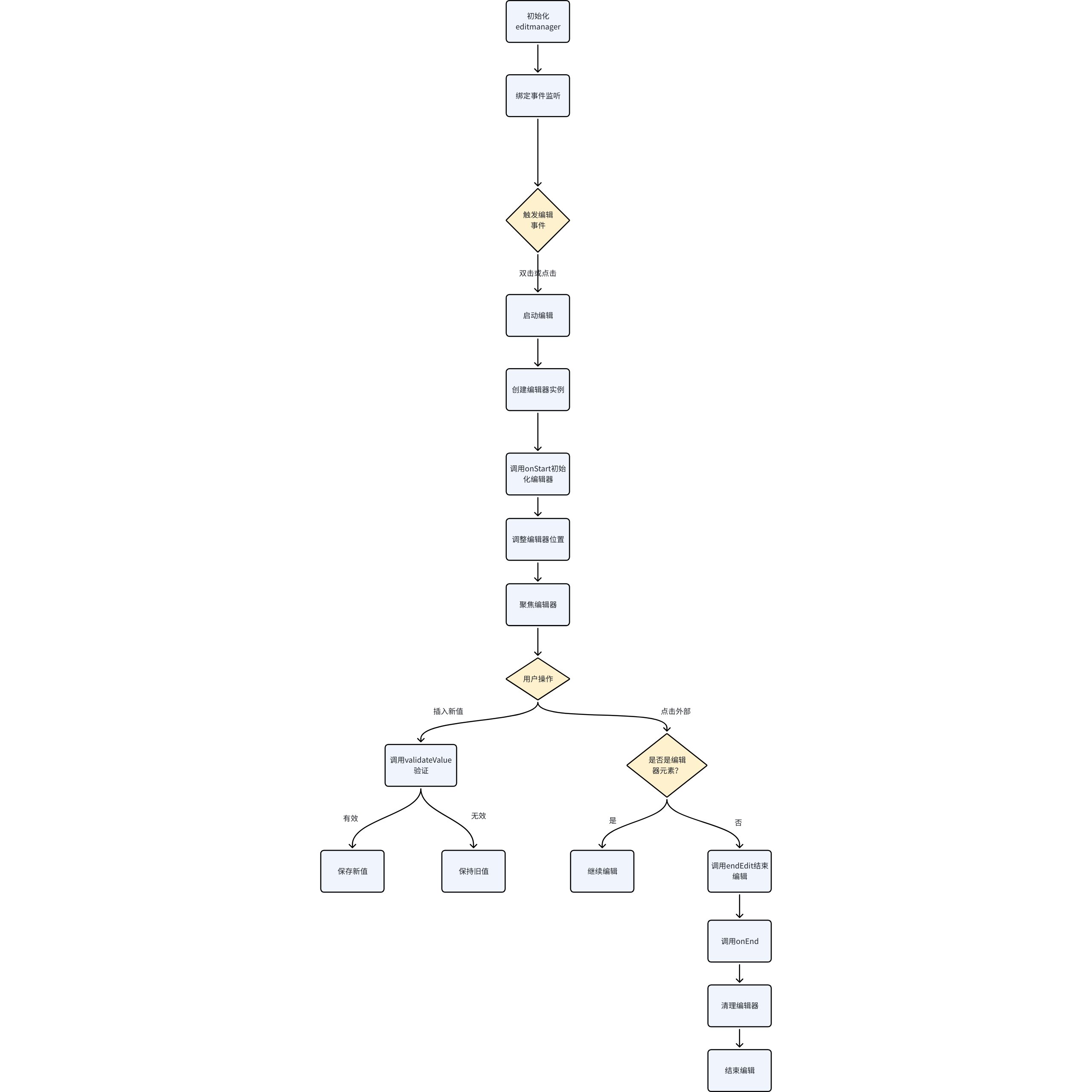
When creating an EditManager instance, the constructor constructor is called, which takes a table object as a parameter and calls the bindEvent method to bind events.
bindEvent method is responsible for binding double-click and single-click events on the table, and determines the way to trigger editing based on the editCellTrigger configuration.
The method checks if it is currently being edited, and if so, it returns immediately. Then it obtains the editor of the cell and checks if the cell is editable. If it is editable, it sets the currently edited cell and editor, and calls the editor.onStart method to start editing.
End Editing
completeEdit method is used to end the editing process. It checks whether the value is being validated and whether the event target is within the editor. If value validation is needed, it calls the editor.validateValue method for validation.
dealWithValidateValue function decides whether to exit the edit state based on the validation result.
function dealWithValidateValue(
// ...
if (validateValue === 'validate-exit') {
editManager.doExit();
resolve?.(true);
return true;
} else if (validateValue === 'invalidate-exit') {
(editManager.editingEditor as any).setValue(oldValue);
editManager.doExit();
resolve?.(true);
return true;
} else if (validateValue === 'validate-not-exit') {
resolve?.(false);
return false;
} else if (validateValue === 'invalidate-not-exit') {
resolve?.(false);
return false;
} else if (validateValue === true) {
editManager.doExit();
resolve?.(true);
return true;
}
// ...
}
Exit Editing
doExit method is used to exit the editing state, update the value of the table cell, and call the editor.onEnd method.
doExit() {
  // ...
  for (let row = range.start.row; row <= range.end.row; row++) {
    const rowChangedValues = [];
    for (let col = range.start.col; col <= range.end.col; col++) {
      rowChangedValues.push(changedValue);
    }
    changedValues.push(rowChangedValues);
  }

  (this.table as ListTableAPI).changeCellValues(range.start.col, range.start.row, changedValues);
  this.editingEditor.onEnd?.();
  this.editingEditor = null;
  this.isValidatingValue = false;
}
Cancel Editing
cancelEdit method is used to cancel the edit state, call editor.onEnd method and clear the editor.
Flowchart
Practical Application
In the current project, the EditManager class in edit-manager.ts provides support for table editing functionality, while PivotTable.ts and ListTable.ts use this class to implement their respective table editing features. Below is a detailed introduction to the use of EditManager in these two files:
Usage in
Import EditManager
At the beginning of the PivotTable.ts file, import the EditManager class:
import { EditManager } from './edit/edit-manager';
Create an EditManager instance
In the PivotTable class constructor, create an EditManager instance:
this.editManager = new EditManager(this);
Here, the PivotTable instance this is passed as a parameter to the constructor of EditManager.
Call EditManager method
In the PivotTable class, the startEditCell and completeEditCell methods are defined to call the corresponding methods of the EditManager instance:
startEditCell method calls the EditManager instance's startEditCell method to start cell editing; completeEditCell method calls the EditManager instance's completeEdit method to end cell editing.
EditManager class provides support for cell editing functionality for PivotTable and ListTable. In the constructors of these two classes, an instance of EditManager is created, and the instance itself is passed as a parameter to the constructor of EditManager. In the subsequent implementation of editing functionality, methods of the EditManager instance are called to handle cell editing operations.
Summary
Through the design of base classes and specific editors, the data editing functionality of vtable achieves high reusability and extensibility. This design not only simplifies the code structure but also makes it easier to support new data types. At the same time, with the unified definition of interfaces, the interaction between different editors becomes more flexible.
This document was revised and organized by the following personnel