In the VTable, the configuration manager BaseTable converts the table configuration into a specific rendering scene by creating a Scenegraph instance.
And the Scenegraph is the carrier of this transformation. The scene graph is a relatively abstract concept. In my understanding, a scene graph can be understood as a hierarchical graphical organization structure, a meticulously designed blueprint, capable of converting abstract configurations into specific interactive, renderable graph node networks. As its name suggests, this tree structure offers higher performance because it does not require recalculating the graphics to be drawn during updates; it only needs to update the properties of the corresponding scene graph nodes. \r
In the scene tree, each node (Group and various graphic elements such as Rect, Text, Icon) is a "graphic unit", and there are parent-child and hierarchical relationships between nodes. Each node can have its own attributes and behaviors. These nodes are nested and associated with each other, collectively forming a complete and dynamically updatable table system. Changes in the entire tree are immediately reflected in the final rendering result, just like adjustments in an organizational structure affect overall operations.
The core design concept of the scene tree is that it provides a structured, manageable, and efficient way to organize and render complex graphical interfaces. \r
BaseTable
It can be observed that: the BaseTable base class (the parent class of specific table classes in VTable) is declared in package/vtabvtable/src/core/BaseTable.ts, and in the constructor of the BaseTable base class, there is:
It can be seen that Scenegraph is a core component of BaseTable, where scenegraph controls the interaction and rendering of the table, while BaseTable is responsible for controlling the basic configuration management and overall logic of a chart. BaseTable manages the lifecycle of Scenegraph, handling the creation and destruction of the scene tree.
At the same time, both classes need to access each other's properties or methods: the scene tree needs to obtain the rendering configuration and basic information of table (options, animationManager, theme, and other basic configurations) to build the stage, while BaseTable relies on Scenegraph to provide core methods for rendering and interaction.
Source Code Location
package/vtable/src/core/BaseTable.ts: Definition file of the core class for the scene tree \r
scenegraph/group-creater/progress/proxy.ts: The core performance optimization module of VTable to address the challenge of rendering large data volumes. \r
Interpretation of Internal Concepts of Data Structures
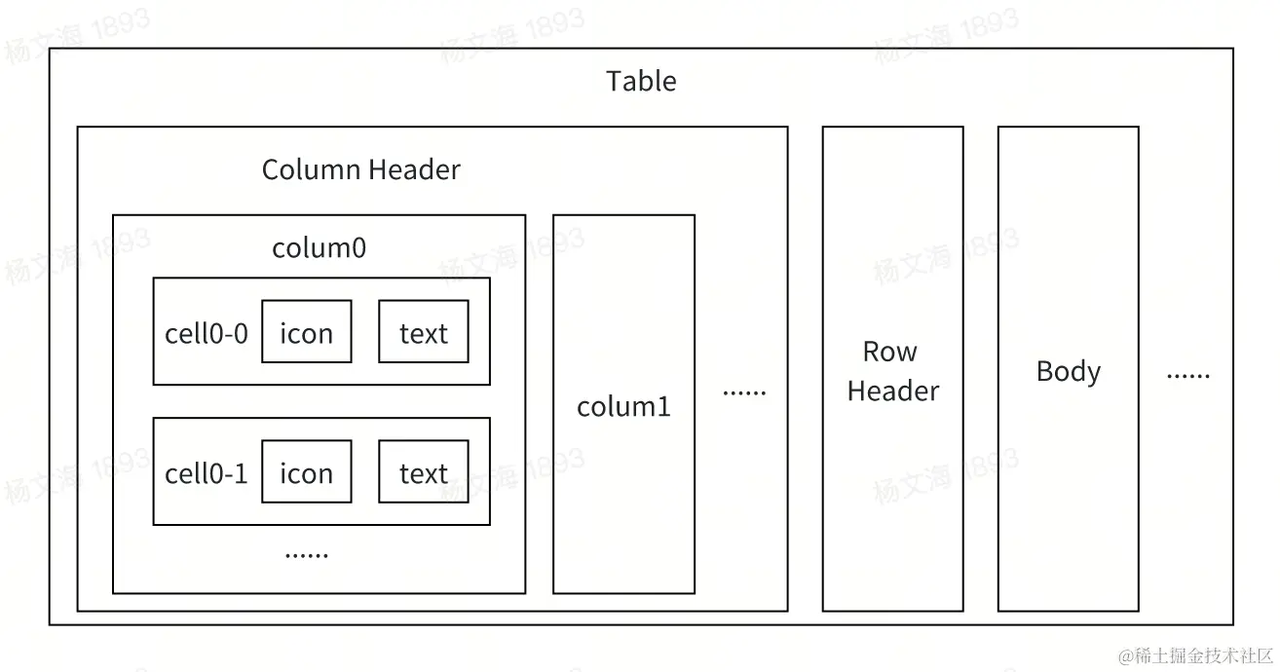
As mentioned above, the scene tree is a tree structure, and its main components are group-column-cell-primitive. The general structure is as follows: \r
Stage
Stage is a concept from the VRender module (https://visactor.com/vrender/guide/asd/Basic_Tutorial/Create_Instance), serving as the top-level container and rendering environment of the scene tree. It can be understood as a virtual "canvas space," responsible for providing the basic environment for rendering, managing the rendering process of the entire scene, and controlling the basic properties of the scene (size, background, pixel ratio), etc.
For VTable, Stage is the foundational container for building the entire table visualization system. \r
Render scene sub-nodes to the canvas
    this.stage.defaultLayer.add(this.tableGroup);
    (this.stage as any).table = this.table;
First, add the root node of the table (tableGroup) to the default layer of the Stage, which means that tableGroup and all its child nodes will be rendered onto the canvas, establishing a direct connection between the scene tree and the rendering environment.
Then mount the table instance onto the stage, establishing a connection with the table configuration.
Group
Group is an important component in the scene tree class. To understand it vividly, a group is a tree node in the tree structure of the scene graph, and it is also a container structure for organizing and managing primitives.
The complexity of the table determines that the scene tree requires multiple Groups, for example: \r
colHeaderGroup: Manage column headers
rowHeaderGroup: Manage row headers
cornerHeaderGroup: List header frozen column Group
bodyGroup: Manage main content
rightFrozenGroup: Manage the right frozen area
bottomFrozenGroup: Manage the bottom frozen area
Primitives
The concept of primitives comes from VRender, which are basic rendering elements that can form the actual table content in VTable (elements such as radio, chart, checkbox, etc.). For example, checkbox can be considered as a combination of Symbol primitives and Text primitives, etc.
ProgressProxy
ProgressProxy is the performance optimization core of VTable, managing node generation, incremental loading, and node position updates during the first screen rendering.\r
It is the core module for VTable to optimize performance during the first screen and interaction under large data volumes. \r
Design Philosophy
Scenegraph module is designed with the concept of using a scene tree to manage the creation and updating of table scene nodes. The overall table scene node is a scene tree structure created based on the primitives provided by VRender. It is constructed layer by layer following the organization order of table -> header/content -> column -> cell -> cell content.
This document was revised and organized by the following personnel