!!!###!!!title=4.5 Event to State Update Process——VisActor/VTable Contributing Documents!!!###!!!!!!###!!!description=---title: 4.5 Event to State Update Process key words: VisActor,VChart,VTable,VStrory,VMind,VGrammar,VRender,Visualization,Chart,Data,Table,Graph,Gis,LLM--- !!!###!!!

Introduction

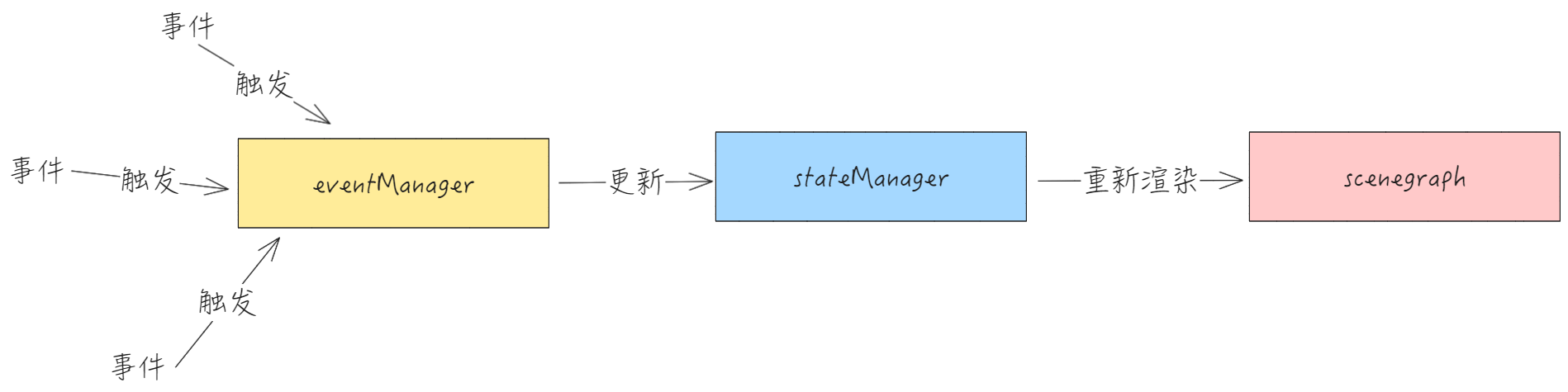
VTable divides the implementation of interactive effects into three modules for processing, which are:

  • State module stateManager: The state module is responsible for maintaining the current state of various interactions in the table, and changes in state will lead to the re-rendering of the scene tree;

  • The event module is eventManager: The event module is responsible for listening to events and changing states based on different events;

  • Scene tree scenegraph: The scene tree is responsible for re-rendering the table, which is the final step in achieving interaction;

Next, we will look at the process of updating events to states from six common interactions. \r

Interaction Implementation

Cell select

Core State

In the state module, the core state value that determines whether a cell is selected is select.ranges. VTable uses this field to determine if the current cell is selected. Changing select.ranges can change the selection state of the cell.

// packages\vtable\src\state\state.ts
select: {
    ranges: (CellRange & { skipBodyMerge?: boolean })[];
    //...
}    

Let's see how cell selection affects the state through events.

select includes three types of interactions: multi-select, drag multi-select, and clear selection, each listening to different events. \r

Single Choice

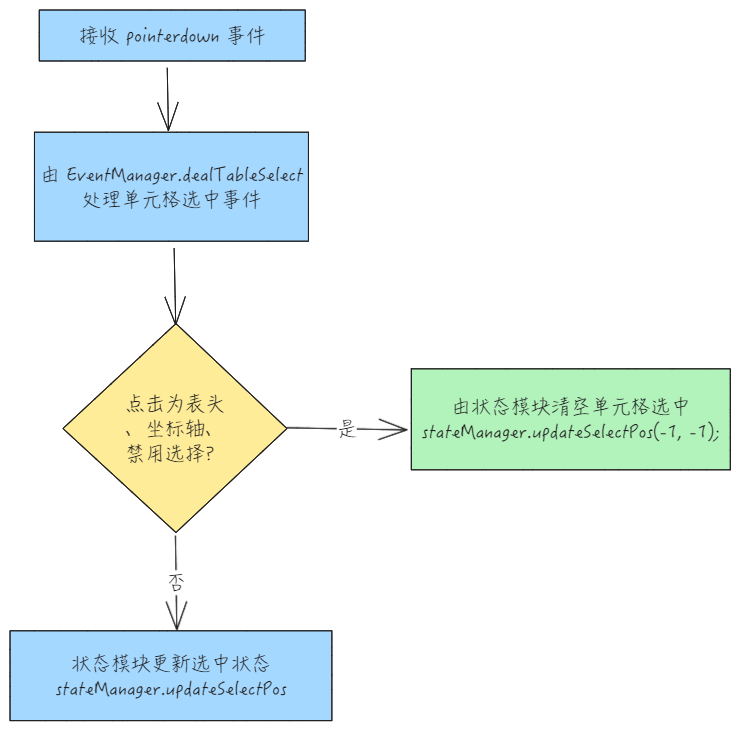
  • pointerdown single select cell

After handling the cell selection event, update interactionState \r

// packages\vtable\src\event\listener\table-group.ts
stateManager.updateInteractionState(InteractionState.grabing);    

As for whether to update the logic of the current cell selection status, it is located in the state module stateManager.updateSelectPos.

Drag and Select

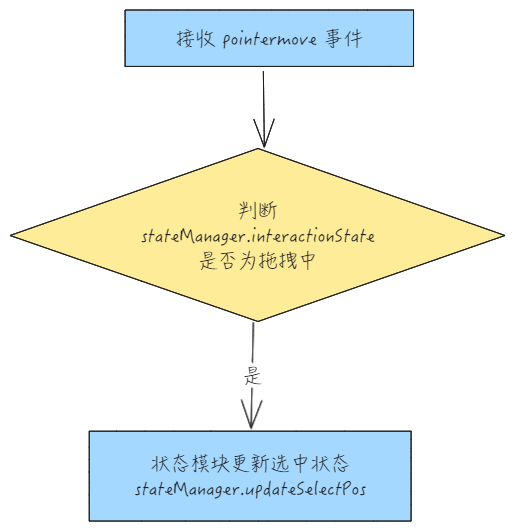
  • pointermove multi-select cells

Clear Selection

  • The event module receives the pointertap event, clicking on a blank area cancels the selection and ends the select interaction. \r
// packages\vtable\src\event\listener\table-group.ts
   table.scenegraph.stage.addEventListener('pointertap', (e: FederatedPointerEvent) => {
    // ...
      if (table.options.select?.blankAreaClickDeselect ?? true) {
        eventManager.dealTableSelect();
      }    
      // ...
  }    

Status Update

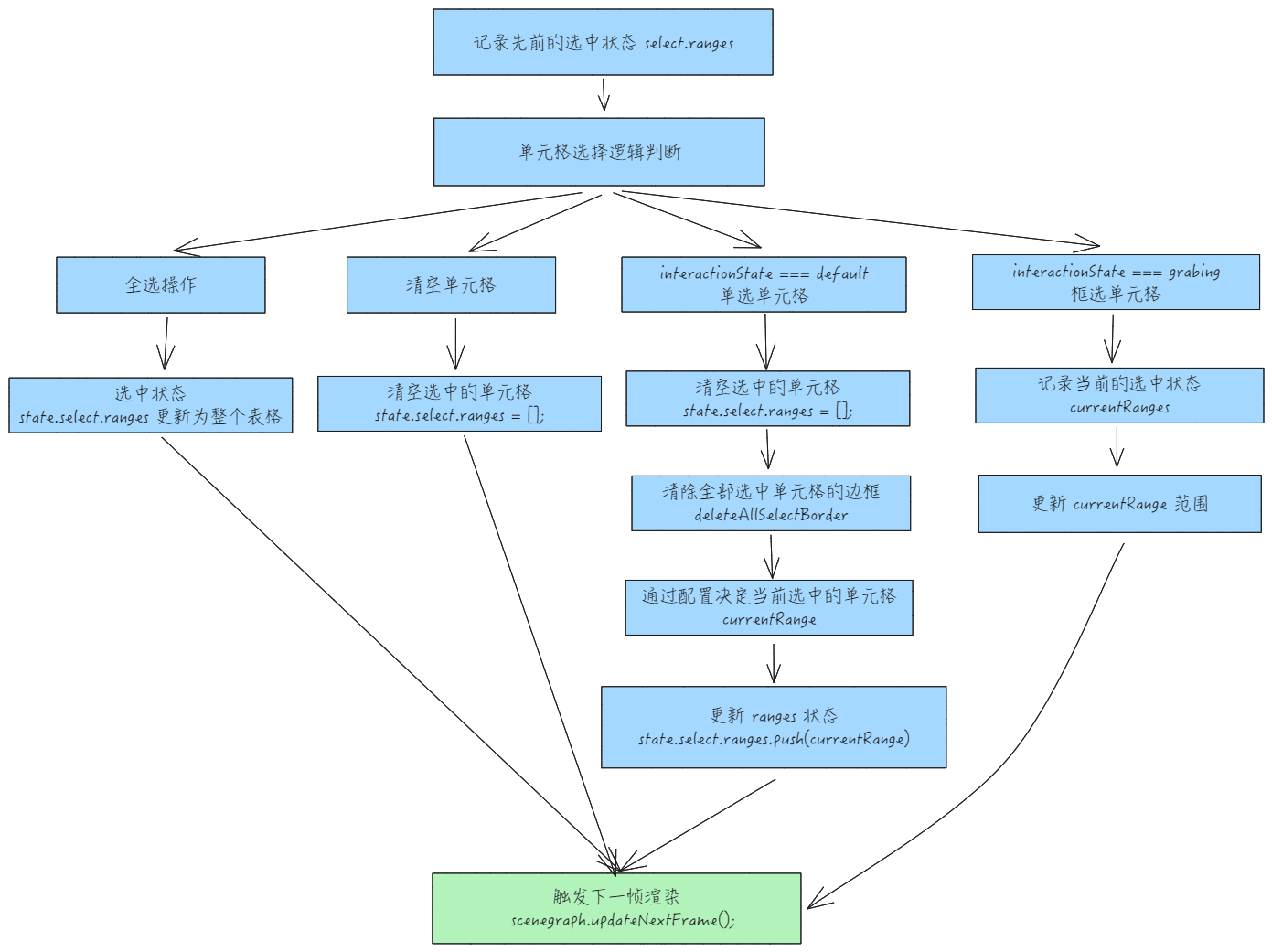
In the process of the select cell in the state module, the core difference between single-select cells and box-select cells lies in the difference of stateManger.interactionState:

  • stateManager.interactionState === 'grabing' indicates the process of selecting cells is currently ongoing

  • stateManager.interactionState === 'default' indicates a single selection cell


The update process regarding the selection state in state management is as follows: \r

  • updateSelectPos

Scrollbar Scrolling

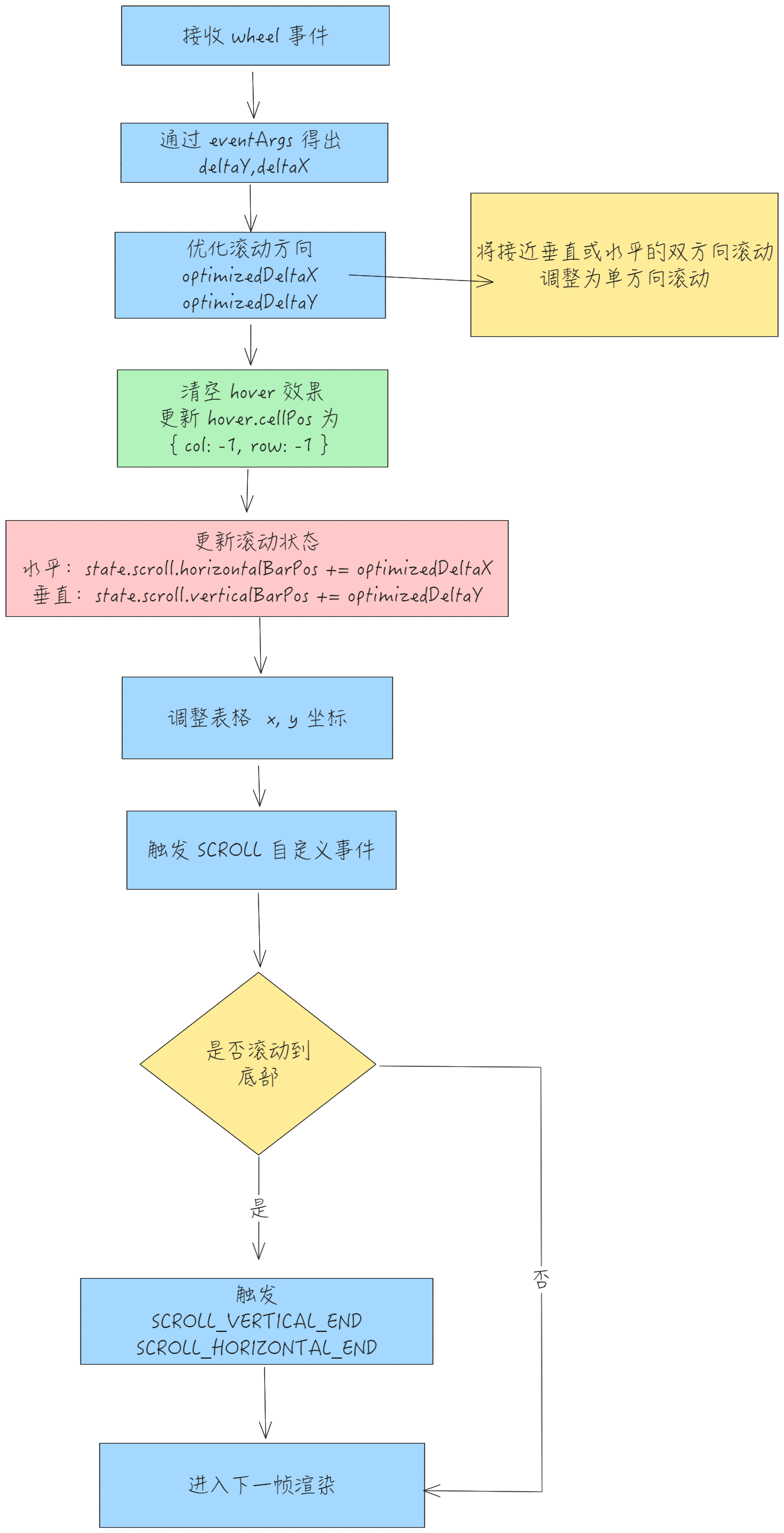
The scrolling effect mainly listens to the wheel event. By using the wheel event, it changes the current scrollbar state, updates scrollTop and scrollLeft, and adjusts the x, y coordinates of the table to achieve the scrolling effect.

Core State

// packages\vtable\src\state\state.ts
  scroll: {
    horizontalBarPos: number;
    verticalBarPos: number;
  };
    

Update Process

hover cell

Core State

// packages\vtable\src\state\state.ts
  hover: {
    cellPos: CellPosition; *// 记录当前hover的位置*
  };    

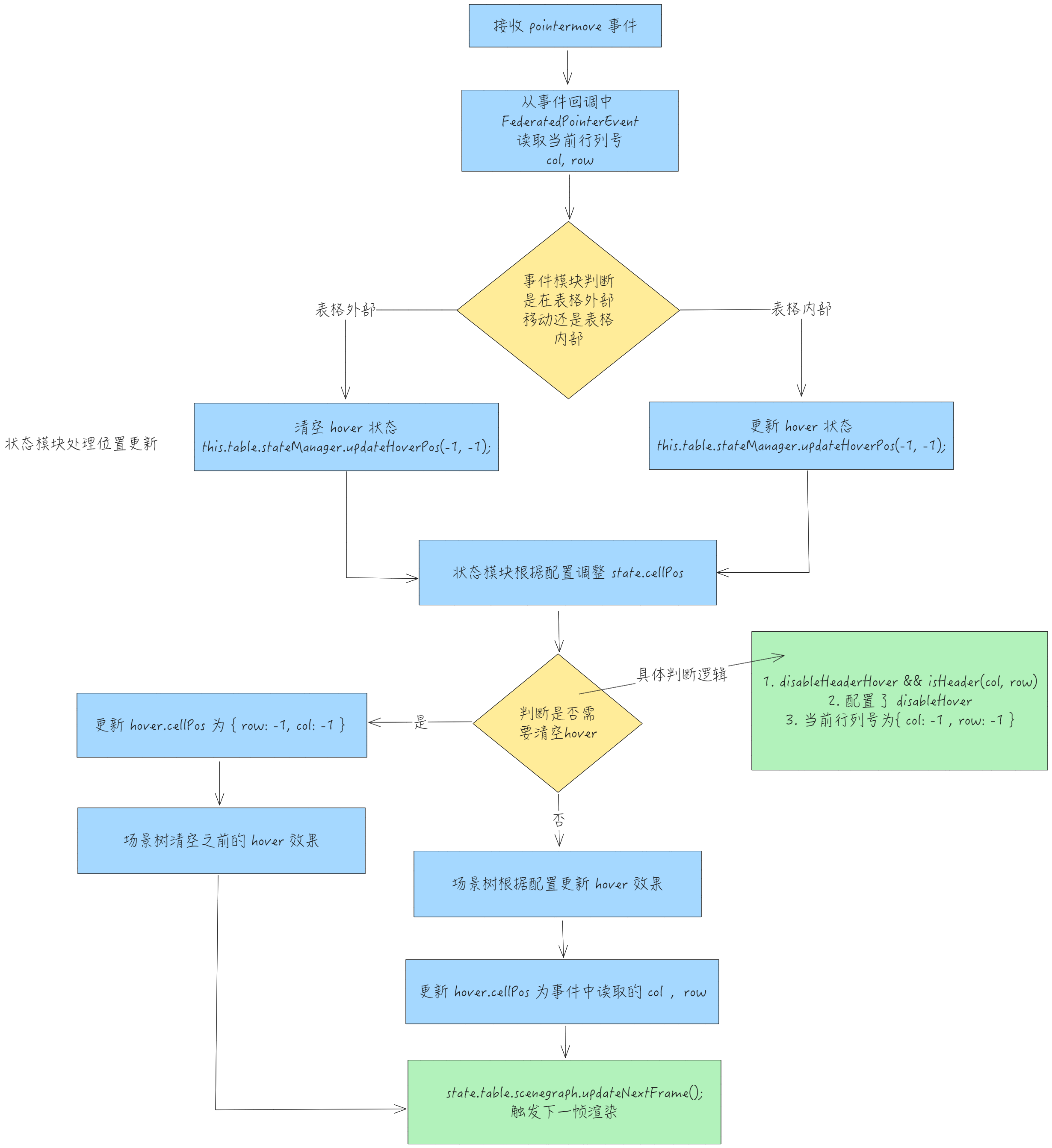
VTable internally uses hover.cellPos to determine whether the current cell is in a hover state, thereby implementing the hover cell functionality. \r

Processing Flow

The cell hover effect is achieved by listening to the pointermove event.

  • First, the event module handles the pointermove event
// packages\vtable\src\event\listener\table-group.ts
  table.scenegraph.tableGroup.addEventListener('pointermove', (e: FederatedPointerEvent) => {
    // ...
    const eventArgsSet = getCellEventArgsSet(e);
    eventManager.dealTableHover(eventArgsSet);
    // ...
  })    

  • The event module eventManager.dealTableHover handles the hover effect, determining whether to clear or update the hover state through eventArgs.
// packages\vtable\src\event\event.ts
  dealTableHover(eventArgsSet?: SceneEvent) {
    if (!eventArgsSet) {
      this.table.stateManager.updateHoverPos(-1, -1);
      return;
    }
    const { eventArgs } = eventArgsSet;

    if (eventArgs) {
      this.table.stateManager.updateHoverPos(eventArgs.col, eventArgs.row);
    } else {
      this.table.stateManager.updateHoverPos(-1, -1);
    }
  }
    

  • State module updates hover position stateManager.updateHoverPos
  • Overall flowchart

Row Height and Column Width Adjustment

Core State

// packages\vtable\src\state\state.ts
columnResize: {
  col: number;
  */** x坐标是相对table内坐标 */*
  x: number;
  resizing: boolean;
};
rowResize: {
  row: number;
  */** y坐标是相对table内坐标 */*
  y: number;
  resizing: boolean;
};    

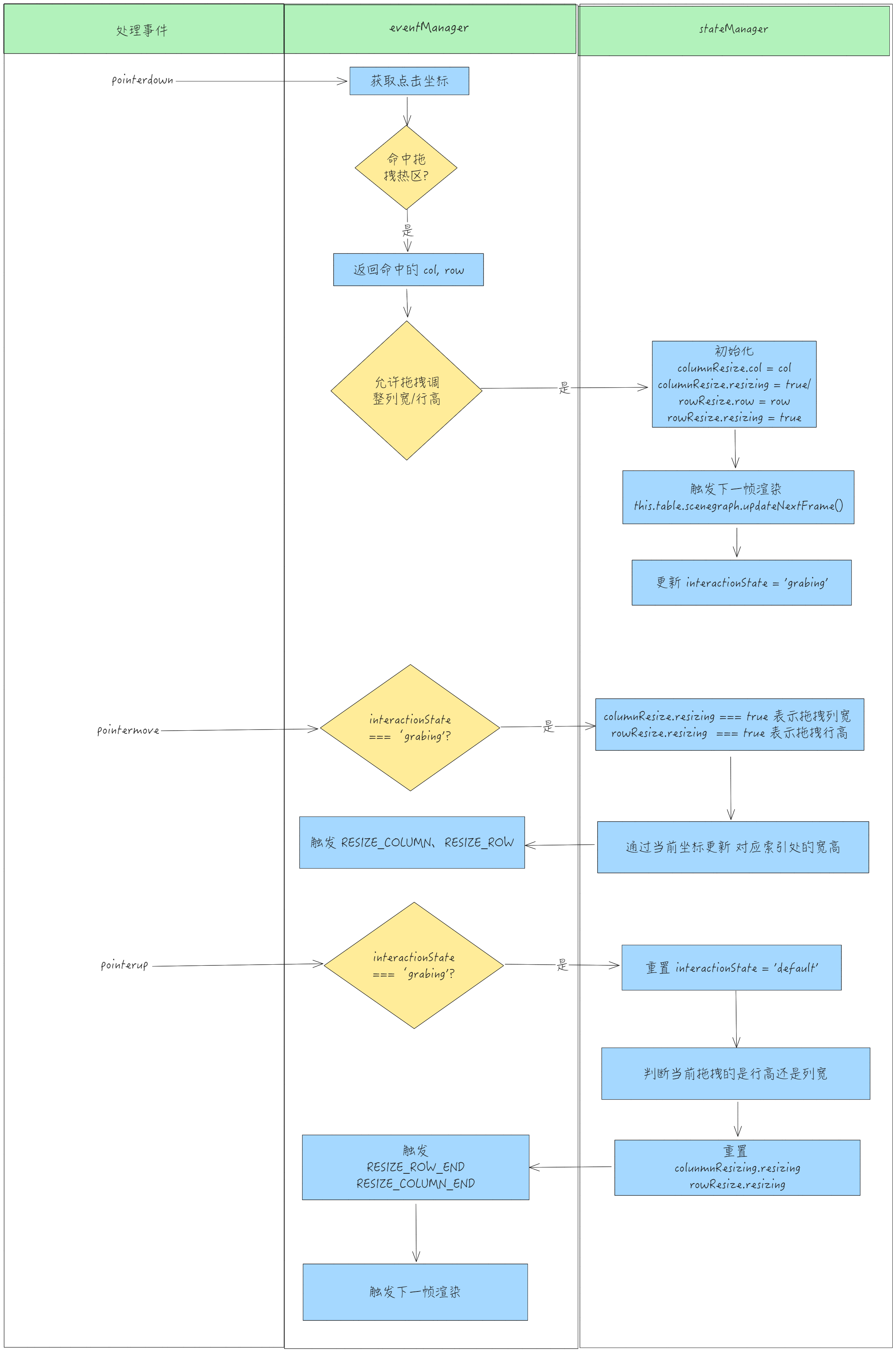
The state records the index and coordinates of the current dragged row and column. In the subsequent actual dragging, only the corresponding row or column of columnResize.col or rowResize.row will be adjusted.

Adjusting Process

  • Receive pointerdown event, checked by the event module to see if it enters the drag to adjust column width. If confirmed to enter row height and column width adjustment, update state.interactionState to grabing;
// packages\vtable\src\event\listener\table-group.ts
  table.scenegraph.tableGroup.addEventListener('pointerdown', (e: FederatedPointerEvent) => {
  // ...
  *// 处理列宽调整*
  if (
    !eventManager.checkCellFillhandle(eventArgsSet) &&
    (eventManager.checkColumnResize(eventArgsSet, true) || eventManager.checkRowResize(eventArgsSet, true))
  ) {
    table.scenegraph.updateChartState(null);
    stateManager.updateInteractionState(InteractionState.grabing);
    return;
  }
  // ...
 }    

  • First, based on the click coordinates provided by pointerdown, calculate whether the drag hotspot is hit. If it is hit, return the corresponding row and column index.

  • Drag column width check

// packages\vtable\src\event\event.ts
  checkColumnResize(eventArgsSet: SceneEvent, update?: boolean): boolean {
    const { eventArgs } = eventArgsSet;
    // ...
    *// 如果是鼠标处理表格外部如最后一列的后面 也期望可以拖拽列宽*
    // 获取当前点击的单元格行列号
    const resizeCol = this.table.scenegraph.getResizeColAt(
      eventArgsSet.abstractPos.x,
      eventArgsSet.abstractPos.y,
      eventArgs?.targetCell
    );
    if (this.table._canResizeColumn(resizeCol.col, resizeCol.row) && resizeCol.col >= 0) {
      if (update) {
        this.table.stateManager.startResizeCol(
          resizeCol.col,
          eventArgsSet.abstractPos.x,
          eventArgsSet.abstractPos.y,
          resizeCol.rightFrozen
        );
      }
      return true;
    }
    // ...
  }    

  • Drag row height check
// packages\vtable\src\event\event.ts
  checkRowResize(eventArgsSet: SceneEvent, update?: boolean): boolean {
  // ...
    const { eventArgs } = eventArgsSet;
    if (eventArgs) {
      const resizeRow = this.table.scenegraph.getResizeRowAt(
        eventArgsSet.abstractPos.x,
        eventArgsSet.abstractPos.y,
        eventArgs.targetCell
      );

      if (this.table._canResizeRow(resizeRow.col, resizeRow.row) && resizeRow.row >= 0) {
        if (update) {
          this.table.stateManager.startResizeRow(
            resizeRow.row,
            eventArgsSet.abstractPos.x,
            eventArgsSet.abstractPos.y,
            resizeRow.bottomFrozen
          );
        }
        return true;
      }
    }

  }
    

  • Based on the row and column index, initialize the state of columnResize and rowResize through the state module, triggering the next frame rendering; \r
// packages\vtable\src\state\state.ts
  startResizeCol(col: number, x: number, y: number, isRightFrozen?: boolean) {
    this.columnResize.resizing = true;
    this.columnResize.col = col;
    this.columnResize.x = x;
    this.columnResize.isRightFrozen = isRightFrozen;

    this.table.scenegraph.component.showResizeCol(col, y, isRightFrozen);
    this.table.scenegraph.updateNextFrame();
  }    

  • Handle the pointermove event, and determine whether it is dragging a row or a column through the state module;

  • If interactionState === 'grabing', it means currently in the interaction of dragging row height or column width;

  • Determine whether the current action is dragging row height or column width by columnResize.resizing and rowResize.resizing;

  • Use the event module as an intermediary to handle drag events eventManager.dealColumnResize(x, y);

  • Trigger RESIZE_COLUMN and RESIZE_ROW events; \r

  const globalPointermoveCallback = (e: MouseEvent) => {
  // ... 
    const { x, y } = table._getMouseAbstractPoint(e, false);
    if (stateManager.interactionState === InteractionState.grabing) {
      if (stateManager.isResizeCol()) {
        eventManager.dealColumnResize(x, y);
        if ((table as any).hasListeners(TABLE_EVENT_TYPE.RESIZE_COLUMN)) {
          table.fireListeners(TABLE_EVENT_TYPE.RESIZE_COLUMN, {
            col: table.stateManager.columnResize.col,
            colWidth: table.getColWidth(table.stateManager.columnResize.col)
          });
        }
      } else if (stateManager.isResizeRow()) {
        eventManager.dealRowResize(x, y);
        if ((table as any).hasListeners(TABLE_EVENT_TYPE.RESIZE_ROW)) {
          table.fireListeners(TABLE_EVENT_TYPE.RESIZE_ROW, {
            row: table.stateManager.rowResize.row,
            rowHeight: table.getRowHeight(table.stateManager.rowResize.row)
          });
        }
      }
    }
  // ...
  }
  document.body.addEventListener('pointermove', globalPointermoveCallback);    

  • Handle the pointermove event through the state module, and update the column width/row height at the corresponding index of columnResize.col and rowResize.row using the current pointer coordinates.
// packages\vtable\src\event\event.ts
  dealColumnResize(xInTable: number, yInTable: number) {
    this.table.stateManager.updateResizeCol(xInTable, yInTable);
  }

  dealRowResize(xInTable: number, yInTable: number) {
    this.table.stateManager.updateResizeRow(xInTable, yInTable);
  }    

  • Handle the pointerup event, restoring state.interactionState to default;
// packages\vtable\src\event\listener\table-group.ts
  table.scenegraph.stage.addEventListener('pointerup', (e: FederatedPointerEvent) => {
    *// 处理列宽调整  这里和tableGroup.addEventListener('pointerup' 逻辑一样*
    if (stateManager.interactionState === 'grabing') {
      stateManager.updateInteractionState(InteractionState.default);
      if (stateManager.isResizeCol()) {
        endResizeCol(table);
      } else if (stateManager.isResizeRow()) {
        endResizeRow(table);
      }
    }
  });    

  • Delegate to the state module to reset stateManager.columnResize and stateManager.rowResize, then trigger the RESIZE_COLUMN_END or RESIZE_ROW_END event
// packages\vtable\src\event\listener\table-group.ts
export function endResizeCol(table: BaseTableAPI) {
  table.stateManager.endResizeCol();
  const columns = [];
  *// 返回所有列宽信息*
  for (let col = 0; col < table.colCount; col++) {
    columns.push(table.getColWidth(col));
  }
  table.fireListeners(TABLE_EVENT_TYPE.RESIZE_COLUMN_END, {
    col: table.stateManager.columnResize.col,
    colWidths: columns
  });
}

export function endResizeRow(table: BaseTableAPI) {
  table.stateManager.endResizeRow();

  table.fireListeners(TABLE_EVENT_TYPE.RESIZE_ROW_END, {
    row: table.stateManager.rowResize.row,
    rowHeight: table.getRowHeight(table.stateManager.rowResize.row)
  });    

  • Reset columnResize.resizing and rowResize.resizing to false, hide the drag baseline, and proceed to the next frame rendering.
// packages\vtable\src\state\state.ts
  endResizeCol() {
    setTimeout(() => {
      this.columnResize.resizing = false;
    }, 0);
    // ...
    this.table.scenegraph.component.hideResizeCol();
    this.table.scenegraph.updateNextFrame();
  }
  endResizeRow() {
    setTimeout(() => {
      this.rowResize.resizing = false;
    }, 0);
    // ...
    this.table.scenegraph.component.hideResizeRow();
    this.table.scenegraph.updateNextFrame();
  }    

  • Flowchart

Drag to Change Rows and Columns

Core State

// packages\vtable\src\state\state.ts
  columnMove: {
    colSource: number;
    colTarget: number;
    rowSource: number;
    rowTarget: number;
    x: number;
    y: number;
    moving: boolean;
  };    

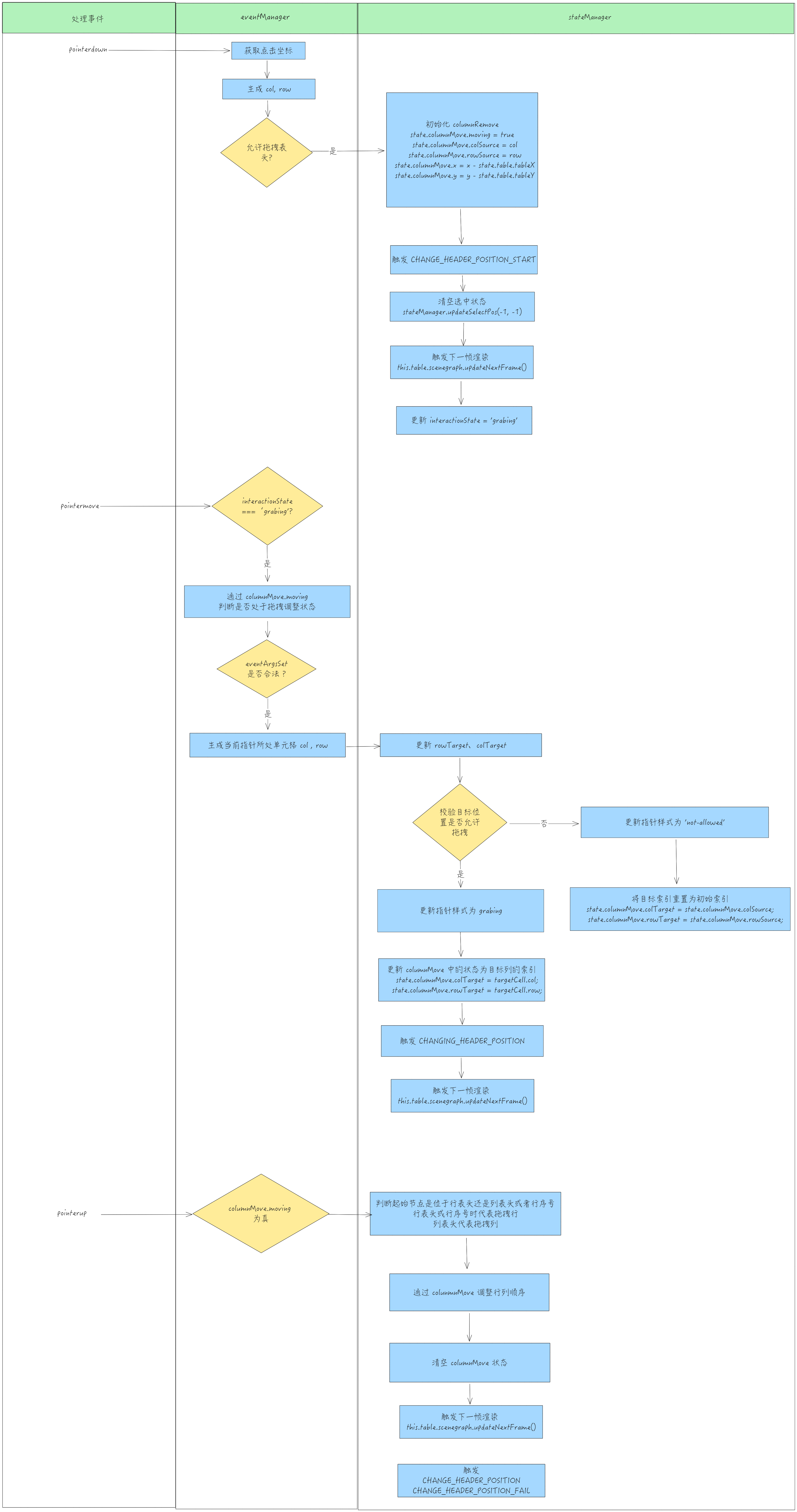
columnRemove stores the original index and target index of the dragged row or column, as well as a flag indicating whether it is in motion. By changing colTarget and rowTarget, you can achieve the function of replacing the selected row/column to the target position.

Processing Flow

Dragging to change rows and columns also relies on three events to complete: pointerdown, pointermove, pointerup

  • Flowchart

Fixed Column

VTable provides a built-in frozen column operation, which can be enabled by configuring allowFrozenColCount.

Core State

VTable maintains the current actual number of frozen columns through the tableInstance.internalProps.frozenColCount state, and internally adjusts the number of frozen columns on the left side based on this field, applying special styles.

Processing Flow

The operation of freezing columns is mainly implemented by pointertap and the custom event ICON_CLICK.

  • First handle the pointertap event;
// packages\vtable\src\event\listener\table-group.ts
  table.scenegraph.tableGroup.addEventListener('pointertap', (e: FederatedPointerEvent) => {
  // ...
    if (
      !eventManager.touchMove &&
      e.button === 0 &&
      eventArgsSet.eventArgs &&
      (table as any).hasListeners(TABLE_EVENT_TYPE.CLICK_CELL)
    ) {
    // ...
    eventManager.dealIconClick(e, eventArgsSet);

  });    

  • In the event module, it is determined by eventArgsSet whether the icon element is clicked. If the clicked element is an icon, the custom event ICON_CLICK is triggered.
// packages\vtable\src\event\event.ts
 dealIconClick(e: FederatedPointerEvent, eventArgsSet: SceneEvent): boolean {
    const { eventArgs } = eventArgsSet;

    const { target, event, col, row } = eventArgs || {
      target: e.target,
      event: e,
      col: -1,
      row: -1
    };
    const icon = target as unknown as Icon;

    if (icon.role && icon.role.startsWith('icon-')) {
      this.table.fireListeners(TABLE_EVENT_TYPE.ICON_CLICK, {
        name: icon.name,
        *// 默认位置:icon中部正下方*
        x: (icon.globalAABBBounds.x1 + icon.globalAABBBounds.x2) / 2,
        y: icon.globalAABBBounds.y2,
        col,
        row,
        funcType: icon.attribute.funcType,
        icon,
        event
      });

  }    

  • The ICON_CLICK event is registered as early as the event module initialization, and the ICON_CLICK event will determine whether the current clicked icon type is frozen;
// packages\vtable\src\event\event.ts
    *// 图标点击*
    this.table.on(TABLE_EVENT_TYPE.ICON_CLICK, iconInfo => {
      const { col, row, x, y, funcType, icon, event } = iconInfo;
      // ...
      if (funcType === IconFuncTypeEnum.frozen) {
        stateManager.triggerFreeze(col, row, icon);
      } 
      // ...
    });
    

  • The status module handles the click fronzen event. Based on the index of the currently clicked column, it updates this.internalProps.frozenColCount. If the currently clicked column is the same as the frozenColCount maintained in the state, it resets frozenColCount to 0; if different, it updates frozenColCount to col.;
// packages\vtable\src\state\frozen\index.ts
export function dealFreeze(col: number, row: number, table: BaseTableAPI) {
  if (table.frozenColCount > 0) {
    if (col !== table.frozenColCount - 1) {
      table.setFrozenColCount(col + 1);
    } else {
      table.setFrozenColCount(0);
    }
  } else {
    table.setFrozenColCount(col + 1);
  }
}
    

  • Trigger the FREEZE_CLICK event
  triggerFreeze(col: number, row: number, iconMark: Icon) {
  // ...
    if ((this.table as any).hasListeners(PIVOT_TABLE_EVENT_TYPE.FREEZE_CLICK)) {
      const fields: ColumnData[] = (this.table as ListTable).internalProps.layoutMap.columnObjects.slice(0, col + 1);
      this.table.fireListeners(PIVOT_TABLE_EVENT_TYPE.FREEZE_CLICK, {
        col: col,
        row: row,
        fields: fields.reduce((pre: any, cur: any) => pre.concat(cur.field), []),
        colCount: this.table.frozenColCount
      });
    }
    // ...
   }    

Conclusion

This article starts from six common interaction effects and explains in detail the process of updating from events to states.

VTable separates interactive effects into event modules and state modules, making the process of handling interactive events clearer.

This document is provided by the following personnel

taiiiyang( https://github.com/taiiiyang)

This document was revised and organized by the following personnel

玄魂