It is not only a fully functional graph visualization library, but also an explorer of data relationships.
!!!###!!!title=2.3 VTable Scene Tree Rendering——VisActor/VTable Contributing Documents!!!###!!!!!!###!!!description=---title: 2.3 VTable Scene Tree Rendering
key words: VisActor,VChart,VTable,VStrory,VMind,VGrammar,VRender,Visualization,Chart,Data,Table,Graph,Gis,LLM---
!!!###!!!
Related Source Code Locations
package/vtable/src/scenegraph/group-creater/cell-helper.ts: The core file for cell processing in the VTable rendering engine, providing functions for creating cells based on different column types (createCell), responsible for dynamic updates of cells (updateCell and updateCellContent), etc.;
package/vtable/src/scenegraph/group-creater/column-helper.ts: Implements the merging and rendering processing of ComplexColumn based on createCell cell creation;
package/vtable/src/scenegraph/group-creater/column.ts: Based on CreateComplexColumn, traverses from the starting column to the ending column to create column groups, thereby constructing the column structure of the entire table;
Table Creation Process
The construction process of the table's scene diagram is progressive, and the overall flow is roughly to first create a single cell using the createCell function, then use the createComplexColumn function to create complex columns (different types of cells in the same column), and finally use the createColGroup function to iterate and generate the column groups of the table, thereby forming the structure of the entire table.
The following is a step-by-step analysis of the creation process:
Creation of Cells (
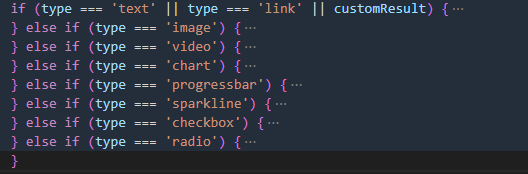
Function: Create the corresponding type of cell based on the passed cell type type. Supported types include text, image, video, chart, progressbar, sparkline, checkbox, radio, etc.
The majority of the structure of this function's source code follows different creation processes based on different CellTypes. It dynamically obtains various types of creation functions through Factory.getFunction for the created Group object, and then configures parameters or logic processing specific to different cells.
Column Creation (createComplexColumn)
Function: Within the specified column range, create composite columns based on the merging status of cells, data types, etc., calculate or obtain the total width and height of merged cells, and optimize performance through Map caching.
Confirm insertion coordinates
The creation of complex columns begins by confirming the insertion coordinates. Based on the last child element of columnGroup and the height, determine the starting Y-coordinate for cell insertion. If cells are inserted consecutively, they are added to the existing height by accumulating the height of the cells, thus forming the structure of the column. This addresses the vertical positioning issue when continuously adding cells.
let y = 0;
if (columnGroup.lastChild && (columnGroup.lastChild as Group).row === rowStart - 1) {
  y = (columnGroup.lastChild as Group).attribute.y + (columnGroup.lastChild as Group).attribute.height;
} else if (columnGroup.colHeight) {
  y = columnGroup.colHeight;
}
Merge Cells dealMerge
Then start executing the traversal loop from the starting line to the ending line to process the cell merging algorithm; handle cell merging by calculating and updating the cell's width and height (calculate mergeSize) to achieve the merging effect. The cache here refers to using the concatenated value of the starting row and column as the key, caching mergeResult through a Map, storing the calculated CellWidth and CellHeight values to avoid repeated calculations.
function dealMerge(range: CellRange, mergeMap: MergeMap, table: BaseTableAPI, forceUpdate: boolean) {
  let cellWidth = 0;
  let cellHeight = 0;
  const mergeResult = mergeMap.get(`${range.start.col},${range.start.row};${range.end.col},${range.end.row}`);
  if (!mergeResult || forceUpdate) {
    for (let col = range.start.col; col <= range.end.col; col++) {
      cellWidth += table.getColWidth(col);
    }

    // let cellHeight = 0;
    for (let i = range.start.row; i <= range.end.row; i++) {
      cellHeight += table.getRowHeight(i);
    }

    mergeMap.set(`${range.start.col},${range.start.row};${range.end.col},${range.end.row}`, {
      cellWidth,
      cellHeight
    });
  } else {
    cellWidth = mergeResult.cellWidth;
    cellHeight = mergeResult.cellHeight;
  }
  return {
    cellWidth,
    cellHeight
  };
}
Creation of Table (createColGroup)
Function: Create column groups within a specified range of columns and rows to construct the column structure of the entire table.
This code first traverses from the starting column to the ending column, executing sequentially: \r
Create a column group object columnGroup, x: xOrigin + x is quite intuitive to understand, x (offset) is continuously accumulated as the column group is created in the loop, making it easy to imagine that each column group can be arranged sequentially in the horizontal direction; width: colWidth sets the width of the column group to the width of the current column colWidth, which is obtained through table.getColWidth(col); height: 0 initially sets the height of the column group to 0, which will be updated later based on the height of the elements (such as cells) actually created in the column.
Set the column group properties and index, set the role attribute to 'column', and set the column group col attribute to the current column index i, so that it is clear which column in the table the column group corresponds to.
By calling the createComplexColumn function, create a ComplexColumn composite column in the specified column group and dynamically update the layout parameters. The createComplexColumn function receives multiple parameters, including column group, column index, column width, row range, etc., and also considers the position of the cell, merging situation, and default row height, ultimately generating the corresponding column structure.
This document was revised and organized by the following personnel