It is not only a fully functional graph visualization library, but also an explorer of data relationships.
!!!###!!!title=2.2 VTable Elements and the Expression Relationship with the Scene Tree——VisActor/VTable Contributing Documents!!!###!!!!!!###!!!description=---title: 2.2 VTable Elements and the Expression Relationship with the Scene Tree
key words: VisActor,VChart,VTable,VStrory,VMind,VGrammar,VRender,Visualization,Chart,Data,Table,Graph,Gis,LLM---
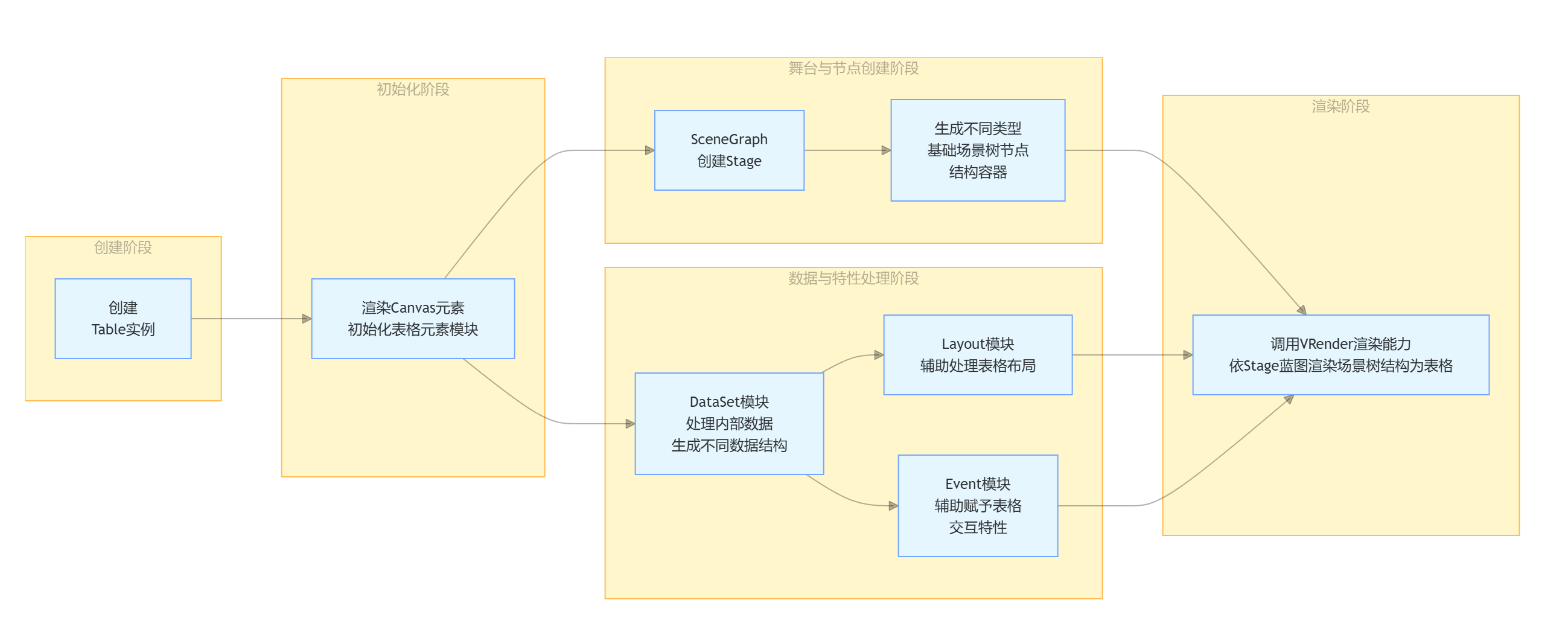
What is the process from code to the vivid table presented to us in a VTable? My understanding is that VTable first creates a Table instance, then initializes each table element module by rendering the Canvas element. **When initializing the element module, the SceneGraph creates the stage Stage and generates different types of basic scene tree node structure containers.** Subsequently, the DataSet module processes the internal data of the table to generate different data structures according to different data display requirements. Additionally, with the assistance of other modules such as the Layout module and Event module, the table is endowed with neat layout and interactive features. After all preparations are completed, the rendering capability of the underlying VRender is called to render the abstract scene tree structure into a colorful table according to the blueprint of the Stage we mentioned earlier.
<img src='https://cdn.jsdelivr.net/gh/xuanhun/articles/visactor/sourcecode/img/DHefbI3iZo1kW7xb4COc1Mnjn7b.gif' alt='' width='1000' height='auto'>
This article explains the process of initializing the table container in the scene tree; \r
!!!###!!!
What is the process from code to the vivid table presented to us in a VTable? My understanding is that VTable first creates a Table instance, then initializes each table element module by rendering the Canvas element. When initializing the element module, the SceneGraph creates the stage Stage and generates different types of basic scene tree node structure containers. Subsequently, the DataSet module processes the internal data of the table to generate different data structures according to different data display requirements. Additionally, with the assistance of other modules such as the Layout module and Event module, the table is endowed with neat layout and interactive features. After all preparations are completed, the rendering capability of the underlying VRender is called to render the abstract scene tree structure into a colorful table according to the blueprint of the Stage we mentioned earlier.
This article explains the process of initializing the table container in the scene tree; \r
Relevant Source Code Location
package/vtable/src/scenegrapg/groupcreater/init-scenegraph.ts Initialization of the scene graph container \r
package/vtable/src/core/BaseTable.ts Definition file of the scene tree core class
package/vtable/src/scenegraph/grapghic/group.ts is the Group class for table rendering extension, used to control the layout, size, and rendering of the table. The final returned instance is a group object in the table, which can be a cell group, header group, frozen column group, etc. \r
Here is the VRender documentation regarding the Group class, explaining the two properties: clip and pickable. When creating a Group, coordinates, dimensions, and these two properties will be configured.
pickable: Whether the primitive can be interactive. If false, it will not respond to any events (only display, no interaction) \r
clip: After setting the group to clip, it will crop the parts of child elements that exceed the range based on width and height (similar to overflow: hidden) \r
Initialization of the Remaining Nodes in the Scene Tree
Add the generated different nodes to the root node in sequence, indicating in the source code comments that different addition orders may have a certain impact; \r
Summary
In the scenegraph class, when initializing the scene tree, the current Scenegraph instance is passed into the initSceneGraph function (from /init-scenegraph.ts). It is not difficult to see from initSceneGraph that different types of table subunits return a Group instance through createContainerGroup while creating the scene tree, and then set the role attribute on the instance to identify its function, finally adding them to the root container TableGroup respectively.
At this point, the initialization part of the container is complete, and container nodes (Group) of different types of elements in the scene tree have been generated.
This document was revised and organized by the following personnel