


6.1.1
What is ListTable?
- Comparison with
PivotTable(Pivot Table)
Core Features
- Powerful data processing capabilities
Provides various data aggregation operations, including sorting, summation, maximum and minimum values, as well as custom aggregation functions, enabling users to quickly perform aggregation operations.
- Rich extensibility
Supports custom cells, custom layouts, custom themes, and supports both React and Vue as components. \r
- Visual enhancement
ListTable supports features such as sparklines, data bars, icons, and custom cell styles. It also supports inserting charts within cells to form composite charts. \r
- High-performance interaction and operation
ListTable supports custom sorting, cell hover and select style customization, custom dropdown menus, and cell editing capabilities. It achieves DOM-like operations through canvas, offering better performance. \r
6.1.2
-
Typical Use Case
-
Real-time display of database query results (supports dynamic field display)
-
Tables that require dynamic add, delete, update, and query (such as admin panels). \r
-
Combine interactive operations with data analysis interfaces (such as selection, sorting, filtering). \r
-
Inappropriate Scenarios
-
Complex row and column hierarchy nesting is required (consider
PivotTableas a priority).
6.1.3
The following are the core concepts of ListTable and their descriptions:
-
Records:
ListTabledata source, represented as an array,ListTablealso supports asynchronous data rendering throughdataSource; -
Columns: Column definitions, including the definition of list headers and cell formatting. Columns support tree form to define multi-level headers and header merging; \r
-
Pagination: pagination configuration, including current page number, total number of items, etc.; \r
-
Scenegraph: The scene tree rendered inside
ListTable, used for progressive rendering of tables; -
Theme: Theme definition,
ListTablesupports custom themes, including table borders, cell background colors, etc. -
SortState: Custom sorting logic; \r
-
Transpose: Row and column transposition, swapping rows and columns, a unique capability of
ListTablecompared toPivotTable; \r -
CustomMergeCell: Custom merge cells, supporting configuration of cell merge logic. \r
6.1.4
The following introduces the capability definition of ListTable. For details, refer to this article https://visactor.com/vtable/guide/introduction \r
Data Processing Capability
-
Data scale: Supports rendering of millions of data, enabling smooth scrolling; \r
-
Data source: ListTable supports both synchronous and asynchronous data input; \r
-
Data structure: Supports two-dimensional objects, two-dimensional arrays, and object structures, with object structures mainly used for asynchronous data source loading; \r
-
Data Formatting: ListTable supports custom data formatting, as well as sorting, filtering, and data aggregation calculations. Refer to the documentation https://visactor.com/vtable/guide/data_analysis/list_table_dataAnalysis \r
-
Dynamic update: Data can be updated through APIs such as updateOption and updateRecords; \r
Rendering Capability
-
Rendering mode: Hybrid rendering (Canvas main body \u002B DOM overlay layer); \r
-
Cell rendering: Utilize VRender to complete the rendering of table components, supporting easy customization of cell styles through the style function; \r
-
Cross-platform adaptation: ListTable supports both Node and Browser; \r
Interactivity
-
Table interaction
-
ListTable allows customization of hover and select highlight configurations, including highlighting the entire row or the entire column; \r
-
Drag and Drop: ListTable supports operations such as dragging the header to adjust position, prohibiting certain columns from being swapped, dragging to adjust column width, and customizing the style of the swap marker line; \r
-
Freeze: Row and column freezing is only supported for ListTable use, allowing configuration of left, right column freezing, and top, bottom row freezing. \r
Configuration document reference: https://visactor.com/vtable/guide/basic_function/frozen_column_row
-
Sorting: Supports clicking to sort charts, with customizable internal sorting rules. \r
-
Component-level interaction
Component-level interactions include scrollbar interactions, dropdown menus, tooltip definitions, etc. \r
- Custom Event
ListTable provides the ability to listen to internal custom events, allowing for interaction with custom callbacks.
Visual Enhancement
- Conditional Formatting
Users can configure cell styles through style. All styles in style, including borders, background color, text thickness, etc., support function forms. Users can achieve cell-level style definitions through style.\r
Detailed reference documentation: https://visactor.com/vtable/guide/theme_and_style/style
- Diverse cell types:
Cells in ListTable not only support text, but also support links, images, and most importantly, sparklines. For an introduction to sparklines, you can refer to this article https://visactor.com/vtable/guide/cell_type/sparkline \r
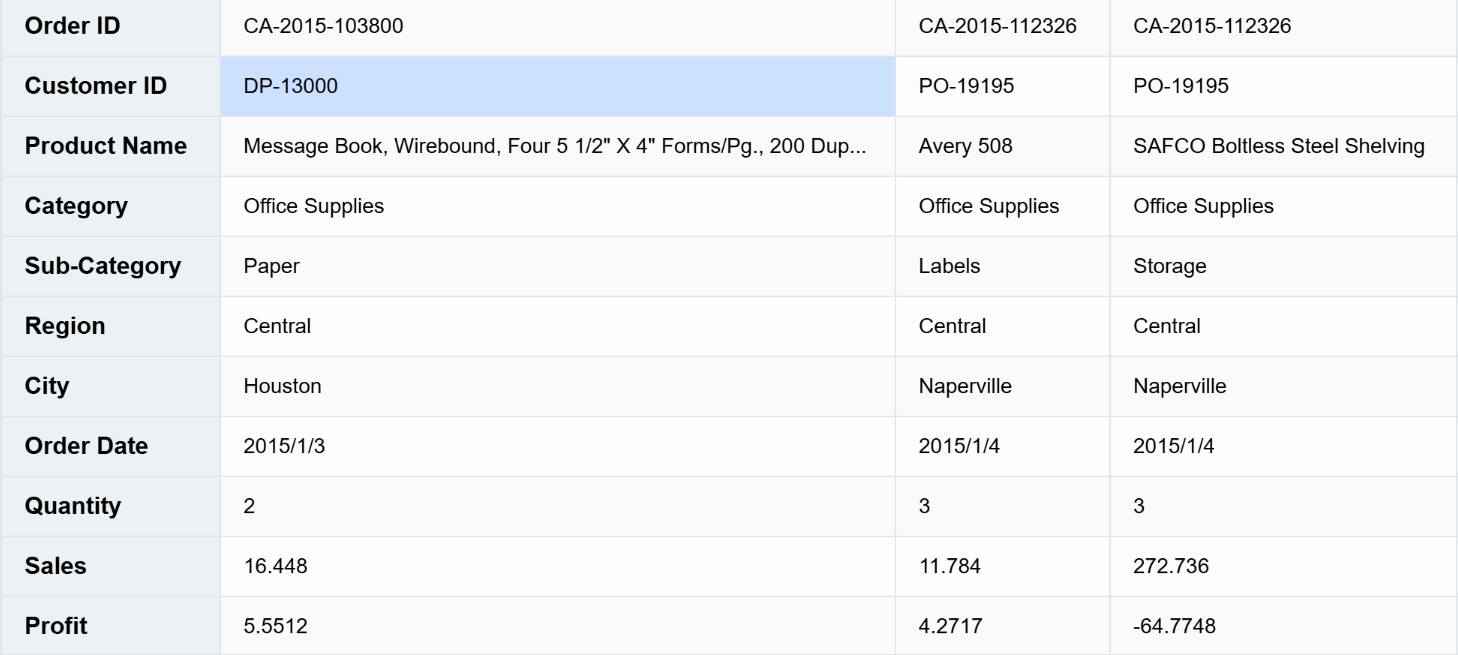
Transpose Table
The unique capability of ListTable allows for the transposition of rows and columns in a table, suitable for scenarios with special requirements, enabled through transpose.
Tree Structure
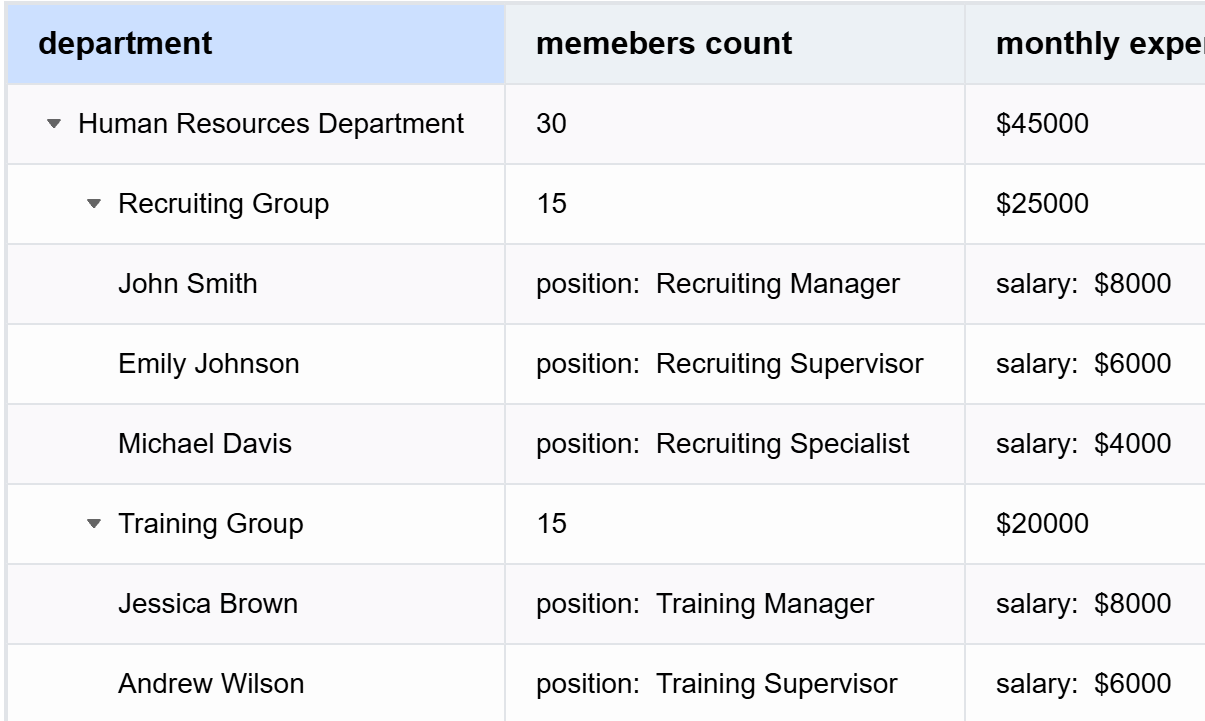
In certain scenarios, it is necessary to support tree-like table displays, including project management, department personnel management. ListTable supports basic tree structure display by defining group and children in records.
Detailed reference documentation: https://visactor.com/vtable/guide/table_type/List_table/tree_list
Grouped Display
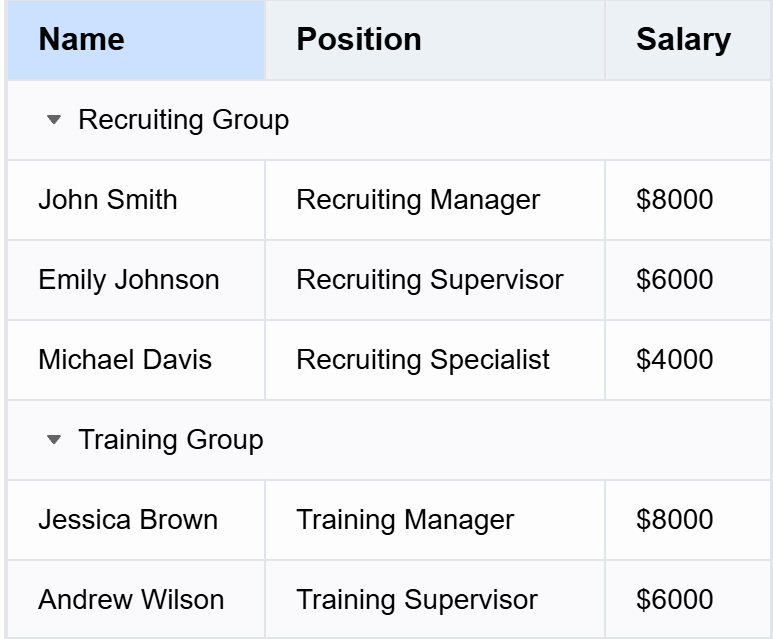
ListTable supports grouping of basic table rows by configuring the groupBy field to specify which field to use for the group operation.
Detailed reference documentation: https://visactor.com/vtable/guide/table_type/List_table/group_list
Subject
Built-in diverse themes: including ARCO Theme, LIGHT Theme, helping users quickly define their desired styles. \r
Detailed reference documentation: https://visactor.com/vtable/guide/theme_and_style/theme
Table Export
ListTable can support custom export to csv and excel formats, and can support export according to options. Apart from basic cells, all other data rows are exported as images. Currently, exporting mini charts is not supported. Introduction to export: https://visactor.com/vtable/guide/export/excel \r
This document is provided by the following personnel
taiiiyang(https://github.com/taiiiyang)