Basic tables differ from the complexity of pivot tables, with only distinctions between rows and columns, and the structure of the header is relatively simple. Let's take a look at the relevant parts of the header structure of basic tables. \r
Scene Tree Related
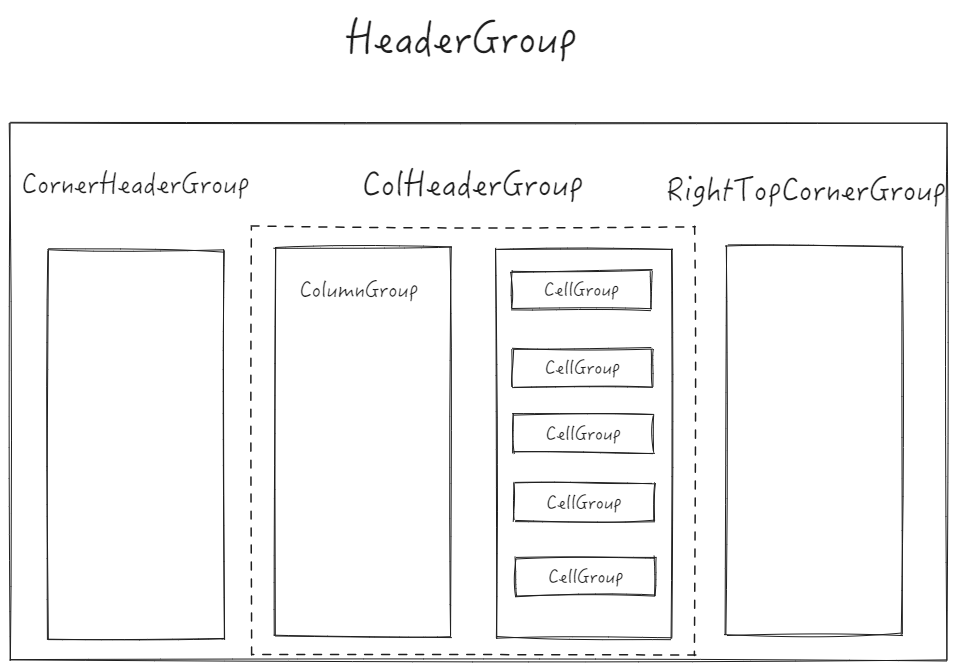
VTable manages the various modules of the table in the form of a scene tree. For the header of a basic table, it mainly involves the following nodes: \r
colHeaderGroup
List header node: Responsible for managing the entire list header, the header part does not change position with scrolling; \r
columnGroup
Column Group: Each column is a separate container, and basically each column will have its own style configuration; \r
cellGroup
Cell node: Each cell maintains its own copy, containing all the graphic elements that need to be rendered internally; \r
rightTopCornerGroup
Freeze the right-side list header: When configuring the right-side frozen columns, maintain a separate list header for the right side;
cornerHeaderGroup
Left frozen list header: Maintain the header part of the left frozen column, equivalent to the corner header; \r
Layout Module
The module related to the basic table header layout is maintained separately in the SimpleHeaderLayoutMap class, which contains a lot of layout-related logic and auxiliary functions. The most important are the following submodules.
Original Column Definition Storage
The original column definition is maintained separately on interProps, and separately maintained as _columns in LayoutMap. The difference is that for tree structures, _columns will only maintain a set of leaf nodes. This field is mainly used for operations to obtain the number of columns and column definitions.
To achieve the column hiding feature, the nodes hidden internally by VTable are not placed in columns, but are stored separately in columnsIncludeHided, which contains all the leaf nodes.
Dimension Tree
For such a multi-level header, it can be maintained in the form of a dimension tree. However, within the basic table, maintaining a tree structure is too costly, so VTable adopts another solution. \r
Tree Structure Alternatives
Since implementing a tree structure is too difficult, what can be done to reduce the complexity of handling tree structures? This is how VTable solves it internally: \r
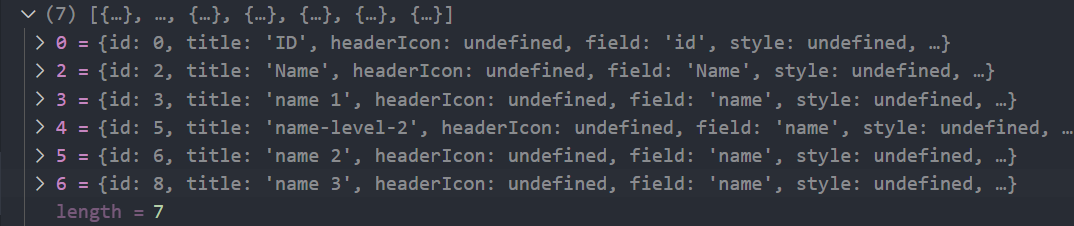
For the table header, flatten the definition of the columns, define an index for each column, and establish a mapping table between the index and the column definition; at the same time, generate a two-dimensional header ID matrix based on the layout of the table, generate the corresponding index at the corresponding row and column, use the row and column numbers to get the id, and then obtain the column definition on the corresponding cell according to the id. \r
The flattened column definition mapping table is maintained in layoutMap._headerObjectMap, and the two-dimensional data index is maintained in layouMap._headerCellIds.
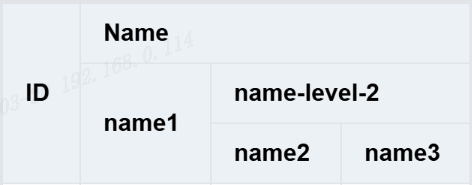
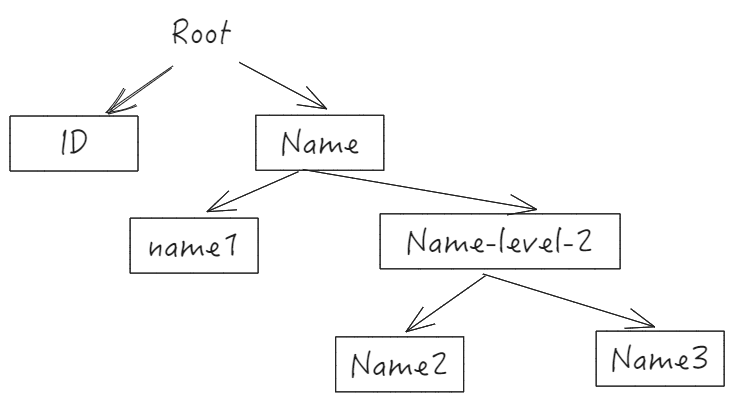
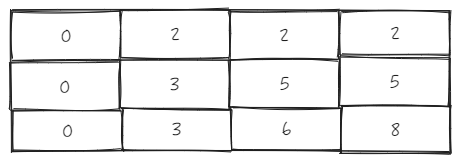
Let's take the above tree structure as an example, \r
_headerCellIds looks like this \r
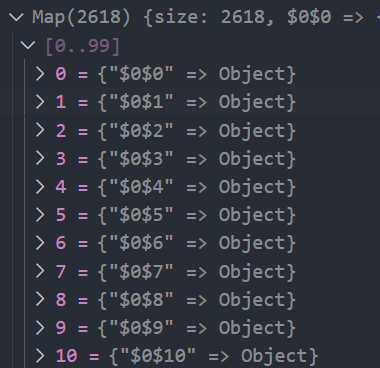
Corresponding _headerObjectsMap mapping table:
By decoupling the tree structure into a data index table corresponding to each row and column's id and a mapping table of id to column definitions, apart from needing to maintain the header ID matrix when the header structure changes, the simplicity of obtaining column definitions and performance in terms of storage are far superior to directly storing the tree structure. \r
Merged Cell Range Cache
In the case where there is a merged header in the basic table header, there is a need to determine which range the current cell is in based on the row and column numbers. If you frequently judge based on the original structure, it will cause a great performance waste. Therefore, LayoutMap internally stores a cache of merged cell ranges _cellRangeMap. This mapping table uses ${col}_${row} as the key, and the cellRange where the current cell is located as the value.
If there is a need to obtain the range based on row and column numbers in the future, you can directly use this mapping table to get it. It should be noted that after the header position is dragged, the cached row and column numbers are no longer accurate and need to be reset.
Module Generation
The above introduces several important modules in LayoutMap and their usage. Let's see how each module is generated during initialization:
Header ID Matrix
Since the generation of the header ID matrix and the header definition mapping are both completed in the same function _addHeader, it is quite challenging to directly understand this functional feature. Here, we will first separate the two parts of the logic and take a look at the generation of the data index table part:
Taking the tree header in the above figure as an example, let's look at the generation logic of _headerCellIds.
Here is the simplified logic for generating _headerCellIds:
// packages\vtable\src\layout\simple-header-layout.ts
const _columns = [];
let seqId = 0;
const _headerCellIds = [];

function _addHeaders(row, column, roots) {
  const rowCells = _newRow(row);
  column.forEach(hd => {
    const col = _columns.length;
    const id = seqId++;
    for (let r = row - 1; r >= 0; r--) {
      _headerCellIds[r] && (_headerCellIds[r][col] = roots[r]);
    }
    rowCells[col] = id;
    if (hd.columns) {
      _addHeaders(row + 1, hd.columns, [...roots, id]);
    } else {
      _columns.push(hd);
      seqId++;
      for (let r = row + 1; r < _headerCellIds.length; r++) {
        _headerCellIds[r][col] = id;
      }
    }
  });
}
Single Line Index Generation
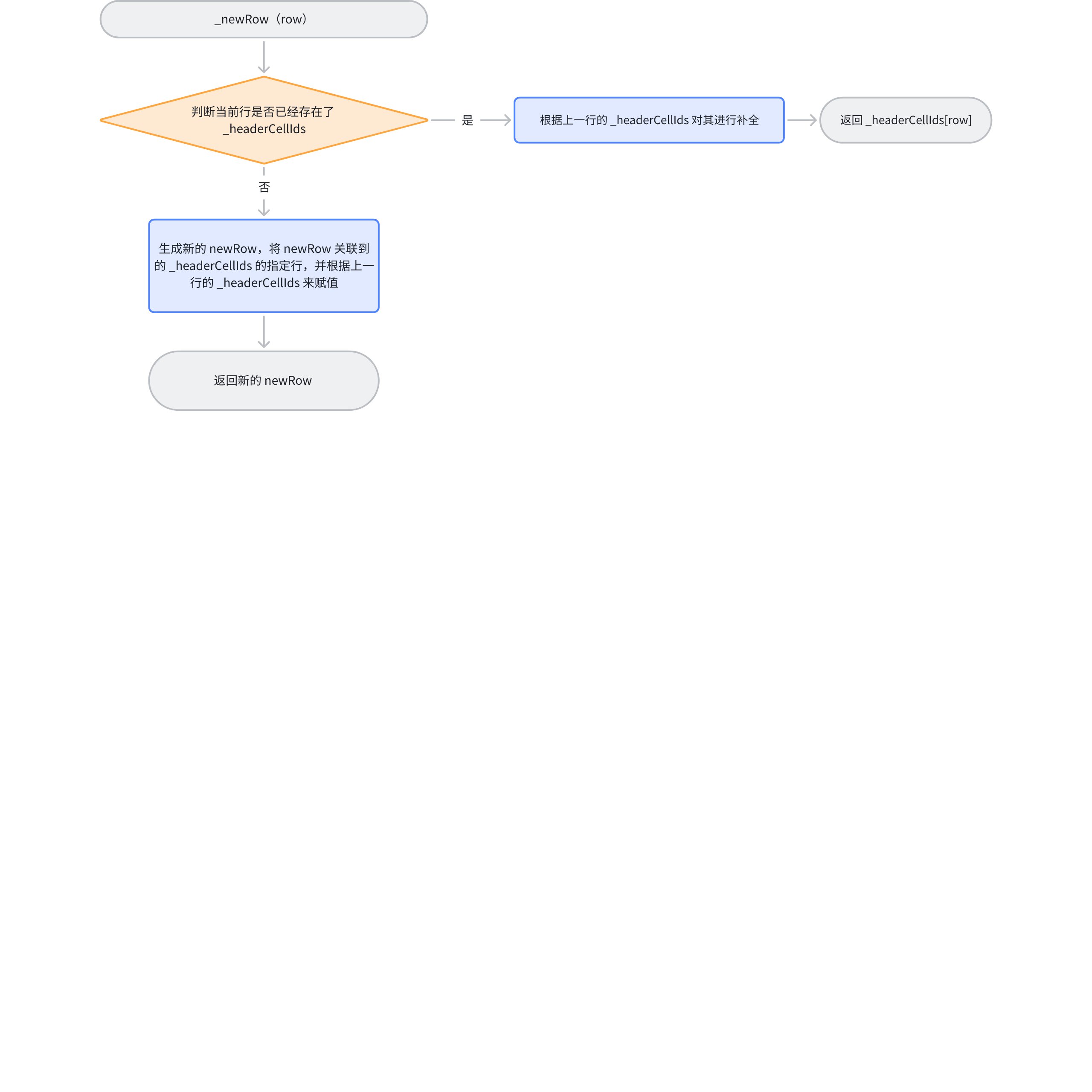
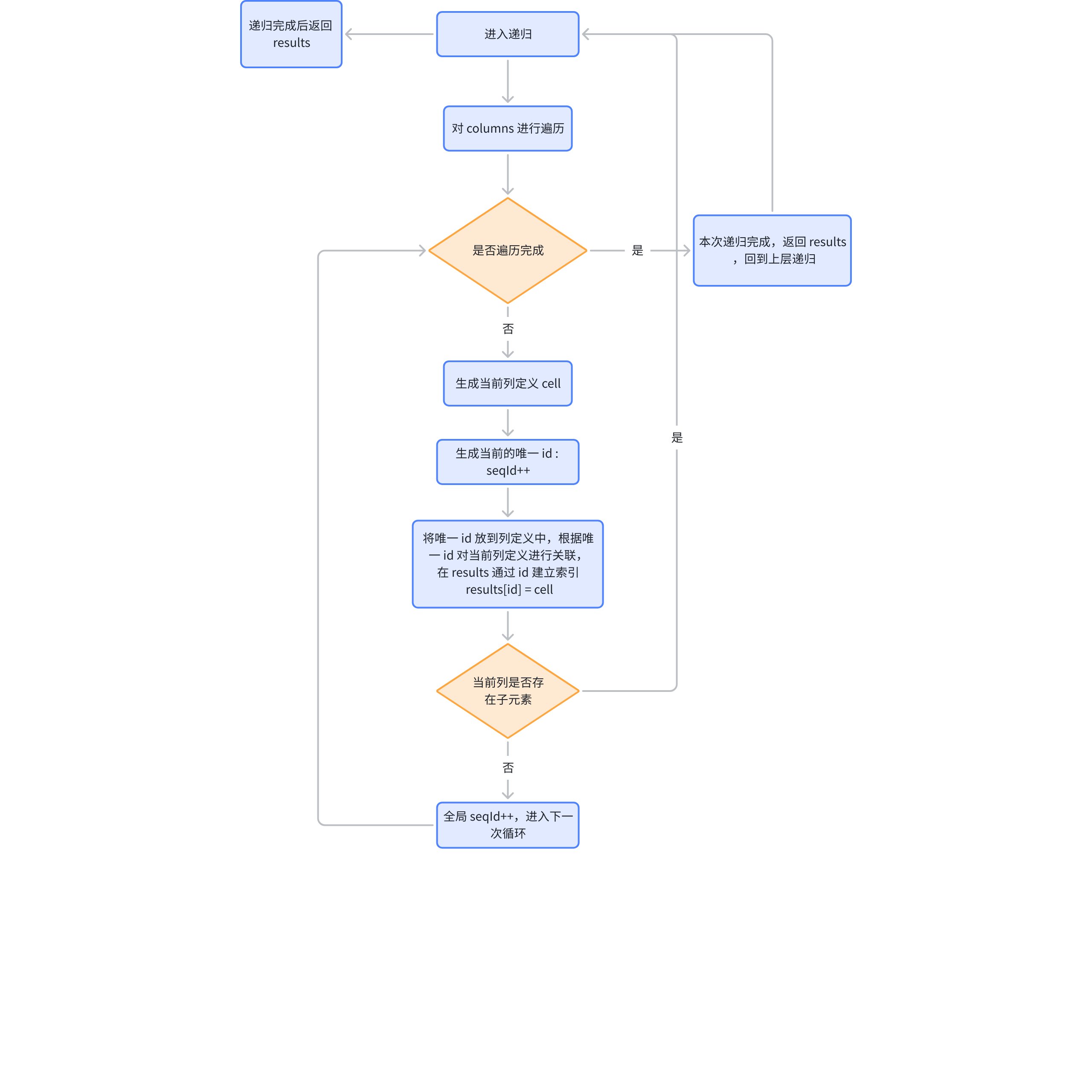
Before parsing the logic in detail, let's first see how the current line's rowCells are associated through line numbers:
When generating lines, there will be two situations: \r
If the current line already exists, it will be completed based on the data from the previous line, and the address of the current line will be returned; \r
If the current row does not exist, a newRow will be generated, associated with _headerCellIds[row], and then the information from the previous layer will be synchronized to newRow, returning the address of newRow. This way, when modifying rowCells, it can be synchronized to _headerCellIds.
_headerCellIds Changes
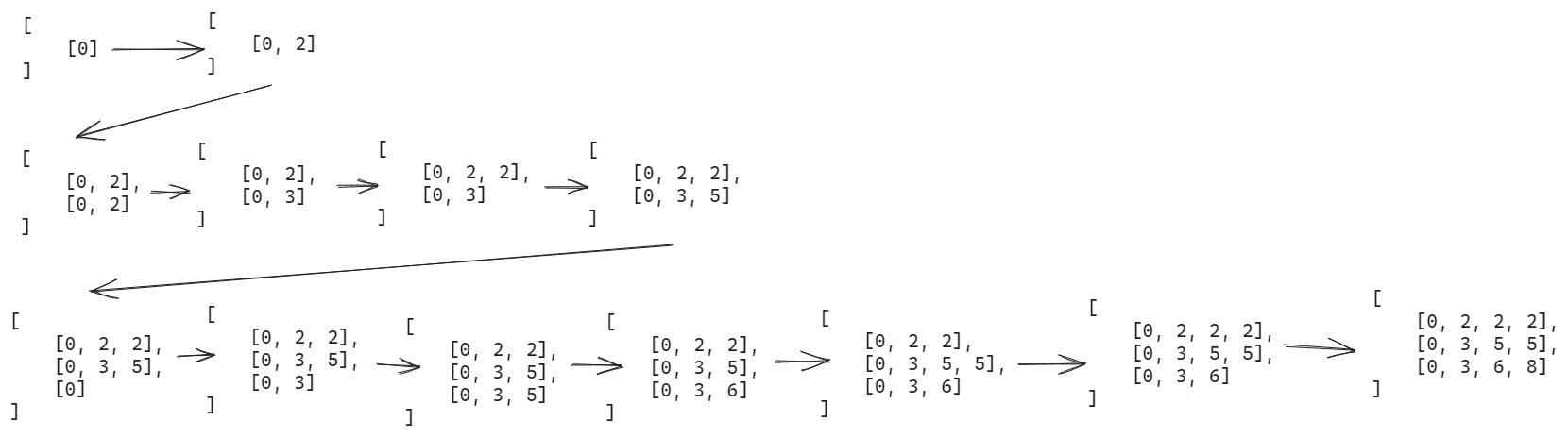
Here is the change in the addHeaders process, headerCellIds:
Generation Process
It can be seen that the number of columns in the final generated _headerCellIds is determined by the breadth of the columns tree, while the number of rows is determined by the depth of the tree.
The generation process is mainly through depth-first traversal. Before traversing the columns, rowCells and _headerCellIds will be associated first. \r
During the traversal of the columns, before processing the current node, if there is a node in the same column at the upper level, the node in the same column at the upper level will be updated.
After processing the previous layer, update the index for the current row and column.
If there is a subtree, recursion will continue to update roots, which represents the path from the root node to the current node. \r
If there is no subtree, the nodes below this column will be updated, and then the next iteration will begin. After the recursion is complete, it indicates that the update of _headerCellIds is finished. \r
Header Mapping
The generation of the header mapping relative to the header ID matrix is relatively simple, it is just a recursive process.