It is not only a fully functional graph visualization library, but also an explorer of data relationships.
!!!###!!!title=Dependency Links——VisActor/VTable tutorial documents!!!###!!!!!!###!!!description=VTable Gantt supports task dependency relationships, which can be displayed as lines connecting tasks.!!!###!!!
Task Dependency Relationships
VTable Gantt supports task dependency relationships, which can be displayed as lines connecting tasks.
Dependency Types
Four dependency types are supported, defined in the DependencyType enumeration:
FinishToStart:The previous task must finish before the next task can start.
StartToStart:Both tasks must start at the same time.
FinishToFinish:Both tasks must finish at the same time.
StartToFinish:The previous task must start before the next task can finish.
The values of linkedFromTaskKey and linkedToTaskKey need to correspond to the unique identifier field in the task data. The default unique identifier field name is id, which can be modified using the taskKeyField configuration option. Each dependency relationship can have its own style set through the linkLineStyle property, such as line color, width, etc., which helps better distinguish between different types of dependency relationships.
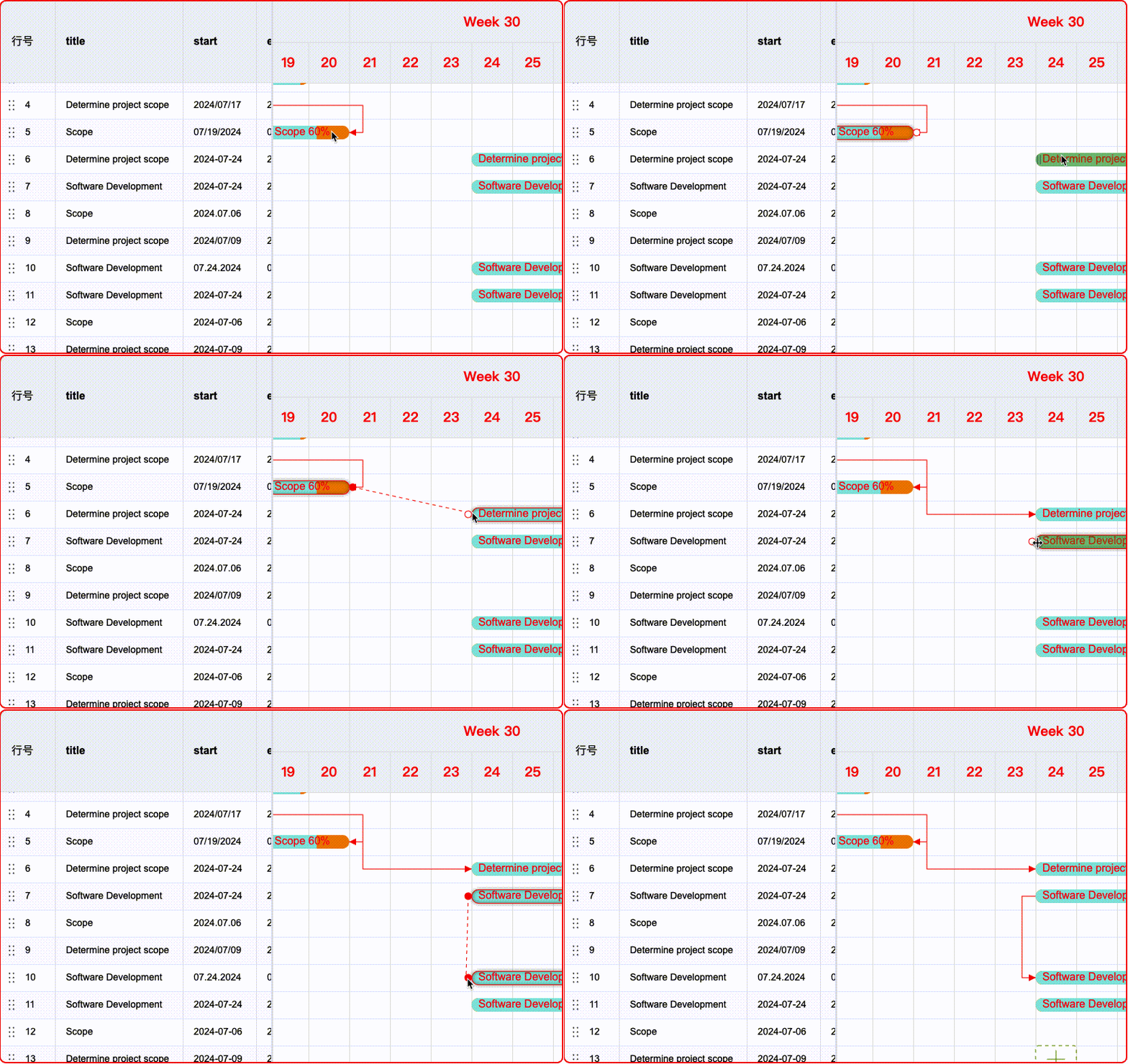
Create Dependencies
Dependencies can be created through API or interaction:
After enabling the dependency.linkCreatable configuration option, dependencies can be created through interaction.
Delete Dependencies
After enabling the dependency.linkDeletable configuration option, dependencies can be deleted through interaction.
Example 1:
To delete a dependency link through a right-click, you can listen for the CONTEXTMENU_DEPENDENCY_LINK event and call the deleteLink interface to delete it.
Example 2:
Configure the shortcut key keyboardOptions.deleteLinkOnDel or keyboardOptions.deleteLinkOnBack to delete the dependency link by pressing the 'del' or 'back' key on the keyboard.
Dependency Style Configuration
Style configuration entry:
{
  /** Basic dependency line style */
  linkLineStyle?: ILineStyle;
  /** Selected line style */
  linkSelectedLineStyle?: ITaskLinkSelectedStyle;
  /** Create link operation point */
  linkCreatePointStyle?: IPointStyle;
  /** Create link operation point response status effect */
  linkCreatingPointStyle?: IPointStyle;
  /** Create link operation line style */
  linkCreatingLineStyle?: ILineStyle;
}
In addition to setting unified dependency line styles, you can also configure styles for each dependency line individually. In the links array, each link object can set the style of that dependency line through the linkLineStyle property. The interface type of linkLineStyle is also ILineStyle.
If the Gantt chart is tree-structured, when the start or end of the dependency line is a collapsed subtask, the dependency line will be automatically hidden.
In different task display modes, dependency links may have exceptions, if you find any issues, please report them or contribute to our code!