The MasterDetailPlugin provides powerful master-detail table functionality for VTable ListTable, enabling embedding of complete sub-tables within master table rows for hierarchical data presentation. This plugin is particularly suitable for business scenarios requiring associated detailed information display, such as order details, project tasks, product specifications, and other complex data structure visualizations.
Plugin Configuration
Configuration Interface Definition
MasterDetailPlugin follows TypeScript interface specifications to ensure type safety and development experience. The plugin constructor accepts a MasterDetailPluginOptions configuration object, defined as follows:
interface MasterDetailPluginOptions {
  /** Whether to enable checkbox cascade functionality - controls checkbox linkage between master and detail tables, default is true */
  enableCheckboxCascade?: boolean;
  /** Field name of sub-table data - This is used to specify the attribute name where the sub-table data is located in the record. The default value is 'children'. */
  childrenKey?: string;
  /** Detail table configuration - can be static configuration object or dynamic configuration function */
  detailTableOptions?: DetailTableOptions | ((params: { data: unknown; bodyRowIndex: number }) => DetailTableOptions);
}

interface DetailTableOptions extends VTable.ListTableConstructorOptions {
  /** Detail table style configuration, including layout margins and size settings */
  style?: {
    margin?: number | [number, number] | [number, number, number, number];
    height?: number;
  };
}
Core Parameter Details
Parameter Name
Type
Default Value
Description
enableCheckboxCascade
boolean
true
Whether to enable checkbox cascade functionality between master and detail tables. When enabled, checkbox selections in master table will automatically sync with corresponding detail tables and vice versa
detailTableOptions
DetailTableOptions | Function
-
Detail table configuration options, supports static object configuration or dynamic configuration function based on data
DetailTableOptions Advanced Configuration
DetailTableOptions fully inherits all features of VTable.ListTableConstructorOptions, meaning the detail grid enjoys the same functionality and configuration capabilities as the master table:
All advanced configuration options supported by ListTable
In DetailTableOptions, there is no need to configure record. When expanding rows, the values configured in the children of the corresponding row in the main table will be used as the record of the sub-table.
Style Configuration Options
Property Name
Data Type
Default Value
Configuration Description
margin
number | number[]
0
Detail grid margin settings, supports flexible margin configuration: • Single value: 12 - uniform margin on all sides • Two values: [12, 16] - vertical and horizontal margins • Four values: [12, 16, 12, 16] - independent settings for top, right, bottom, left
height
number | 'auto'
300
Fixed height of detail grid container (in pixels), recommended to be set reasonably based on business data volume The height of the sub-table can also be automatically adapted by configuring auto
Quick Start
Basic Integration Steps
Integrating MasterDetailPlugin into your project requires only three simple steps:
Step 1: Import Plugin
import { MasterDetailPlugin } from '@visactor/vtable-plugins';
The following is a simplified master-detail functionality demonstration, showing the core working principles and basic configuration methods of the plugin:
Configuration data corresponding to the expanded state
The expansion status corresponding to this data row can be configured by setting the "hierarchyExpandLevel" in the "option" section.
If you want to use grouping when using the registered table plugin, please pass only one parameter when configuring groupBy, otherwise the plugin will not be able to recognize it.
Lazy Loading Setup
MasterDetailPlugin supports lazy loading functionality, allowing dynamic asynchronous loading of sub-table data when users expand rows. This is very useful for handling large amounts of data or scenarios that require real-time data fetching from servers.
Lazy Loading Workflow:
Data Identifier: In the main table data, set the children attribute of the rows that need lazy loading to true
Event Trigger Mechanism: When the user clicks the expand icon, the VTable triggers the TREE_HIERARCHY_STATE_CHANGE event
Core APIs:
Listen to event: 'TREE_HIERARCHY_STATE_CHANGE'
Show loading state: tableInstance.setLoadingHierarchyState(col, row)
Set child data: plugin.setRecordChildren(detailData, col, row)
Implementation Method:
// Data structure example
const masterData = [
  {
    id: 1,
    name: "Zhang San Company",
    amount: 15000,
    // Static sub-data - display directly
    children: [
      { productName: "Laptop", quantity: 2, price: 5000 },
      { productName: "Mouse", quantity: 5, price: 100 }
    ]
  },
  {
    id: 2,
    name: "Li Si Enterprise",
    amount: 25000,
    children: true // Lazy loading identifier - requires asynchronous data loading
  }
];

// Listen to expand/collapse events
tableInstance.on('tree_hierarchy_state_change', async (args) => {
  // Only handle expand operations with children === true (lazy loading identifier)
  if (args.hierarchyState === VTable.TYPES.HierarchyState.expand &&
      args.originData?.children === true) {

    // Show loading state
    tableInstance.setLoadingHierarchyState(args.col, args.row);

    try {
      // Asynchronously fetch data
      const detailData = await fetchDataFromServer(args.originData.id);

      // Set child data and automatically expand
      plugin.setRecordChildren(detailData, args.col, args.row);
    } catch (error) {
      console.error('Failed to load detail data:', error);
    }
  }
});
Technical Implementation Details:
The plugin internally implements lazy loading support through the following mechanism: listening to the TREE_HIERARCHY_STATE_CHANGE event of the VTable to ensure the correct synchronization of the hierarchy state.
The following is a complete lazy loading example demonstrating how to implement product detail lazy loading in an order management system:
Typical Business Scenario Examples
Scenario 1: Enterprise Employee Management System
In enterprise human resource management, it's necessary to display each employee's project participation in the employee list. The master table shows basic employee information (name, department, position, etc.), and when expanded, shows all project details and work records that the employee participates in.
Scenario 2: B2B Customer Order Tracking System
Business Requirements: In B2B customer relationship management systems, sales personnel need to quickly grasp customer profiles and be able to view each customer's historical orders, transaction amounts, and order status distribution in detail.
Solution: The master table displays key customer information (customer name, industry, regional distribution, cumulative transactions), and when expanded shows the customer's complete order history, including order details, product information, transaction amounts, and order status tracking.
Plugin Interfaces and Events
Plugin Interfaces
The master-detail plugin provides the following interface methods for getting and manipulating sub-table instances:
getAllSubTableInstances(Function)
Get a mapping of all sub-table instances.
/**
 * Get all sub-table instances
 * @returns Map of sub-table instances, where key is bodyRowIndex and value is VTable instance
 */
getAllSubTableInstances(): Map<number, VTable.ListTable> | null
Returns a Map containing all created sub-table instances, where the key is the body row index of the master table (excluding header), and the value is the corresponding VTable sub-table instance. Returns null if there are no sub-table instances.
getSubTableByRowIndex(Function)
Get sub-table instance by master table row number.
/**
 * Get sub-table instance by master table row number
 * @param rowIndex Master table row index (including header)
 * @returns Sub-table instance, or null if not exists
 */
getSubTableByRowIndex(rowIndex: number): VTable.ListTable | null
Get the corresponding sub-table instance based on the master table's row index (including header). This method automatically calculates the corresponding body row index.
getSubTableByBodyRowIndex(Function)
Get sub-table instance by master table body row number.
/**
 * Get sub-table instance by master table body row number
 * @param bodyRowIndex Master table body row index (excluding header)
 * @returns Sub-table instance, or null if not exists
 */
getSubTableByBodyRowIndex(bodyRowIndex: number): VTable.ListTable | null
Get the corresponding sub-table instance based on the master table's body row index (excluding header). This is the most direct way to get sub-table instances.
filterSubTables(Function)
Filter sub-table instances based on conditions.
/**
 * Filter sub-table instances based on conditions
 * @param predicate Filter condition function
 * @returns Array of sub-table instances that meet the conditions
 */
filterSubTables(
  predicate: (bodyRowIndex: number, subTable: VTable.ListTable, record?: unknown) => boolean
): Array<{ bodyRowIndex: number; subTable: VTable.ListTable; record?: unknown }>
Filter sub-table instances based on the provided filter condition function. The filter function receives body row index, sub-table instance, and record data as parameters, and returns a boolean indicating whether the condition is met. The return value is an array containing information about sub-tables that meet the conditions.
setRecordChildren(Function)
Set child data for a record and expand it.
/**
 * Set child data for a record and expand it
 * @param children Array of child data
 * @param col Column index
 * @param row Row index
 */
setRecordChildren(children: unknown[], col: number, row: number): void
Set child data for the record corresponding to the specified cell and automatically expand that row to display the sub-table. This method modifies the children property of the original record data and refreshes the table display. It is used for lazy loading scenarios.
Plugin Events
The master-detail plugin forwards all sub-table events to the master table through the setupSubTableEventForwarding mechanism, which traverses VTable.TABLE_EVENT_TYPE and uses the VTable.TABLE_EVENT_TYPE.PLUGIN_EVENT event type for unified forwarding:
Sub-table Event Forwarding
Master-detail plugin event forwarding mechanism.
/**
 * Plugin event information interface
 */
interface SubTableEventInfo {
  /** Sub-table event type */
  eventType: keyof typeof VTable.TABLE_EVENT_TYPE;
  /** Master table row index (excluding header) */
  masterBodyRowIndex: number;
  /** Master table row index (including header) */
  masterRowIndex: number;
  /** Sub-table instance */
  subTable: VTable.ListTable;
  /** Original event data */
  originalEventArgs?: unknown;
}
When any event occurs in a sub-table, the plugin wraps the event information as a SubTableEventInfo object and forwards it through the master table's PLUGIN_EVENT event.
Listening Example:
// Listen to sub-table events
tableInstance.on(VTable.TABLE_EVENT_TYPE.PLUGIN_EVENT, (args) => {
  const { plugin, pluginEventInfo } = args;

  // Check if it's a master-detail plugin event
  if (plugin?.name === 'Master Detail Plugin') {
    const eventInfo = pluginEventInfo;

    console.log('Sub-table event:', {
      eventType: eventInfo.eventType,           // Original event type, e.g., 'click_cell'
      masterRowIndex: eventInfo.masterRowIndex, // Master table row index (including header)
      masterBodyRowIndex: eventInfo.masterBodyRowIndex, // Master table body row index
      subTable: eventInfo.subTable,            // Sub-table instance
      originalEventArgs: eventInfo.originalEventArgs // Original event parameters
    });

    // Handle different logic based on event type
    if (eventInfo.eventType === VTable.TABLE_EVENT_TYPE.CLICK_CELL) {
      // Handle sub-table cell click event
      handleSubTableCellClick(eventInfo);
    }
  }
});
Through this event forwarding mechanism, developers can uniformly handle all sub-table interaction events at the master table level, enabling complex business logic implementation.
Technical Implementation Principles
MasterDetailPlugin adopts efficient rendering strategies to implement master-detail functionality:
ViewBox Positioning System: The plugin is based on VTable's ViewBox mechanism for precise positioning, ensuring that detail grids can be accurately rendered at specified positions within expanded rows.
Canvas Shared Rendering: Detail grids share the same Canvas drawing surface with the master table, avoiding performance overhead from multi-canvas switching while ensuring visual consistency.
Dynamic Row Height Adjustment: By intelligently adjusting the height of expanded rows while keeping the original height of CellGroups in those rows unchanged, it cleverly creates blank areas for rendering detail grids.
Scroll Event Optimization: The plugin automatically sets scrollEventAlwaysTrigger to true, ensuring that scroll events can still be triggered when the table scrolls to boundaries, achieving automatic scrolling effects for detail grids.
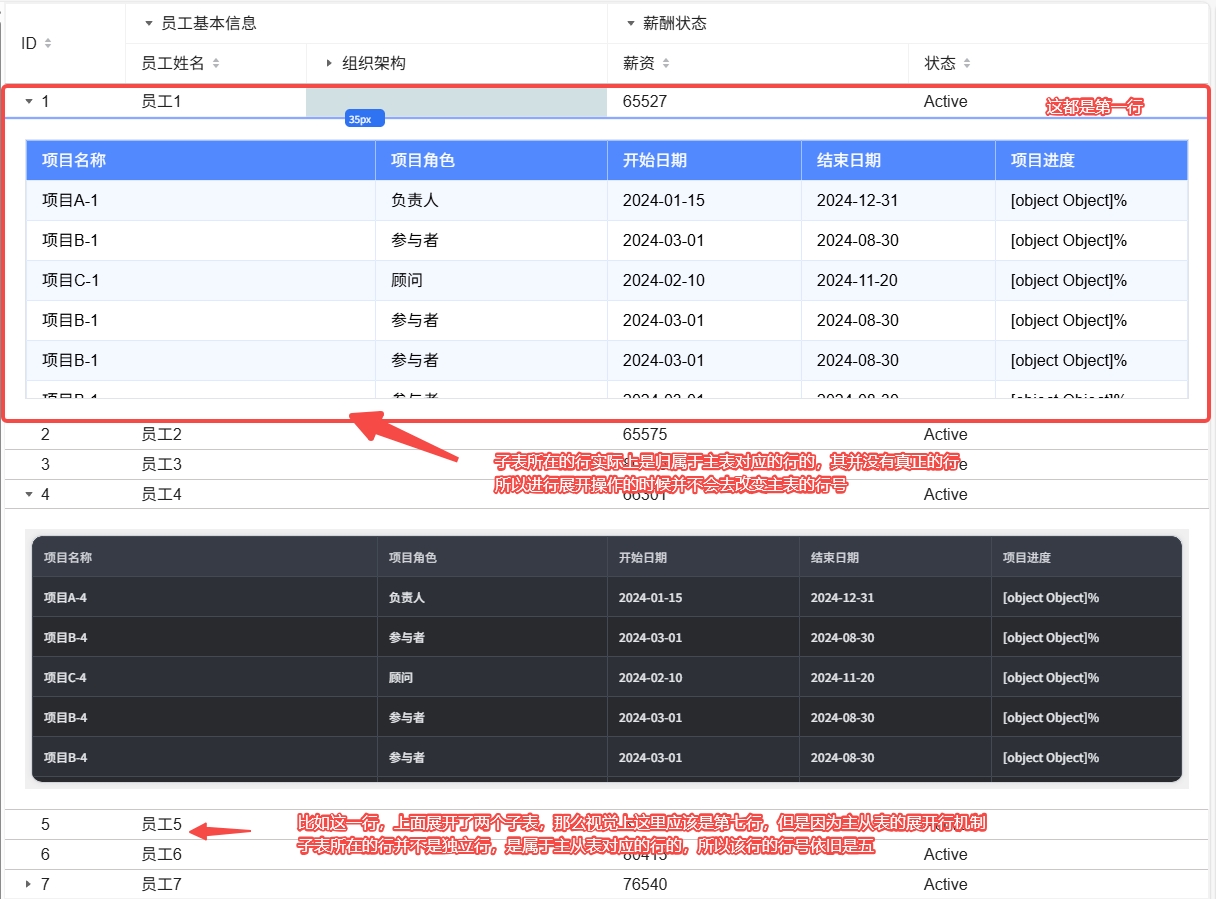
An important design concept of the master-slave table plugin is that: The rows where the sub-tables are located visually appear as separate rows, but they actually belong to the expanded rows of the corresponding master table
The row numbers of the main table (such as 1, 2, 3, 4, 5, 6, 7 in the figure) remain continuous and do not break due to the existence of sub-tables. The sub-tables actually adjust the height of the expanded rows of the main table dynamically, so that there is corresponding space within the rows. Then, a rendering area is created within that row. Therefore, the sub-tables do not have true "row numbers". The master-slave table plugin uses various technical means to make the expanded rows visually appear as an independent sub-table area, but essentially this area still belongs to the corresponding row of the main table.