It is not only a fully functional graph visualization library, but also an explorer of data relationships.
!!!###!!!title=Gantt Scales——VisActor/VTable tutorial documents!!!###!!!!!!###!!!description=The date scale of the Gantt chart determines the display mode and the layout of the task bar. VTable provides multiple date granularity options, including:- 'day' Display by day- 'week' Display by week- 'month' Display by month- 'quarter' Display by quarter- 'year' Display by year- 'hour' Display by hour- 'minute' Display by minute- 'second' Display by second!!!###!!!
Gantt Date Scale
The date scale of the Gantt chart determines the display mode and the layout of the task bar. VTable provides multiple date granularity options, including:
'day' Display by day
'week' Display by week
'month' Display by month
'quarter' Display by quarter
'year' Display by year
'hour' Display by hour
'minute' Display by minute
'second' Display by second
Configuration
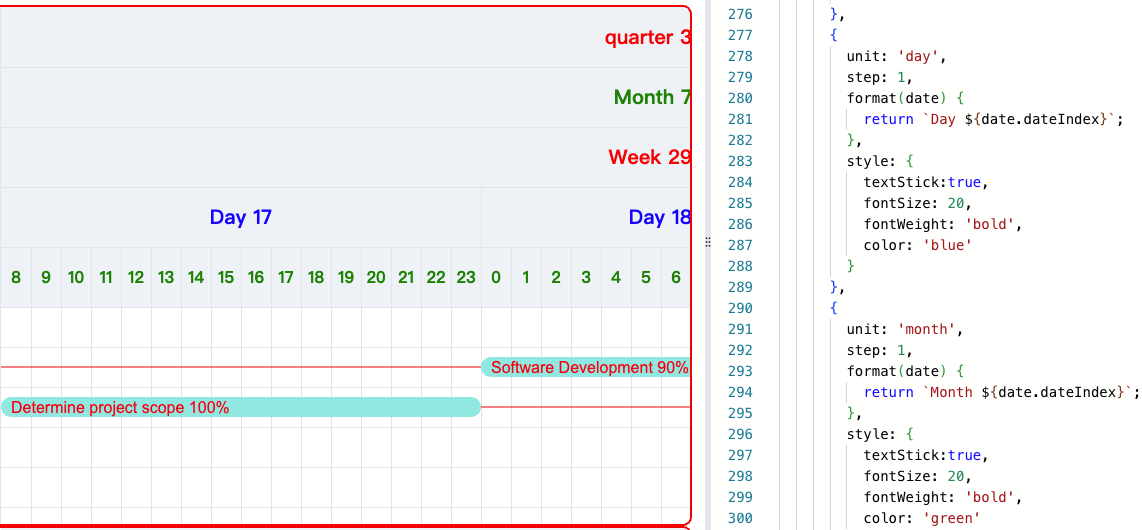
You can set the date granularity through the timeLineHeader.scales configuration item. You can set multiple layers, and each layer can set a different date granularity.
After configuring multiple layers of time granularity, vtable-gantt will display the time granularity from largest to smallest by default.
The following example shows the configuration of multiple layers of scales:
The final display effect is that the smallest granularity is at the bottom and the largest granularity is at the top. This rule is符合人类阅读习惯。
Time Granularity Completeness
The bottom level of the date header is the smallest time granularity, and it must be complete.
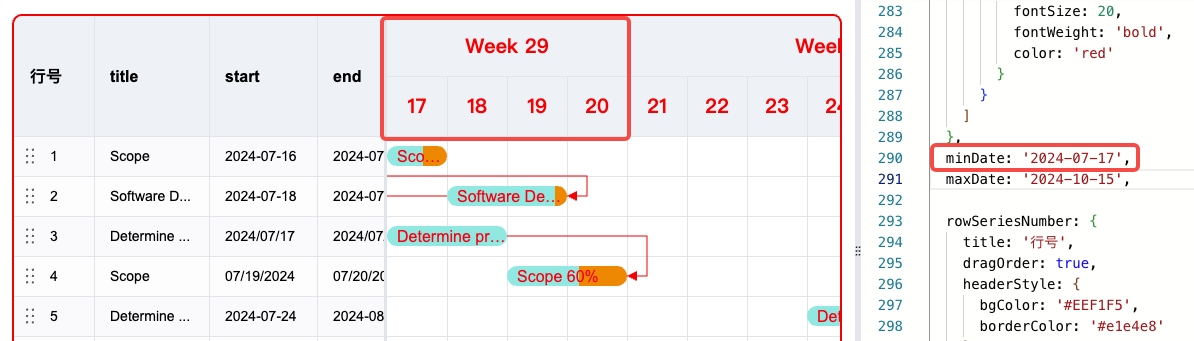
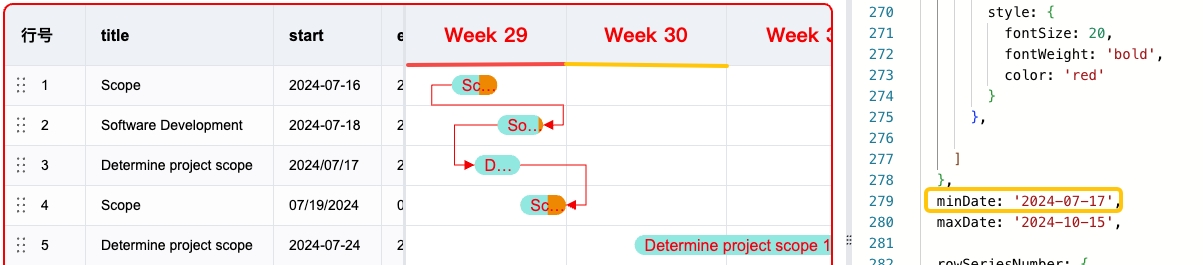
This completeness is explained through the following two images:
In the above image, we set the minimum time granularity to day, and we can see that the leftmost date of the bottom level of the date header is consistent with minDate, which is '2024-07-17'.
Next, we set the minimum time granularity to week, and we can see that the leftmost date of the bottom level of the date header should be '2024-07-15', because '2024-07-15' is the start date of the week of '2024-07-17'.
This date is not based on minDate, but on startOfWeek. The current rule of VTable-Gantt is:
If the minimum time granularity is day, the leftmost date of the bottom level of the date header is consistent with minDate.
If the minimum time granularity is week, the leftmost date of the bottom level of the date header is consistent with the start date of the week of minDate.
If the minimum time granularity is month, the leftmost date of the bottom level of the date header is consistent with the start date of the month of minDate.
If the minimum time granularity is quarter, the leftmost date of the bottom level of the date header is consistent with the start date of the quarter of minDate.
If the minimum time granularity is year, the leftmost date of the bottom level of the date header is consistent with the start date of the year of minDate.
If the minimum time granularity is hour, the leftmost date of the bottom level of the date header is consistent with the start date of the hour of minDate.
If the minimum time granularity is minute, the leftmost date of the bottom level of the date header is consistent with the start date of the minute of minDate.
If the minimum time granularity is second, the leftmost date of the bottom level of the date header is consistent with the start date of the second of minDate.
Related Interfaces
updateScales:Update time granularity configuration
updateDateRange:Update date range
Coming Soon
The zoomIn and zoomOut functions, which can zoom in and out the time granularity.