It is not only a fully functional graph visualization library, but also an explorer of data relationships.
!!!###!!!title=sheet plugins——VisActor/VTable tutorial documents!!!###!!!!!!###!!!description=VTable-Sheet currently uses several VTable plugins, including:- [filter-plugin](../plugin/filter) Filter plugin- [auto-fill-plugin](../plugin/auto-fill) Auto-fill plugin- [history-plugin](../plugin/history) History (undo/redo) plugin- [table-series-number-plugin](../plugin/table-series-number) Table number plugin- [highlight-header-when-select-cell-plugin](../plugin/header-highlight) Header highlight plugin- [context-menu-plugin](../plugin/context-menu) Right-click menu plugin- [table-export-plugin](../plugin/table-export) Table export plugin- [excel-import-plugin](../plugin/excel-import) Table import pluginThe principle is that each sheet is a VTable instance, so you can use plugins just like with VTable.Because of this, plugins can only work on individual sheets, not on the entire VTableSheet. For capabilities like import and export, importing an Excel file can only import into the current sheet, rather than importing all sheets from the file into VTableSheet, and exporting can only export the current sheet.**In the future, VTableSheet will provide plugin extension capabilities, without being limited to individual sheets. We also hope that you can contribute plugins to enrich VTableSheet's functionality.**!!!###!!!
Plugin Functionality
VTable-Sheet currently uses several VTable plugins, including:
The principle is that each sheet is a VTable instance, so you can use plugins just like with VTable.
Because of this, plugins can only work on individual sheets, not on the entire VTableSheet. For capabilities like import and export, importing an Excel file can only import into the current sheet, rather than importing all sheets from the file into VTableSheet, and exporting can only export the current sheet.
In the future, VTableSheet will provide plugin extension capabilities, without being limited to individual sheets. We also hope that you can contribute plugins to enrich VTableSheet's functionality.
Configuring Plugins
In addition to the built-in plugins mentioned above, VTableSheet also supports users configuring plugins through VTablePluginModules to extend VTableSheet's table plugin functionality.
Before referencing plugins, make sure that @visactor/vtable-plugins and VTableSheet are using the same version, otherwise the plugins may not work properly. Also, be familiar with the plugin usage tutorial, which you can refer to at VTable Plugin Usage Tutorial. If you want to extend VTable plugins, you can refer to VTable Plugin Contribution.
Configuration example: Configure the carousel animation plugin during VTableSheet initialization to implement table carousel scrolling:
For combined use of plugins and menus, refer to Menu Configuration for specific menu configuration.
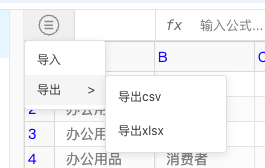
Here we mainly introduce how to add import and export functionality to the menu. When configuring VTablePluginModules, you need to explicitly configure the required ExcelImportPlugin and TableExportPlugin plugins.
In the example below, mainMenu is configured, and a main menu button will appear in the upper left corner of the UI. Clicking the main menu button will display import and export functionality:
The MenuKey in the example is the menu key value defined internally by VTableSheet.
The import and export functionality above can also be called through APIs. After successful initialization, the VTableSheet instance provides the following APIs to call import and export functionality:
exportSheetToFile
importFileToSheet
Through the plugin system, you can greatly extend the functionality of VTable-Sheet to meet various complex business requirements. If you want to customize plugins, please refer to Plugin Contribution