


Gantt Chart Grid
The grid lines mainly refer to the grid lines of the left information table of the Gantt chart, the date header and task bar of the right Gantt chart, and the overall outer frame line.
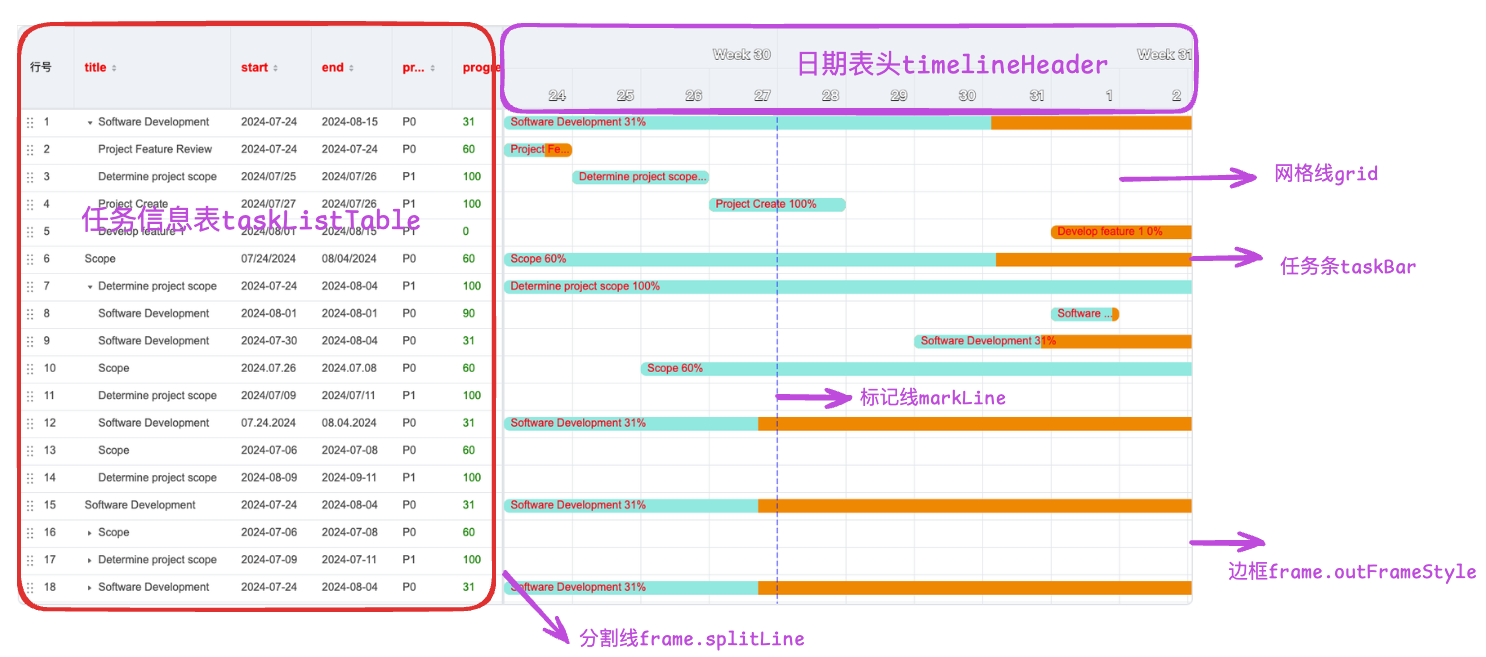
Gantt Task List Table Grid Lines
In the Gantt chart, the grid lines of the left information table are rendered and organized by the VTable component, which can be controlled through the taskListTable configuration item.
The specific configuration of the left information table can refer to the configuration items of VTable, please refer to the tutorial theme or style.
For example, to remove the vertical split lines of the table, you can configure the theme:
{
  "taskListTable": {
    "theme": {
      "bodyStyle": {
        "borderLineWidth":[1,0]
      }
    }
  }
}
Date Table Grid Lines
The relevant configurations of the date table are in the timelineHeader configuration item, where the verticalLine configuration item can control the vertical split lines of the date table, and the horizontalLine configuration item can control the horizontal split lines of the date table.
{
  "timelineHeader": {
    "verticalLine": {
      "lineColor": "red",
      "lineWidth": 1
    },
    "horizontalLine": {
      "lineColor": "red",
      "lineWidth": 1
    }
  }
}
Gantt Task Bar Grid Lines
The grid lines of the Gantt task bar can be controlled through the grid configuration item. The specific configuration is as follows:
export interface IGrid {
  backgroundColor?: string;
  /** Set different background colors for different data rows */
  horizontalBackgroundColor?: string[] | ((args: GridHorizontalLineStyleArgumentType) => string);
  /** Set different background colors for different date columns */
  verticalBackgroundColor?: string[] | ((args: GridVerticalLineStyleArgumentType) => string);
  /** Weekend background color */
  weekendBackgroundColor?: string;
  /** Vertical interval line style */
  verticalLine?: ILineStyle | ((args: GridVerticalLineStyleArgumentType) => ILineStyle);
  /** Horizontal interval line style */
  horizontalLine?: ILineStyle | ((args: GridHorizontalLineStyleArgumentType) => ILineStyle);
  /** The date scale that the vertical line depends on. The default is the smallest time granularity in the timelineHeader scales. */
  verticalLineDependenceOnTimeScale?: 'day' | 'week' | 'month' | 'quarter' | 'year' | 'hour' | 'minute' | 'second';
}
It can be seen that the grid configuration item can control the grid lines of the task bar, including the background color, horizontal split lines, vertical split lines, weekend background color, and the specific date scale that the vertical line depends on.
The background color and split lines can be configured as arrays to set different background colors for different rows or columns. They can also be configured as functions to set different background colors for different data rows or date columns.
For example:
{
  "grid": {
    "verticalBackgroundColor": ["#f00", "#0f0"],
    "horizontalBackgroundColor": ["#00f", "#0f0"],
    "verticalBackgroundColor": (args) => {
      return args.columnIndex % 2 === 0 ? "#f00" : "#0f0";
    }
  }
}
Gantt Chart Outer Frame Line
The outer frame line of the Gantt chart can be controlled through the frame.outerFrameStyle configuration item. The specific configuration is as follows:
{
  "frame": {
    "outerFrameStyle": {
      "lineColor": "red",
      "lineWidth": 1
    }
  }
}
Gantt Chart Overall Split Line
The split line between the left information table and the right task bar can be controlled through the frame.verticalSplitLine configuration item.
The split line between the header and the list body can be controlled through the frame.horizontalSplitLine configuration item.
For example:
{
  "frame": {
    "verticalSplitLine": {
      "lineColor": "red",
      "lineWidth": 1
    },
    "horizontalSplitLine": {
      "lineColor": "red",
      "lineWidth": 1
    }
  }
}