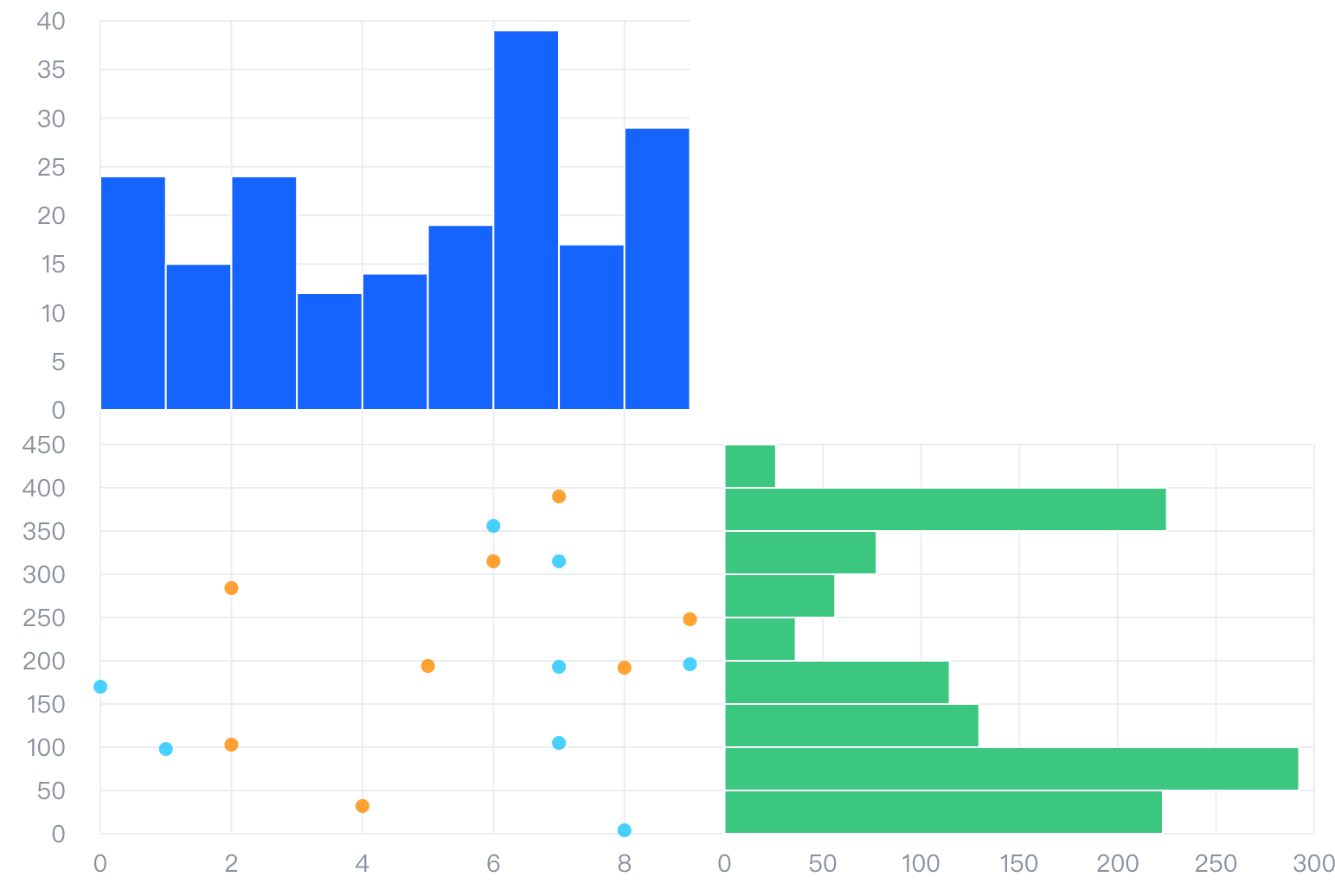
A combination chart is a type of data visualization chart that displays interdependent data sets combined in a single chart for better data analysis and comparison. Combination charts typically use multiple data series and visual elements such as line series, bar series, area series, scatter series, pie series, etc., to represent various types of data. In combination charts, each data series usually has its own legend and coordinate axis, and each axis can use different scale ranges and labels to more clearly represent different data.
The advantage of combination charts is that they can simultaneously present information from multiple data sets, providing a more comprehensive view of the overall trend and direction. By combining different data types, units, and measurements, combination charts can provide deeper and more comprehensive insights into complex data. Combination charts are widely used in various fields such as business, science, and medical to effectively analyze and compare various complex data.
layout attribute declares a custom combination chart layout
layout.type attribute declares the layout type, grid for row and column layout
layout.col attribute declares the number of columns (note: all independent elements in the chart need to occupy one column separately, e.g., data axis or other components, and chart series should each occupy one column)
layout.row attribute declares the number of rows (note: the same as above)
layout.col attribute specifies column width, supporting { index: xx, size: xx } format, where index represents the index of the column, and size represents the column width
layout.row attribute specifies row height, supporting { index: xx, size: xx } format, where index represents the index of the row, and size represents the row height
layout.elements attribute declares layout unit IDs for binding data series to layout units. Declare in {modelId: xx, row: xx, col: xx} format, where modelId represents the ID of the layout unit, and row and col represent the index of the row and column where the layout unit is located
region attribute declares data regions for subsequent binding. Layout units using the same data need to bind to the same regionId, such as the coordinate axis and the layout unit where its corresponding chart series is located. Declare as id: xx, where id represents the data region ID
series attribute declares different chart series. In the series configuration, regionIndex is used to bind the data region where the chart series is located. id is used to bind the axis where the layout unit is located, corresponding one-to-one with layout.elements' modelId (since there is a corresponding relationship between data region and layout.elements' modelId, there is no need to declare id here)
axes attribute declares different coordinate axis components, regionIndex and id attributes are the same as above
Instructions for use
Because the combination chart does not limit the coordinate system, it cannot determine internally what type of coordinate axes should be created. Therefore, when configuring the combination chart, you must declare the axes attribute to declare what type of coordinate axes to use.
For the Cartesian coordinate system, we need to declare the coordinate axis and type of the corresponding direction, for example:
axes: [
  { orient: 'left', type: 'linear' }, // Declare the left axis as a linear axis
  { orient: 'bottom', type: 'band' } // Declare the lower axis as a discrete axis
];
For the polar coordinate system, we need to declare the coordinate axis and type of the corresponding direction, for example:
axes: [
  { orient: 'angle', type: 'band' }, // Declare the arc axis as a discrete axis
  { orient: 'radius', type: 'linear' } // Declare the radius axis as a linear axis
];
Chart Components
As the name suggests, a combination chart consists of different chart series, coordinate axes, tooltips, and other components combined. Theoretically, VChart supports all chart series combinations, but before that, some configurations are needed to determine the data, layouts, and other relationships of different series, so that different series can be placed reasonably and their correct graphic attributes can be obtained through data mapping.
commonChart.type: 'common': Chart type, combination chart type is 'common'
commonChart.layout.type: Layout type, grid for row and column layout
commonChart.layout.col: Number of columns (note: all independent elements in the chart need to occupy one column separately, e.g., data axis or other components, and chart series should each occupy one column)
commonChart.layout.row: Number of rows (note: the same as above)
commonChart.layout.col: Specify column width, supporting { index: xx, size: xx } format, index represents the index of the column, size represents the column width
commonChart.layout.row: Specify row height, supporting { index: xx, size: xx } format, index represents the index of the row, size represents the row height
commonChart.layout.elements: Layout unit IDs for binding data series to layout units. Declare in {modelId: xx, row: xx, col: xx} format, where modelId represents the ID of the layout unit, and row and col represent the index of the row and column where the layout unit is located
commonChart.region: Determine data region for subsequent binding, layout units using the same data need to bind to the same regionId, such as coordinate axis and the layout unit where its corresponding chart series is located. Declare as id: xx, where id represents the data region ID
commonChart.series: Declare different chart series, in the series configuration, regionIndex is used to bind the data region where the chart series is located. id is used to bind the axis where the layout unit is located, corresponding one-to-one with layout.elements' modelId (since there is a corresponding relationship between data region and layout.elements' modelId, there is no need to declare id here)
commonChart.axes: Declare different coordinate axis components, regionIndex and id attributes are the same as above
Combination Chart Features
Dual-axis chart (bar chart + line chart)
Key configurations
type: 'common' declares a combination chart type
axesseriesIndex attribute is configured as the series index that the axis needs to associate with
axesseriesId attribute is configured as an array of seriesid that the axis needs to associate with
Line Pie Combination Chart (Pie Chart + Line Chart)
Key configurations
type: 'common' declares a combination chart type
layout attribute configures the layout of multiple regions
Polar Coordinate Combination Chart (Radar Chart + Rose Chart)
Key configurations
type: 'common' declares a combination chart
series configuration of the corresponding series
axes declare angle axis and radius axis, note that axis information must be declared, otherwise, it cannot be drawn
Easing function visualization
Key configurations
type: 'common' declares a combination chart type
layout attribute configures the layout of multiple regions
animationAppear entrance animation configuration
animationAppear.easing entrance animation easing function configuration
Multi-region Pie Chart (Pie Chart + Pie Chart)
Key configurations
type: 'common' declares a combination chart type
layout attribute configures the layout of multiple regions