It is not only a fully functional graph visualization library, but also an explorer of data relationships.
!!!###!!!title=VMind Getting Started——VisActor/VChart tutorial documents!!!###!!!!!!###!!!description=@VisActor/VChart provides a full-process solution from data to presentation, with "visual narrative" and "intelligence" as its core competitiveness. The powerful generation ability of large language models provides VChart with a natural language interactive interface, allowing us to directly call VChart's capabilities through natural language, and complete chart generation and editing with simple, fast and high quality.@VisActor/VMind is a chart intelligence module based on VChart and large language model. It provides chart intelligent recommendation, intelligent color scheme, conversational chart editing and other capabilities, which can greatly reduce the threshold for using VChart and improve the efficiency of users to create data lake visualization works.In this tutorial, we will cover how to use VMind components to generate a simple diagram.!!!###!!!
Get started quickly
@VisActor/VChart provides a full-process solution from data to presentation, with "visual narrative" and "intelligence" as its core competitiveness. The powerful generation ability of large language models provides VChart with a natural language interactive interface, allowing us to directly call VChart's capabilities through natural language, and complete chart generation and editing with simple, fast and high quality.
@VisActor/VMind is a chart intelligence module based on VChart and large language model. It provides chart intelligent recommendation, intelligent color scheme, conversational chart editing and other capabilities, which can greatly reduce the threshold for using VChart and improve the efficiency of users to create data lake visualization works.
In this tutorial, we will cover how to use VMind components to generate a simple diagram.
Get VMind
Use the NPM package
First, you need to install VMind in the project root directory using the following command
# using npm to install
npm install @visactor/vmind

# using yarn to install
yarn add @visactor/vmind
VMind needs to be used with VChart. In order to draw diagrams, you also need to introduce VChart into your project. See the specific tutorial for details Get started quickly
Introducing VMind
Imported via NPM package
Use at the top of a JavaScript file import Introducing VMind
import VMind from '@visactor/vmind';
Initialize the VMind instance
First we need to initialize a VMind instance and use it to complete subsequent operations. VMind currently only supports OpenAI GPT-3.5 models, you need to provideOpenAI API keyCan be used. In the future we will support more large models and allow users to customize the method of calling large models.
Initialize a VMind instance with the following code:
const vmind = new VMind(openAIKey); //passing your openAI key as a parameter
Chart intelligent generation module
In the traditional chart generation step, in order to make a complete chart, you need to complete the following steps:
First prepare a piece of data that you want to present
Specify a chart type (chart recommended)
Describes how fields in the data are mapped to the visual channel of the chart (data field mapping)
Make style changes to individual elements and set the chart swatch (smart color scheme)
To use VMind to generate a chart, you only need:
Provide a copy of the data you want to display (csv format)
Describe your requirements for the diagram, such as what information you want to display in the diagram, what style of color scheme to use, etc
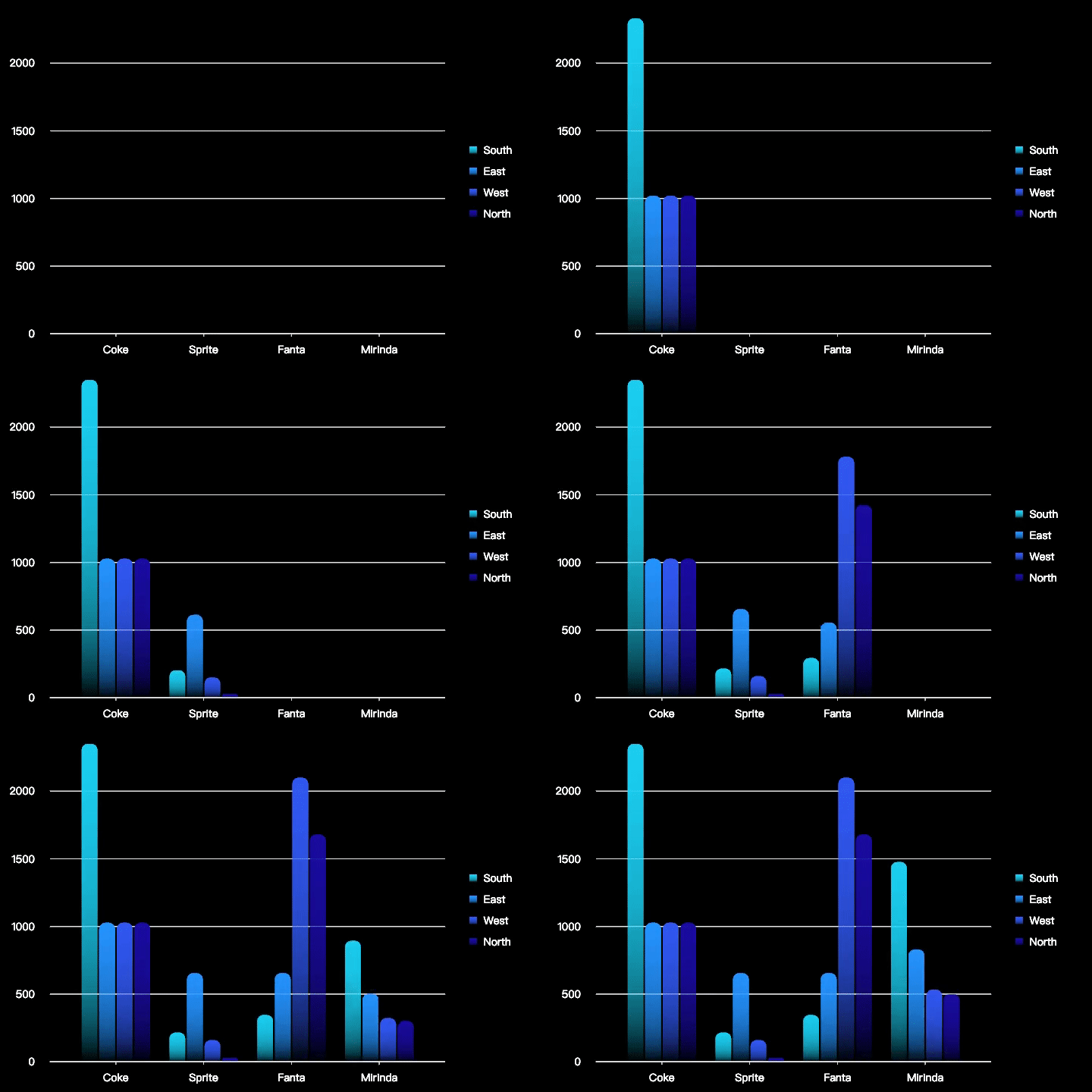
For example, we would like to use the following merchandise sales data to show merchandise sales by region:
Product name
region
Sales
Coke
south
2350
Coke
east
1027
Coke
west
1027
Coke
north
1027
Sprite
south
215
Sprite
east
654
Sprite
west
159
Sprite
north
28
Fanta
south
345
Fanta
east
654
Fanta
west
2100
Fanta
north
1679
Mirinda
south
1476
Mirinda
east
830
Mirinda
west
532
Mirinda
north
498
Use the following code to get the chart spec:
const csvData = `Product name ,region,Sales
Coke,south,2350
Coke,east,1027
Coke,west,1027
Coke,north,1027
Sprite,south,215
Sprite,east,654
Sprite,west,159
Sprite,north,28
Fanta,south,345
Fanta,east,654
Fanta,west,2100
Fanta,north,1679
Mirinda,south,1476
Mirinda,east,830
Mirinda,west,532
Mirinda,north,498`;
const describe = 'display the sales figures of different products in various regions.';
const { spec, time } = await(vmind.generateChart(csvData, describe)); //Intelligent chart generation, input your data in csv format and chart description, return chart spec and chart animation duration.
Next, we can use VChart to draw the generated chart.
Before drawing we need to prepare a DOM container with height and width for VChart.
<body>
  <!-- Prepare a DOM with size (width and height) for vchart, of course, you can also specify it in the spec configuration -->
  <div id="chart" style="width: 600px;height:400px;"></div>
</body>
Next, we create a VChart Example, pass in the ID of the spec and DOM container just generated:
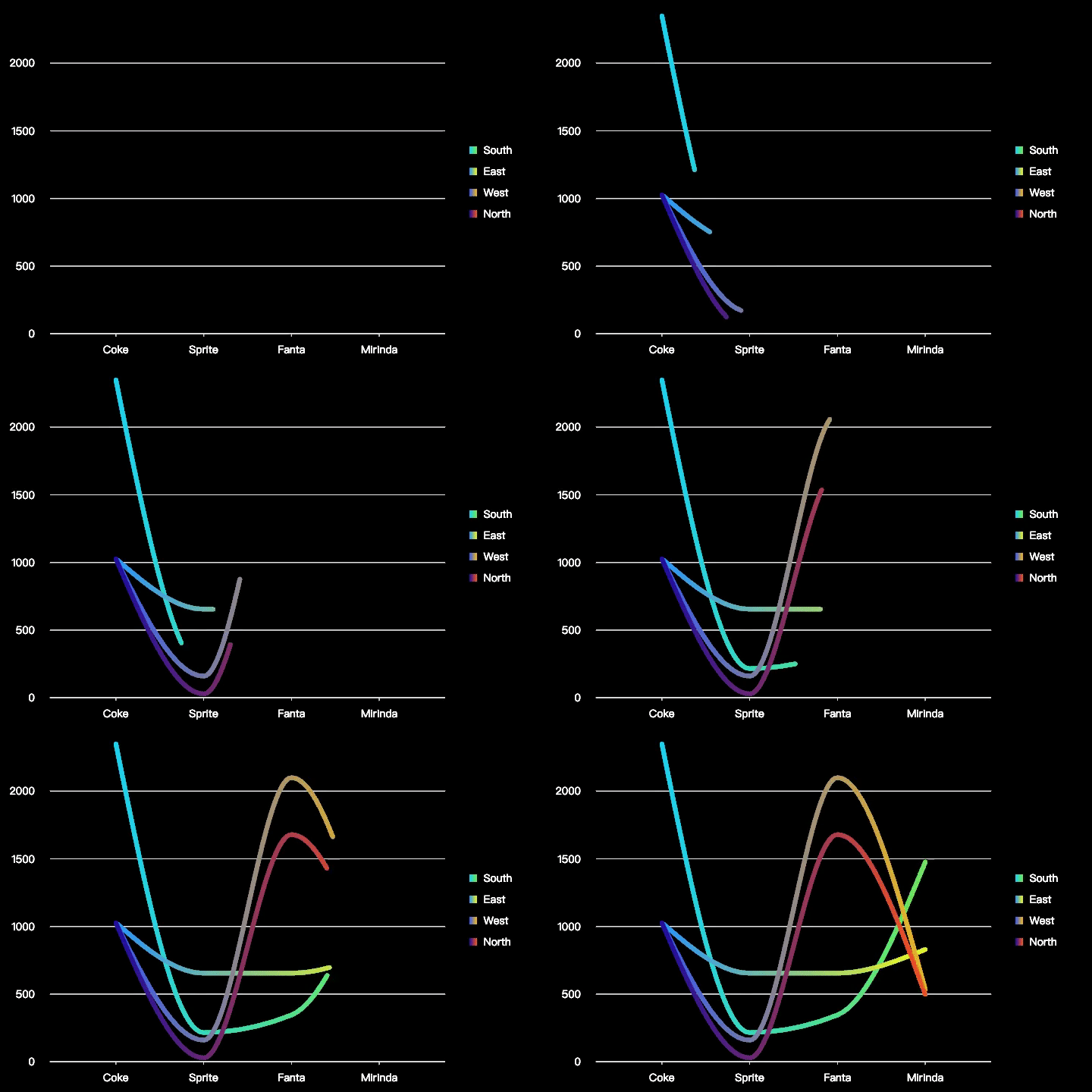
We can also make more requirements for diagrams, such as:
const describe =
  'display the sales figures of different products in various regions. using line chart and using produce name as x axis.';
const { spec, time } = await(vmind.generateChart(csvData, describe));
The resulting chart is as follows:
Export GIFs and videos
VMind supports exporting the generated charts as animations and videos in GIF format for sharing anytime, anywhere.
Here's how to get ObjectURLs for chart GIFs and videos:
//export as video
const videoSrc = await vmind.exportVideo(spec, time); //Given a chart spec and video duration, return an ObjectURL.
//export as GIF
const gifSrc = await vmind.exportGIF(spec, time); //Given a chart spec and GIF duration, return an ObjectURL.
Once we get the ObjectURL of the chart, we can save it as a file. Take saving a video file as an example:
//create a dom element for downloading documents.
const a = document.createElement('a');
a.href = videoSrc;
a.download = `${filename}.mp4`; //set the filename of the downloaded file
a.dispatchEvent(new MouseEvent('click')); //save to local
summarize
This chapter introduces how to install and use VMind for chart generation, and demonstrates how to save the generated charts as GIFs and videos. VMind currently supports bar charts, pie charts, line charts, scatter charts, word clouds, and dynamic bar charts, and more chart types are under development. VMind can recommend suitable chart types based on user data and exhibition diagrams, and map data fields to appropriate visual channels, automatically generate swatches that meet user requests, lower the threshold for users to perform data lake visualization, and help you easily complete data storytelling.