It is not only a fully functional graph visualization library, but also an explorer of data relationships.
!!!###!!!title=Title——VisActor/VChart tutorial documents!!!###!!!!!!###!!!description=The chart title is mainly used to display the theme information of the chart. The title of VChart is displayed at the top of the chart by default, consisting of the main title and subtitle, with the option of displaying the subtitle below. This tutorial mainly explains the related concepts and components of Title. For more detailed configuration and examples of Title, please refer to [Configuration Document](../../../option) and [Example](../../../example) pages.!!!###!!!
Title
The chart title is mainly used to display the theme information of the chart. The title of VChart is displayed at the top of the chart by default, consisting of the main title and subtitle, with the option of displaying the subtitle below. This tutorial mainly explains the related concepts and components of Title. For more detailed configuration and examples of Title, please refer to Configuration Document and Example pages.
Components of Title
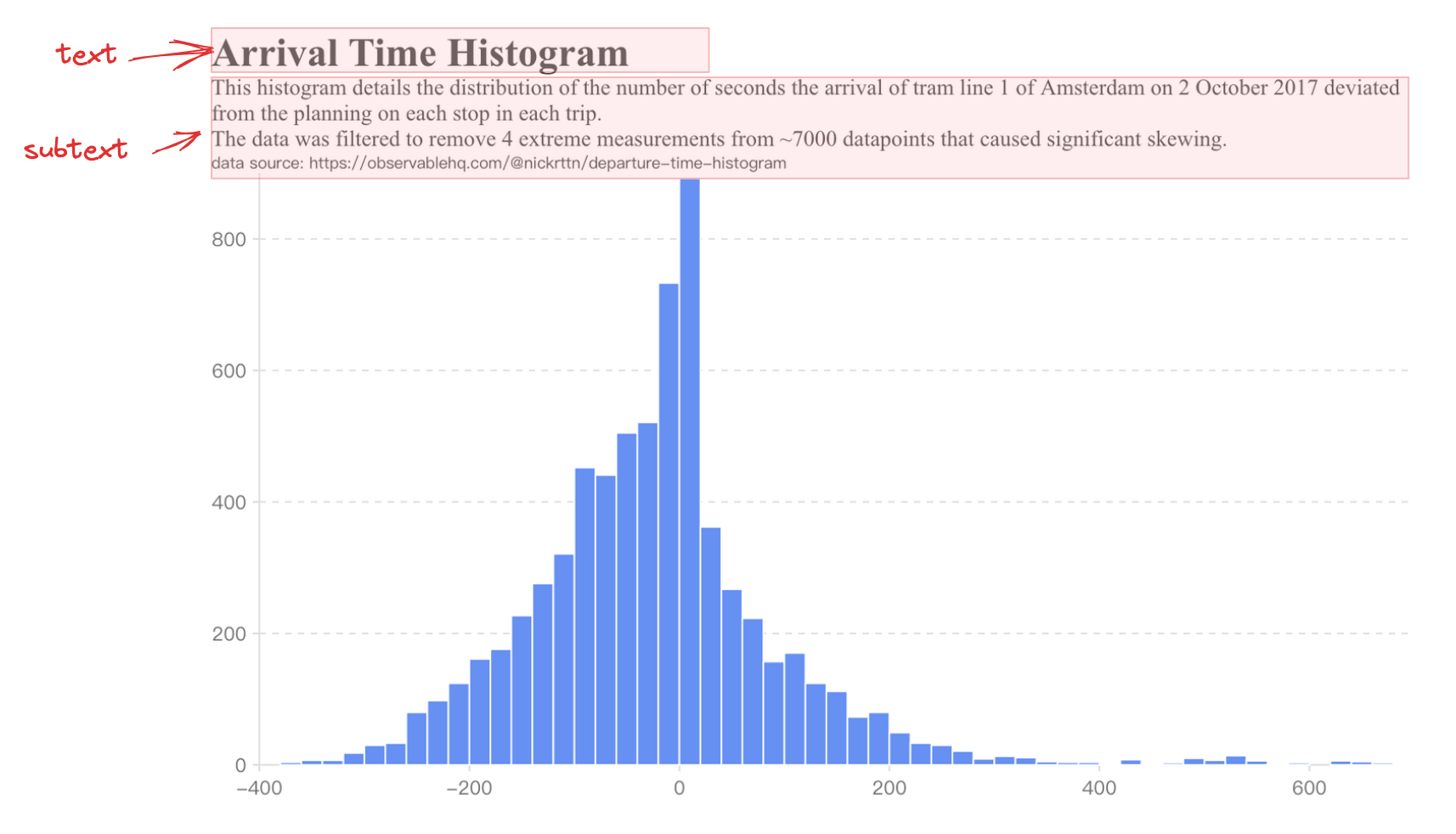
The components of the title are as follows:
In VChart, we can configure the title through the title attribute. The following code example shows how to configure the chart's title and subtitle:
{
  title: {
    text: 'chart title',
    subtext: 'This is a subtext.'
  }
}